Navigate Up WE icon

Navigate Up WE Chrome Extension Analysis

Tab & Bookmark Productivity

Chrome extension ID: enpignbamdhfjfipfefolmfbjhpkabpm

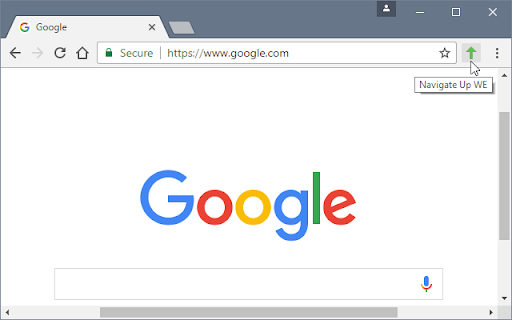
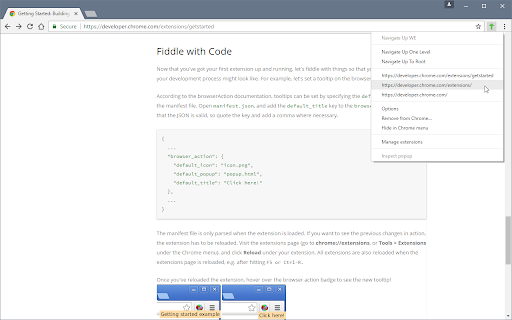
Navigate Up WE is a browser extension that allows users to jump to higher levels of a website's URL hierarchy. It provides options to move up a single level or jump directly to the root domain.

Developer:DW-dev
Version:31.2
Size:60.68KiB
Last updated:

Overview

Installs

1K+

Rating

★ 3.4

10 reviews

Languages

1 locales

Includes English (United States)

Market analysis

Review-backed positioning, friction, and market signals for this Chrome extension.

Backed by review samples

Macro category

Tab & Bookmark Productivity

Pricing friction

Low review signal

Complaint intensity

Moderate review signal

Listing & review signals
Observed signals from store listing text and review samples.

Listing positioning

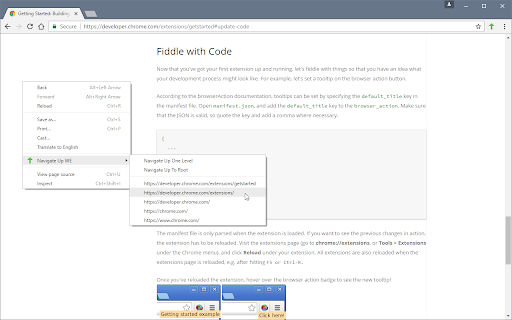
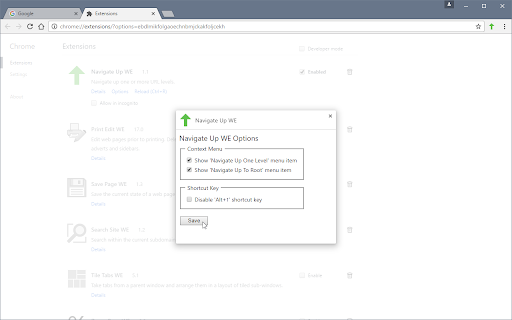
The extension is positioned as a simple utility to navigate up one or more levels of a URL path. It emphasizes cross-browser compatibility via the WebExtensions API and provides multiple trigger methods including a toolbar button, context menu, and keyboard shortcuts.

Inferred product pattern

Single-purpose utility for URL path manipulation and navigation efficiency.

Review-backed pain points

Users report the extension is frequently broken or non-functional on the Brave browser, with some noting that clicking the toolbar button does nothing.

Observed feature gaps

A user suggested adding the ability to navigate to the parent domain when already at the root of the current URL.

Tags
URL NavigationProductivity ToolBrowser Utility
Target users

- Power users

- Web researchers

- Users navigating deep directory structures

Primary use cases

- Quickly returning to a parent category page

- Jumping to the home page from a deep URL path

- Reducing repetitive use of the back button

Positive themes

- Simplicity and ease of use

- Effective functionality for supported environments

Negative themes

- Compatibility issues with Brave browser

- Intermittent functionality breakage

- Unresponsive toolbar button

Observed friction

- Performance complaints detected

- No pricing friction observed; the product is distributed under an open-source license.

Evidence boundary: Analysis based on store listing data and 10 user reviews. The small number of reviews may not fully capture the stability across all Chromium-based browsers.
Complaint summaries
Review-backed complaint signals grouped by operational area.

Support

No specific support response complaints, though users expressed disappointment over unresolved bugs in specific browsers.

Reliability

Reports of the extension being 'dead' or broken, specifically highlighting issues with Brave Chromium versions.

Privacy

No privacy or security complaints observed.

Access & pricing

- Free usage observed

- No account requirement observed

- Free plan or free usage claimed

Store listing facts

Listing assets

- Screenshots: 4

- Videos: 0

- Languages: 1

Trust signals

- Developer contact

Store metadata

- Version: 31.2

- Size: 60.68KiB

- Last updated:

Listing SEO keywords

Search intent keywords
Keyword signals for evaluating how users may discover, compare, or search for this extension category.

Core discovery

navigate up urlurl path navigatorgo to root urlurl hierarchy tool

Comparison

navigate up alternativeurl navigator vs back button

Problem

how to go up one url levelnavigate to parent directory browser

Alternative

URL navigation extensionpath jumper chrome

Similar extensions

Jump to related discovery paths:

Screenshots

Navigate Up WE screenshot

Recommended Chrome extensions

Related listings from the same category, trending peers, and the same publisher portfolio.

Browse tools
Save Page WE icon

Save Page WE

DW-dev

Save a complete web page (as curently displayed) as a single HTML file that can be opened in any browser.

Installs

200K+

Rating

★ 4.5

Print Edit WE icon

Print Edit WE

DW-dev

Edit web pages prior to printing. Delete, hide and format elements. Edit text. Remove adverts and sidebars.

Installs

100K+

Rating

★ 4.4

WPS浏览器助手:文档在线阅读编辑 icon

WPS浏览器助手:文档在线阅读编辑

金山PDF

PDF、Excel、Word、PPT等文档无需下载即可在线预览,还能对文档进行编辑、打印、转换等处理。

Installs

2.0M+

Rating

★ 3.0

Planet Search icon

Planet Search

Free VPN Planet

Enchanced default search engine.

Installs

2.0M+

Rating

★ 3.4

Lightshot (screenshot tool) icon

Lightshot (screenshot tool)

Skillbrains

Simple and convenient screenshot tool. Select an area, edit your screenshot and upload it to the server.

Installs

2.0M+

Rating

★ 4.4

CSFloat Market Checker icon

CSFloat Market Checker

CSFloat Inc.

Shows the float value, paint seed, and more of Counter-Strike (CS:GO & CS2) items on the Steam Market or Inventories

Installs

1.0M+

Rating

★ 3.9

PrintFriendly: Print, PDF Editor & Full Page Screenshot icon

PrintFriendly: Print, PDF Editor & Full Page Screenshot

PrintFriendly

Print clean web pages, save as PDF, edit PDFs, and capture full-page screenshots. Integrates with ChatGPT, Claude, and Gemini.

Installs

1.0M+

Rating

★ 4.6

Ecosia - The search engine that plants trees icon

Ecosia - The search engine that plants trees

Ecosia GmbH

This extension sets your search engine to Ecosia and customizes your new tab page so you can plant trees with every search.

Installs

1.0M+

Rating

★ 4.7

Chat with all AI models (Gemini, Claude, DeepSeek…) & AI Agents | AITOPIA icon

Chat with all AI models (Gemini, Claude, DeepSeek…) & AI Agents | AITOPIA

AITOPIA AI Sidebar

AI Agent Marketplace & AI Sidebar with all AI models (Gemini, Claude, DeepSeek & more) and hundreds of AI Agents

Installs

1.0M+

Rating

★ 4.9

Mobile simulator - responsive testing tool icon

Mobile simulator - responsive testing tool

François Duprat

Phone Simulator — Free Chrome Extension to test and preview your site on 80+ devices.

Installs

1.0M+

Rating

★ 4.9