DejaVocab - 得记单词 icon

DejaVocab Chrome Extension Analysis

AI & Writing Assistants

Store listing title: DejaVocab - 得记单词

Chrome extension ID: fgoacfcjfdnjgiamkgphccmhcieibmgh

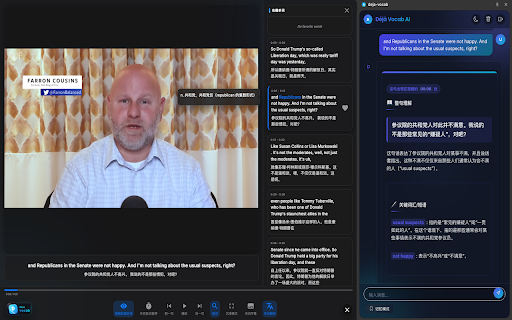
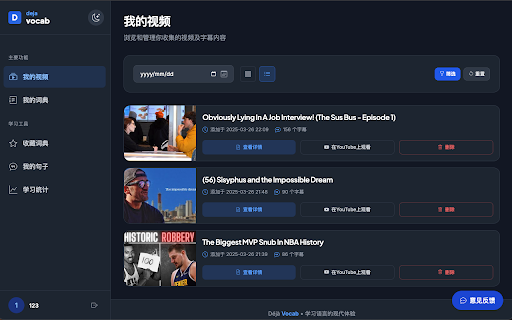
A productivity extension for English learners that integrates directly with YouTube and general web browsing. It features a distraction-free video player, bilingual subtitle generation, instant word lookups, and an AI sidebar for text manipulation.

Version:1.4.4
Size:1.26MiB
Last updated:

Overview

Installs

2K+

Rating

★ 5.0

6 reviews

Languages

1 locales

Includes English

Market analysis

Review-backed positioning, friction, and market signals for this Chrome extension.

Backed by review samples

Macro category

AI & Writing Assistants

Pricing friction

Low review signal

Complaint intensity

Low review signal

Listing & review signals
Observed signals from store listing text and review samples.

Listing positioning

DejaVocab positions itself as an immersive language learning ecosystem that builds a 'language intuition network.' It focuses on converting passive video consumption on YouTube into active study through bilingual subtitles and AI-powered web assistance.

Inferred product pattern

An AI-enhanced language acquisition tool that bridges content consumption with vocabulary management and spaced repetition.

Review-backed pain points

Manually collecting and organizing new vocabulary from video content is described as time-consuming and difficult.

Observed feature gaps

No explicit mention of social/collaborative learning features in the listing.

Tags
Language LearningAI SidebarYouTube LearningVocabulary Builder
Target users

- English language learners

- YouTube content consumers

- Students using spaced repetition systems like Anki

Primary use cases

- Immersive video-based language learning

- Vocabulary building via web browsing

- AI-assisted reading and summarization

Positive themes

- Seamless synchronization between subtitles and video

- Efficient workflow for creating study cards

- Active developer engagement in updates

Negative themes

No negative theme data.

Observed friction

- The product uses a freemium model where core features are free, but higher AI usage quotas and semantic search capabilities require Ultra or Lifetime plans.

Evidence boundary: Extracted from Chrome Web Store listing and four highly positive reviews emphasizing the ease of syncing subtitles and exporting to study tools. The review sample size is very small (5 reviews) and lacks low-rating samples to identify common complaints.
Complaint summaries
Review-backed complaint signals grouped by operational area.

Support

No support complaints observed.

Reliability

No reliability or performance complaints observed.

Privacy

No privacy complaints observed; the listing claims data is only processed upon explicit user action.

Access & pricing

- Free entry with paid features

- Login needed for core features

- Limited free usage observed

Store listing facts

Listing assets

- Screenshots: 2

- Videos: 0

- Languages: 1

Trust signals

- Privacy policy

- Developer contact

- Official website

Store metadata

- Version: 1.4.4

- Size: 1.26MiB

- Last updated:

Listing SEO keywords

Search intent keywords
Keyword signals for evaluating how users may discover, compare, or search for this extension category.

Core discovery

learn English on YouTubebilingual subtitlesAI language assistantvocabulary builderEnglish subtitle extension

Comparison

AnkiLanguage Reactor

Problem

tedious vocabulary note-takingdifficulty understanding English videos

Alternative

dual subtitlesEnglish learning tool

Similar extensions

Jump to related discovery paths:

Screenshots

DejaVocab - 得记单词 screenshot

Links

Recommended Chrome extensions

Related listings from the same category, trending peers, and the same publisher portfolio.

Browse education
ImTranslator: Translator, Dictionary, TTS icon

ImTranslator: Translator, Dictionary, TTS

smartlink

Translator, Dictionary, Voice

Installs

900K+

Rating

★ 4.4

ProctorExam Activity Sharing icon

ProctorExam Activity Sharing

ProctorExam BV

Lets you share your browsing activity when taking an online exam on ProctorExam - https://www.proctorexam.com

Installs

800K+

Rating

★ 1.6

Voice In - Voice Typing & Speech-to-Text Dictation icon

Voice In - Voice Typing & Speech-to-Text Dictation

Dictanote

Voice typing in ChatGPT, Gmail, Google Docs & 10,000+ sites. Dictate emails, notes & AI prompts in 50+ languages.

Installs

700K+

Rating

★ 4.4

eJOY AI Dictionary icon

eJOY AI Dictionary

ejoy-english.com

Your ultimate knowledge and English learning tool to discover the world and upskill yourself. Translate video, websites and PDF.

Installs

700K+

Rating

★ 4.8

Translate for Chrome -Translator, Dictionary icon

Translate for Chrome -Translator, Dictionary

Translator App.

Translate words, phrases or text on any webpage. Full page translator and dictionary, text to speech (TTS) using Google Translate.

Installs

600K+

Rating

★ 4.6

Cite This For Me: Web Citer icon

Cite This For Me: Web Citer

Chegg Writing Tools

Automatically create website citations in the APA, MLA, Chicago, or Harvard referencing styles at the click of a button.

Installs

600K+

Rating

★ 3.8

GPTZero: AI Detection & Writing Replay icon

GPTZero: AI Detection & Writing Replay

chrome-extension-publisher

Bring AI detection, citation checks, live essay feedback, and writing replays directly into Google Docs and your workflow.

Installs

500K+

Rating

★ 4.7

Google Meet Attendance List icon

Google Meet Attendance List

MeetList

Easiest way to save the attendance list for your meetings or lectures

Installs

400K+

Rating

★ 4.7

Google Meet Breakout by Robert Hudek icon

Google Meet Breakout by Robert Hudek

Unknown developer

Only the teacher needs to install. Completely Free and your Data is Private. Google Classroom integration, Slider Control.

Installs

400K+

Rating

★ 4.3

Revision History: Writing Process Visibility for Google Docs & Slides icon

Revision History: Writing Process Visibility for Google Docs & Slides

Revision History

Built for teachers: See how students write, not just what they wrote. View the writing process in Google Docs & Slides.

Installs

300K+

Rating

★ 3.7