AI Voice to Text icon

AI Voice to Text Chrome Extension Analysis

AI & Writing Assistants

Chrome extension ID: fllaaifhdecmmekbiaifljnjpkcdelbm

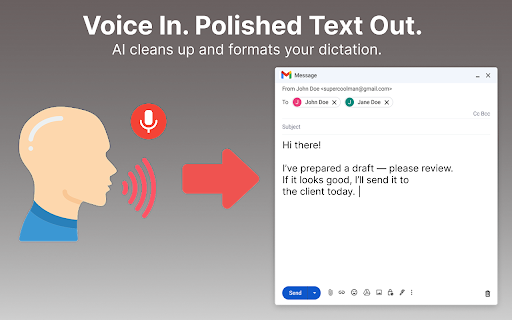
A Chrome extension that converts spoken voice into polished text in real-time within browser form fields. It features an AI engine for short-form dictation and supports multiple languages to speed up writing and note-taking.

Version:1.0.7
Size:1.02MiB
Last updated:

Overview

Installs

593

Rating

4.2

5 reviews

Languages

52 locales

Includes Deutsch, English, Filipino, Indonesia...

Market analysis

Review-backed positioning, friction, and market signals for this Chrome extension.

Backed by review samples

Macro category

AI & Writing Assistants

Pricing friction

Low review signal

Complaint intensity

Moderate review signal

Listing & review signals
Observed signals from store listing text and review samples.

Listing positioning

The product positions itself as a lightweight, AI-powered alternative to heavy transcription software, specifically optimized for short voice notes and professional communication. It emphasizes seamless integration into tools like Gmail, Slack, and Notion with automatic grammar and punctuation correction.

Inferred product pattern

Lightweight AI utility focusing on short-form voice-to-text conversion for web-based productivity platforms.

Review-backed pain points

One user reported that the extension appears to be constantly accessing the microphone without explicit consent, leading to claims of it being malware.

Observed feature gaps

The tool is explicitly not designed for long-form audio recordings or podcasts, limiting its use to short dictations.

Tags
AI DictationSpeech To TextVoice TypingProductivity ToolWriting Assistant
Target users

- Lawyers

- Journalists

- Marketers

- Project Managers

- Students

- Researchers

Primary use cases

- Dictating emails in Gmail

- Speaking team updates in Slack

- Capturing ideas in Notion

- Logging bug reports in Jira

- Taking quick study notes

Positive themes

- Ease of use

- Time-saving efficiency

- Accurate transcription and punctuation

- Lightweight performance

Negative themes

- Privacy and security concerns regarding microphone access

Observed friction

- Privacy complaints detected

- No pricing information is provided in the store listing or user reviews.

Evidence boundary: Analysis based on the official Chrome Web Store listing and 5 user reviews. Very small review sample size (5 reviews) limits the ability to determine broad sentiment distribution or common technical bugs.
Complaint summaries
Review-backed complaint signals grouped by operational area.

Support

No support-related complaints were observed in the provided samples.

Reliability

General reliability is praised by most users, though one user raised a critical security concern regarding microphone permissions.

Privacy

A high-anger review claims the extension accesses microphone data without consent or instructions, questioning its safety.

Access & pricing

- No clear monetization signal

- No account requirement observed

- No clear pricing signal

Store listing facts

Listing assets

- Screenshots: 1

- Videos: 0

- Languages: 52

Trust signals

- Privacy policy

- Developer contact

Store metadata

- Version: 1.0.7

- Size: 1.02MiB

- Last updated:

Listing SEO keywords

Search intent keywords
Keyword signals for evaluating how users may discover, compare, or search for this extension category.

Core discovery

AI voice to textspeech to text extensionvoice dictation chromeaudio transcription tool

Comparison

voice to text vs typingAI dictation vs transcription software

Problem

slow typingdifficulty taking quick notesmanual email drafting

Alternative

voice to text alternativebest chrome dictation extension

Similar extensions

Jump to related discovery paths:

Screenshots

AI Voice to Text screenshot

Links

Recommended Chrome extensions

Related listings from the same category, trending peers, and the same publisher portfolio.

Browse communication
Kommodo Screen Recorder & SOP icon

Kommodo Screen Recorder & SOP

kgrauer

Record screen and get a magical SOP with an AI Summary

Installs

40K+

Rating

4.7

HTML Editor for Gmail by cloudHQ icon

HTML Editor for Gmail by cloudHQ

cloudHQ

HTML Editor for Gmail™ - code HTML email directly from Gmail

Installs

40K+

Rating

4.0

Noise Cancelling App icon

Noise Cancelling App

AI Webcam Effects

AI mic noise cancellation for calls, streams, and recording. Share with friends to enjoy clear sound in every conversation!

Installs

40K+

Rating

4.7

SendSafely Encryption for Chrome and Gmail icon

SendSafely Encryption for Chrome and Gmail

SendSafely.com

Chrome extension that provides end-to-end encryption for Gmail. Encrypt private emails and securely share files up to 10GB.

Installs

40K+

Rating

4.9

InTouchApp Phone Contacts & Data Saver icon

InTouchApp Phone Contacts & Data Saver

Volare Tech. Pvt. Ltd.

Save unknown numbers & other data from WhatsApp, LinkedIn, Gmail to your phone instantly. Make phone call from web + much more!

Installs

40K+

Rating

4.0

VisualSP icon

VisualSP

visualsp-app-administrators

VisualSP is the enterprise help assistant that delivers answers and guidance for any web site when and where customers need them.

Installs

40K+

Rating

4.6

Insert and Send HTML with Gmail icon

Insert and Send HTML with Gmail

Designmodo

Easily insert custom HTML into your Gmail emails with this handy extension. Create and preview your custom emails directly in Gmail.

Installs

40K+

Rating

3.7

mail.com MailCheck icon

mail.com MailCheck

1&1 Mail & Media GmbH

The safe way to access your personal mail.

Installs

40K+

Rating

4.0

Synthesia - AI Screen Recorder & Editor icon

Synthesia - AI Screen Recorder & Editor

Synthesia

Record screen and create pro-level video in minutes. Edit recording in Synthesia for quality - shareable content in just one take.

Installs

30K+

Rating

4.1

Bearby icon

Bearby

Rinat

#1 quantum-resistant, WEB3, multi-currency decentralized wallet.

Installs

30K+

Rating

3.8