Onion Browser Button icon

Onion Browser Button Chrome Extension Analysis

Privacy, Security & Ad Blockers

Chrome extension ID: fockhhgebmfjljjmjhbdgibcmofjbpca

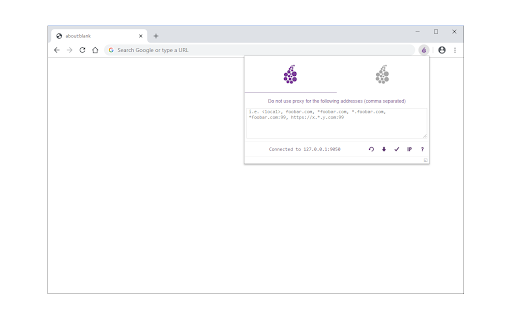
Onion Browser Button acts as a proxy switcher for Google Chrome that directs traffic to a pre-established local Tor connection. It requires users to download and execute separate external patch files on their computer to initiate the Tor proxy service before the browser extension can toggle the routing.

Developer:Sevina
Version:0.2.7
Size:110KiB
Last updated:

Overview

Installs

10K+

Rating

★ 3.4

45 reviews

Languages

1 locales

Includes English

Market analysis

Review-backed positioning, friction, and market signals for this Chrome extension.

Backed by review samples

Macro category

Privacy, Security & Ad Blockers

Pricing friction

Low review signal

Complaint intensity

High review signal

Listing & review signals
Observed signals from store listing text and review samples.

Listing positioning

The extension positions itself as a one-click proxy tool for routing browser traffic through the Tor network. It explicitly disclaims any official affiliation with the Tor Project, requiring users to perform manual external system configuration to function.

Inferred product pattern

Utility wrapper for external, manual proxy configuration.

Review-backed pain points

Users struggle significantly with the dual-step requirement of running external batch files on their OS, frequently reporting that the extension fails to successfully mask their IP address or connect to the Tor network as promised.

Observed feature gaps

The product lacks a self-contained Tor client, relying on external, often non-functional scripts; users report high complexity and a lack of clear documentation for troubleshooting.

Tags
TorProxyPrivacyAnonymity
Target users

- Privacy-conscious users

- Tor network users

Primary use cases

- Routing web traffic through Tor proxy

- Managing Tor identity via browser interface

Positive themes

- None observed in analyzed samples

Negative themes

- Failed connection verification

- Confusing setup process

- Redundancy compared to Tor Browser

- Technical execution errors on macOS

Observed friction

- Performance complaints detected

- Privacy complaints detected

- No payment requested; friction is purely technical and instructional.

Evidence boundary: Analysis is based on user reviews highlighting consistent failure to establish a secure connection and frustration with the prerequisite external installation steps. The sample reflects a highly dissatisfied user base; feedback is predominantly focused on technical failure rather than usage scenarios.
Complaint summaries
Review-backed complaint signals grouped by operational area.

Support

Users report the instructions are inadequate and the software fails to work even when steps are followed.

Reliability

High incidence of reports stating the extension fails to connect to Tor, leaks user IP addresses, or fails to execute on specific operating systems.

Privacy

Users express concerns that the tool provides a false sense of security or fails to actually anonymize traffic.

Access & pricing

- Free usage observed

- No account requirement observed

- Free plan or free usage claimed

Store listing facts

Listing assets

- Screenshots: 1

- Videos: 0

- Languages: 1

Trust signals

- Privacy policy

- Developer contact

- Official website

Store metadata

- Version: 0.2.7

- Size: 110KiB

- Last updated:

Listing SEO keywords

Search intent keywords
Keyword signals for evaluating how users may discover, compare, or search for this extension category.

Core discovery

Tor browser extensionChrome Tor proxyOnion router chrome

Comparison

Tor browser vs extensionChrome anonymity tools

Problem

Tor not workingTor connection errorproxy failure

Alternative

Tor Browser downloadprivacy proxy alternatives

Similar extensions

Jump to related discovery paths:

Screenshots

Onion Browser Button screenshot

Links

Recommended Chrome extensions

Related listings from the same category, trending peers, and the same publisher portfolio.

Browse tools
Text Editor icon

Text Editor

Sevina

A free, highly customizable text and code editor extension for your browser.

Installs

50K+

Rating

★ 4.0

Text to Speech (TTS) icon

Text to Speech (TTS)

Sevina

A text to speech tool with natural sounding voices.

Installs

50K+

Rating

★ 3.1

NaturalReader - AI Text to Speech icon

NaturalReader - AI Text to Speech

NaturalSoft Limited

Read aloud any text with realistic AI voices, compatible with webpages, kindle Ebooks, Google Docs, PDF, Emails, and more.

Installs

1.0M+

Rating

★ 4.2

Transpose: pitch ▸ speed ▸ loop icon

Transpose: pitch ▸ speed ▸ loop

Transpose

Change pitch and speed, loop sections and practice music directly on YouTube, Spotify and other supported sites.

Installs

1.0M+

Rating

★ 4.5

Keywords Everywhere - Keyword Tool icon

Keywords Everywhere - Keyword Tool

Axeman Technology Solutions LLP

Keyword search volume, cpc and competition for 15+ websites like Google™ Search Console, YouTube™, Amazon™ & more

Installs

1.0M+

Rating

★ 4.5

Ruffle - Flash Emulator icon

Ruffle - Flash Emulator

ruffle

Puts Flash back on the web where it belongs.

Installs

1.0M+

Rating

★ 4.3

AIPRM for ChatGPT icon

AIPRM for ChatGPT

AIPRM

AIPRM is your cheat code for ChatGPT. Adds a list of curated prompt templates and advanced features. Try today.

Installs

1.0M+

Rating

★ 3.9

Screen Recorder & Screenshot App for Chrome | Scrnli icon

Screen Recorder & Screenshot App for Chrome | Scrnli

scrnli

Screen recorder for Chrome: capture, edit, share screenshots and videos instantly

Installs

1.0M+

Rating

★ 4.7

BlockSite Block Websites & Stay Focused icon

BlockSite Block Websites & Stay Focused

BlockSite

Stay focused and boost productivity: Custom blocklist, Scheduled site blocking, and Password protection.

Installs

1.0M+

Rating

★ 4.5

Enhancer for YouTube™ icon

Enhancer for YouTube™

Max RF

Take control of YouTube and boost your user experience!

Installs

1.0M+

Rating

★ 4.7