Кайтен AI icon

Кайтен AI Chrome Extension Analysis

Automation & Workflow Efficiency

Chrome extension ID: gbchpefoiaebiljcbjhfkhgpofkfcjhk

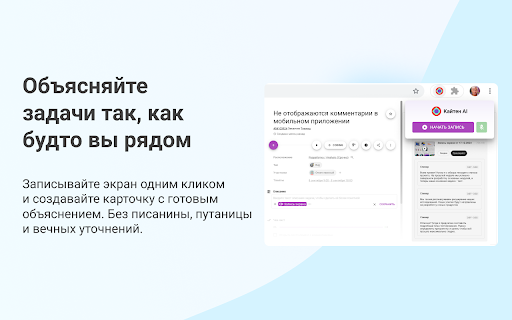
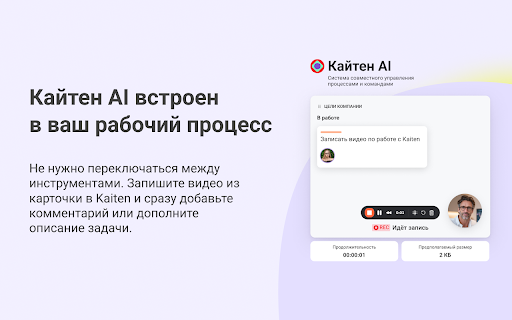
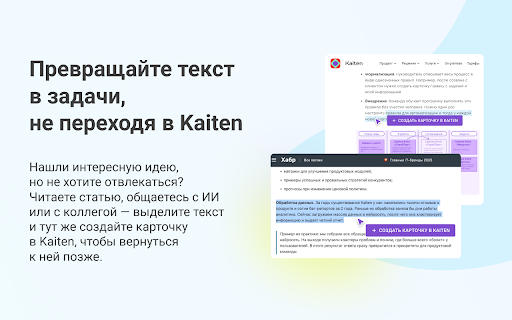
Kaiten AI is a browser extension that enables users to record their screen, webcam, and microphone and automatically attach the recordings to Kaiten task cards. Additionally, it allows users to highlight text on any webpage to immediately generate and assign tasks within their Kaiten workspace.

Developer:kaiten.apps
Version:1.16.0
Size:127KiB
Last updated:

Overview

Installs

5K+

Rating

3.0

6 reviews

Languages

1 locales

Includes русский

Market analysis

Review-backed positioning, friction, and market signals for this Chrome extension.

Backed by review samples

Macro category

Automation & Workflow Efficiency

Pricing friction

Moderate review signal

Complaint intensity

High review signal

Listing & review signals
Observed signals from store listing text and review samples.

Listing positioning

Kaiten AI is positioned as a productivity booster for teams and professionals working inside the Kaiten project management system. The listing highlights its ability to streamline workflow by integrating screen recording and instant task creation directly into the Chrome browser. It aims to eliminate copy-pasting and simplify asynchronous team communication.

Inferred product pattern

A dedicated browser companion that links external web content and screen recordings directly to an existing task management platform.

Review-backed pain points

Users experience frustration when the core text-highlighting feature to create tasks fails to display the action button. There are also reports of unexpected blocks on viewing recorded videos due to an apparent requirement for AI tokens.

Observed feature gaps

Based on negative feedback, there is a lack of reliable feedback loops or fallback options when the text selection trigger fails to render. Additionally, the lack of explanation in the store listing regarding AI token requirements for viewing videos constitutes a significant communication gap.

Tags
Kaiten IntegrationScreen RecorderTask CreatorWorkflow Automation
Target users

- Kaiten workspace users

- Project managers

- Customer support representatives

- Software developers

- Remote team members

Primary use cases

- Recording bug demos or video feedback and attaching them to Kaiten tasks

- Creating new tasks instantly from web articles, emails, or chat threads without leaving the page

Positive themes

- No positive review themes available due to a lack of high-rating review samples in the provided data.

Negative themes

- Task creation button does not appear after highlighting text

- Inability to watch recorded videos without AI tokens

Observed friction

- Free-tier complaints detected

- Performance complaints detected

- A review indicates that the extension restricts viewing of recorded videos unless the user has AI tokens, suggesting unexpected barriers to free usage.

Evidence boundary: Based on the official Kaiten AI Chrome Web Store listing descriptions and two 1-star user reviews focusing on broken workflow features and token limitations. The review analysis is heavily constrained by a very small sample of only two negative reviews, which may not represent the entire user base.
Complaint summaries
Review-backed complaint signals grouped by operational area.

Support

No support or refund complaints were observed in the current review sample.

Reliability

Users report that the text-highlight shortcut fails to trigger the task-creation button, making it impossible to convert web text to Kaiten cards.

Privacy

No privacy or security concerns were reported in the provided reviews.

Access & pricing

- No clear monetization signal

- Account required for core usage

- No clear pricing signal

Store listing facts

Listing assets

- Screenshots: 5

- Videos: 0

- Languages: 1

Trust signals

- Privacy policy

- Developer contact

- Official website

Store metadata

- Version: 1.16.0

- Size: 127KiB

- Last updated:

Listing SEO keywords

Search intent keywords
Keyword signals for evaluating how users may discover, compare, or search for this extension category.

Core discovery

Kaiten task creatorKaiten screen recordingKaiten extensionbrowser to Kaiten tool

Comparison

Kaiten vs Jira browser integrationKaiten vs Loom for task management

Problem

how to record screen for Kaitencreate Kaiten task from browser text

Alternative

LoomTrello extensionAsana task creator

Similar extensions

Jump to related discovery paths:

Screenshots

Кайтен AI screenshot

Links

Website: kaiten.apps

Privacy policy: https://kaiten.ru/privacy

Recommended Chrome extensions

Related listings from the same category, trending peers, and the same publisher portfolio.

Browse communication
CrankWheel Screen Sharing icon

CrankWheel Screen Sharing

CrankWheel

Easier screen sharing. No app needed for viewers, even on their mobile. Record your screen or webcam.

Installs

50K+

Rating

4.8

Reminders for Google Calendar™ icon

Reminders for Google Calendar™

SMS Reminder for Google Calendar™

Send reminders by SMS/Text from your Google Calendar™. Use it for your customers or your own appointments.

Installs

50K+

Rating

3.6

Auto BCC for Gmail™ by cloudHQ icon

Auto BCC for Gmail™ by cloudHQ

cloudHQ

Setup automatic blind copies to your CRM or any other email address

Installs

50K+

Rating

4.2

Fax.Plus - HIPAA Fax Online icon

Fax.Plus - HIPAA Fax Online

Alohi SA

Secure HIPAA fax service to send fax online and receive online fax on local, toll-free, and International fax numbers.

Installs

50K+

Rating

3.6

Private Grammar Checker - Harper icon

Private Grammar Checker - Harper

Elijah Potter

The private grammar checker for 21st Century English

Installs

40K+

Rating

4.2

Kommodo Screen Recorder & SOP icon

Kommodo Screen Recorder & SOP

kgrauer

Record screen and get a magical SOP with an AI Summary

Installs

40K+

Rating

4.7

HTML Editor for Gmail by cloudHQ icon

HTML Editor for Gmail by cloudHQ

cloudHQ

HTML Editor for Gmail™ - code HTML email directly from Gmail

Installs

40K+

Rating

4.0

Noise Cancelling App icon

Noise Cancelling App

AI Webcam Effects

AI mic noise cancellation for calls, streams, and recording. Share with friends to enjoy clear sound in every conversation!

Installs

40K+

Rating

4.7

SendSafely Encryption for Chrome and Gmail icon

SendSafely Encryption for Chrome and Gmail

SendSafely.com

Chrome extension that provides end-to-end encryption for Gmail. Encrypt private emails and securely share files up to 10GB.

Installs

40K+

Rating

4.9

InTouchApp Phone Contacts & Data Saver icon

InTouchApp Phone Contacts & Data Saver

Volare Tech. Pvt. Ltd.

Save unknown numbers & other data from WhatsApp, LinkedIn, Gmail to your phone instantly. Make phone call from web + much more!

Installs

40K+

Rating

4.0