Multiple Screenshots icon

Multiple Screenshots Chrome Extension Analysis

Web Scraping & Data Extraction

Chrome extension ID: gbgeckhegkbgdlfpcgjdhdckdfcimmbc

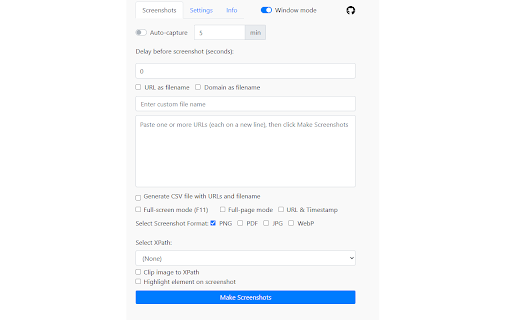
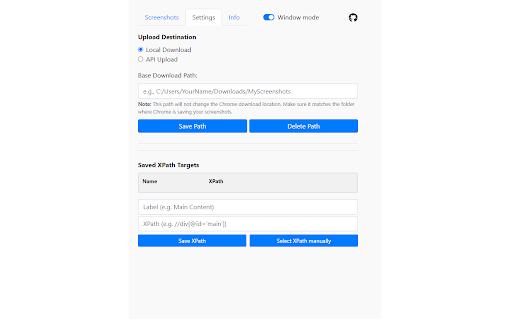
Multiple Screenshots is a productivity tool that automates the process of capturing full-page or element-specific screenshots from a list of URLs. Users can customize file formats, add overlays, schedule periodic captures, and export data via CSV or API endpoints.

Version:0.2.1
Size:19.65MiB
Last updated:

Overview

Installs

1K+

Rating

5.0

11 reviews

Languages

1 locales

Includes English

Market analysis

Review-backed positioning, friction, and market signals for this Chrome extension.

Backed by review samples

Macro category

Web Scraping & Data Extraction

Pricing friction

Low review signal

Complaint intensity

Low review signal

Listing & review signals
Observed signals from store listing text and review samples.

Listing positioning

The extension positions itself as an automation utility for bulk webpage capturing, targeting researchers, marketers, and developers. It emphasizes time-saving features like batch URL processing, XPath-based cropping, and API integration for data pipelines.

Inferred product pattern

Free, open-source utility focused on bulk browser automation tasks.

Review-backed pain points

No review-backed negative pain points identified in available data.

Observed feature gaps

No feature gaps identified from current review samples.

Tags
Screenshot AutomationBulk CaptureWeb ScrapingSEO Tools
Target users

- SEO Specialists

- Web Designers

- QA Testers

- Researchers

Primary use cases

- Bulk website screenshotting

- Monitoring website UI changes

- Automated visual evidence collection

- SEO audit visual documentation

Positive themes

- Ease of use

- Responsive developer feedback

- Efficient batch processing

- High reliability

Negative themes

No negative theme data.

Observed friction

- No pricing friction identified; developer accepts optional support via Buy Me a Coffee.

Evidence boundary: Evidence is derived from public Chrome Web Store listing data and a consistent set of highly positive user reviews praising the developer's responsiveness and tool utility. Review sample size is relatively small, though sentiment is uniformly positive.
Complaint summaries
Review-backed complaint signals grouped by operational area.

Support

None; reviews explicitly mention the developer is friendly and responsive to user requests.

Reliability

None; users report smooth and error-free operation.

Privacy

None; no privacy concerns raised in reviews.

Access & pricing

- Free usage observed

- No account requirement observed

- Free plan or free usage claimed

Store listing facts

Listing assets

- Screenshots: 2

- Videos: 0

- Languages: 1

Trust signals

- Developer contact

Store metadata

- Version: 0.2.1

- Size: 19.65MiB

- Last updated:

Listing SEO keywords

Search intent keywords
Keyword signals for evaluating how users may discover, compare, or search for this extension category.

Core discovery

bulk screenshot captureautomated website screenshotschrome extension screenshot automationwebpage capture tool

Comparison

alternative to manual screenshottingscreenshot automation tool

Problem

automate webpage capturebatch screenshot URLs

Alternative

webpage capture chrome extension

Similar extensions

Jump to related discovery paths:

Screenshots

Multiple Screenshots screenshot

Recommended Chrome extensions

Related listings from the same category, trending peers, and the same publisher portfolio.

Browse tools