ReClipped: YouTube Notes & Screenshots icon

ReClipped Chrome Extension Analysis

Automation & Workflow Efficiency

Store listing title: ReClipped: YouTube Notes & Screenshots

Chrome extension ID: gbnebpdekafhpcipejfhabfghccgfnbh

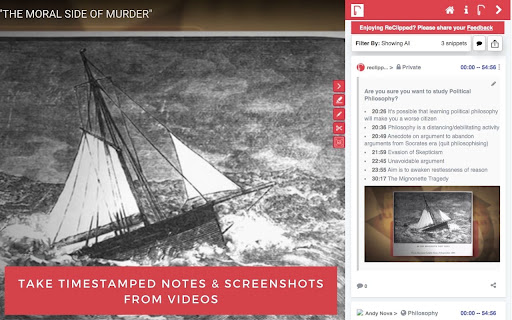
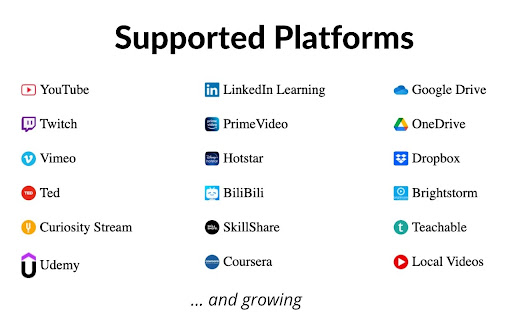
A browser extension and web application that allows users to capture timestamped notes and screenshots from YouTube and other video platforms. It provides organization features like tagging and color-coding, and supports exporting notes to various formats and productivity ecosystems.

Version:2.1.1.43
Size:4.02MiB
Last updated:

Overview

Installs

5K+

Rating

★ 4.3

53 reviews

Languages

1 locales

Includes English

Market analysis

Review-backed positioning, friction, and market signals for this Chrome extension.

Backed by review samples

Macro category

Automation & Workflow Efficiency

Pricing friction

Moderate review signal

Complaint intensity

Moderate review signal

Listing & review signals
Observed signals from store listing text and review samples.

Listing positioning

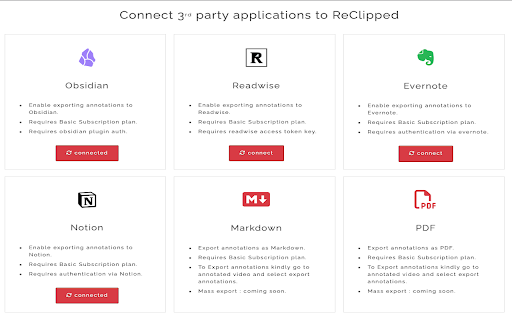
Positions itself as a high-productivity tool for students, teachers, and professionals to convert video content into organized knowledge. Emphasizes timestamped notes, screenshots, and seamless integration with popular note-taking apps like Notion and Obsidian.

Inferred product pattern

A video-to-knowledge-base bridge that converts passive video consumption into a structured, searchable personal library.

Review-backed pain points

Users report critical failures where the extension does not recognize login status despite active sessions, causing the tool to become unusable. Others highlight UI friction where extension buttons overlap YouTube's native fullscreen controls.

Observed feature gaps

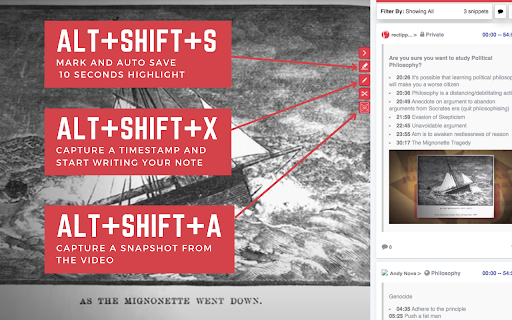
Lack of support for the Rumble platform, absence of free SRT export options, and inconsistent performance of screenshot keyboard shortcuts.

Tags
Video NotesYouTube AnnotationsKnowledge ManagementStudy ToolScreen Capture
Target users

- Students

- Teachers

- Online Learners

- Professionals

- Content Analysts

Primary use cases

- Taking timestamped notes during online courses

- Creating video summaries for study or work

- Analyzing videos for skill improvement

- Organizing video snippets into themed boards

- Syncing video annotations to external productivity apps

Positive themes

- Ease of creating video annotations

- Efficient synchronization with Evernote

- Improved organization of video-based learning

Negative themes

- Critical login and authentication bugs

- UI overlap with native YouTube player controls

- Extension failing to load on certain videos

- Limited trial periods and payment processing errors

- Unresponsive customer support

Observed friction

- Free-tier complaints detected

- Performance complaints detected

- Frustration regarding a restrictive 15-day trial period and technical errors (invalid name format) when attempting to process credit card payments.

Evidence boundary: Extracted from store listing and 10 representative user reviews covering both high and low ratings. Review sample size is small relative to the total comment count, potentially limiting the breadth of sentiment data.
Complaint summaries
Review-backed complaint signals grouped by operational area.

Support

Users report that support does not respond to queries and that the internal feedback form returns server errors.

Reliability

Reports of the extension not appearing on all tested videos, login session persistence issues, and malfunctioning shortcut keys.

Privacy

No privacy or security complaints observed in the provided samples.

Access & pricing

- Free entry with paid features

- Account required for core usage

- Trial or limited free usage before paid plan

Store listing facts

Listing assets

- Screenshots: 5

- Videos: 1

- Languages: 1

Trust signals

- Privacy policy

- Developer contact

- Official website

Store metadata

- Version: 2.1.1.43

- Size: 4.02MiB

- Last updated:

Listing SEO keywords

Search intent keywords
Keyword signals for evaluating how users may discover, compare, or search for this extension category.

Core discovery

YouTube timestamp notesvideo screenshot extensionvideo annotation toolsave YouTube notes

Comparison

ReClipped vs Notionbest YouTube note taking extension

Problem

how to take notes from YouTube videossave timestamps from videoorganize online course notes

Alternative

YouTube notes alternativevideo highlighter tool

Similar extensions

Jump to related discovery paths:

Screenshots

ReClipped: YouTube Notes & Screenshots screenshot

Links

Website: reclipped.com

Privacy policy: https://reclipped.com/privacy

Videos: Watch

Recommended Chrome extensions

Related listings from the same category, trending peers, and the same publisher portfolio.

Browse education
Scribbr Citation Generator icon

Scribbr Citation Generator

Scribbr

Instantly get accurate citations for any webpage in APA, MLA, Chicago, Harvard and any other style with our Citation Generator.

Installs

1.0M+

Rating

★ 3.9

ImTranslator: Translator, Dictionary, TTS icon

ImTranslator: Translator, Dictionary, TTS

smartlink

Translator, Dictionary, Voice

Installs

900K+

Rating

★ 4.4

ProctorExam Activity Sharing icon

ProctorExam Activity Sharing

ProctorExam BV

Lets you share your browsing activity when taking an online exam on ProctorExam - https://www.proctorexam.com

Installs

800K+

Rating

★ 1.6

Voice In - Voice Typing & Speech-to-Text Dictation icon

Voice In - Voice Typing & Speech-to-Text Dictation

Dictanote

Voice typing in ChatGPT, Gmail, Google Docs & 10,000+ sites. Dictate emails, notes & AI prompts in 50+ languages.

Installs

700K+

Rating

★ 4.4

eJOY AI Dictionary icon

eJOY AI Dictionary

ejoy-english.com

Your ultimate knowledge and English learning tool to discover the world and upskill yourself. Translate video, websites and PDF.

Installs

700K+

Rating

★ 4.8

Translate for Chrome -Translator, Dictionary icon

Translate for Chrome -Translator, Dictionary

Translator App.

Translate words, phrases or text on any webpage. Full page translator and dictionary, text to speech (TTS) using Google Translate.

Installs

600K+

Rating

★ 4.6

Cite This For Me: Web Citer icon

Cite This For Me: Web Citer

Chegg Writing Tools

Automatically create website citations in the APA, MLA, Chicago, or Harvard referencing styles at the click of a button.

Installs

600K+

Rating

★ 3.8

GPTZero: AI Detection & Writing Replay icon

GPTZero: AI Detection & Writing Replay

chrome-extension-publisher

Bring AI detection, citation checks, live essay feedback, and writing replays directly into Google Docs and your workflow.

Installs

500K+

Rating

★ 4.7

Google Meet Attendance List icon

Google Meet Attendance List

MeetList

Easiest way to save the attendance list for your meetings or lectures

Installs

400K+

Rating

★ 4.7

Google Meet Breakout by Robert Hudek icon

Google Meet Breakout by Robert Hudek

Unknown developer

Only the teacher needs to install. Completely Free and your Data is Private. Google Classroom integration, Slider Control.

Installs

400K+

Rating

★ 4.3