ClearPass Onboard icon

ClearPass Onboard Chrome Extension Analysis

Automation & Workflow Efficiency

Chrome extension ID: gdkddcndonbadjjminbeeokgcknciebo

ClearPass Onboard is a Chrome extension from Aruba, a Hewlett Packard Enterprise company, designed to facilitate managed device enrollment within corporate network environments. It functions as a component of the ClearPass Onboard server solution and is not intended for direct end-user installation from the Chrome Web Store.

Version:6.11.18.2503
Size:205KiB
Last updated:

Overview

Installs

500K+

Rating

★ 1.3

18 reviews

Languages

1 locales

Includes English

Market analysis

Review-backed positioning, friction, and market signals for this Chrome extension.

Backed by review samples

Macro category

Automation & Workflow Efficiency

Pricing friction

Low review signal

Complaint intensity

High review signal

Listing & review signals
Observed signals from store listing text and review samples.

Listing positioning

This extension is positioned as a tool for "Managed Device Enrollment" specifically for use with a "ClearPass Onboard server." The listing explicitly states that it "must be force installed by admin policy" and "installing directly from the web store will not work," indicating it's an enterprise-only deployment. It is developed by Aruba, a Hewlett Packard Enterprise company.

Inferred product pattern

A utility Chrome extension designed exclusively for enterprise deployment via IT policy, serving as a component of a larger network access control and device management solution. It is not intended for direct end-user installation from the Chrome Web Store, which causes significant user frustration and negative reviews.

Review-backed pain points

Users attempting to install the extension directly from the store express significant frustration, reporting an inability to access or use it, leading to confusion about its purpose. Several users also complain that the extension 'blocked everything' for them, suggesting it interferes with their browsing experience when not deployed as intended.

Observed feature gaps

From an end-user perspective, the extension lacks direct user-facing functionality or guidance when installed outside of an admin-managed environment, leading to a perceived lack of features and significant user confusion. The store listing itself, while having a warning, doesn't prevent users from attempting a direct installation, which is a major point of friction.

Tags
Device EnrollmentIT AutomationNetwork Security
Target users

- IT Administrators

- Network Security Teams

- Enterprise IT Departments

Primary use cases

- Managed device onboarding

- Enforcing corporate network access policies

- Secure device authentication for enterprise networks

Positive themes

No positive theme data.

Negative themes

- User confusion about how to use or access the extension

- Perception of the extension being non-functional or 'garbage'

- The extension blocking other functionalities or access when installed incorrectly

- General extreme dissatisfaction and frustration

Observed friction

- Performance complaints detected

- Review-backed data regarding pricing friction is not available. The extension itself appears to be a component of an enterprise solution, rather than a standalone paid product.

Evidence boundary: Analyzed store listing details including title, short and long descriptions, developer information, and 10 low-rating user reviews for functionality, usage, and sentiment. All available user reviews are negative, primarily from users who attempted direct installation, which does not represent the product's intended performance or functionality within an administratively managed enterprise environment. No high-rating or neutral reviews are available.
Complaint summaries
Review-backed complaint signals grouped by operational area.

Support

Users express confusion about how to use the extension, which implies a lack of accessible support or clear instructions for direct installers. There are no specific complaints about Aruba's official support channels.

Reliability

Users report reliability issues such as the extension blocking other functionalities and being completely inaccessible, indicating significant breakage when the product is not deployed via its intended administrative policy.

Privacy

Review-backed data is not available regarding privacy or security complaints.

Access & pricing

- Enterprise pricing observed

- Login needed for core features

- Free plan or free usage claimed

Store listing facts

Listing assets

- Screenshots: 1

- Videos: 0

- Languages: 1

Trust signals

- Privacy policy

- Developer contact

- Official website

Store metadata

- Version: 6.11.18.2503

- Size: 205KiB

- Last updated:

Listing SEO keywords

Search intent keywords
Keyword signals for evaluating how users may discover, compare, or search for this extension category.

Core discovery

ClearPass Onboardmanaged device enrollment extensionenterprise device managementnetwork access control Chrome

Comparison

ClearPass alternativedevice enrollment solutions comparisonenterprise network security tools

Problem

can't use ClearPass OnboardClearPass extension not workingdevice blocked by ClearPass extensionClearPass Onboard installation issue

Alternative

ClearPass Onboard alternativesenterprise device enrollment tools Chromemanaged endpoint security extensions

Similar extensions

Jump to related discovery paths:

Screenshots

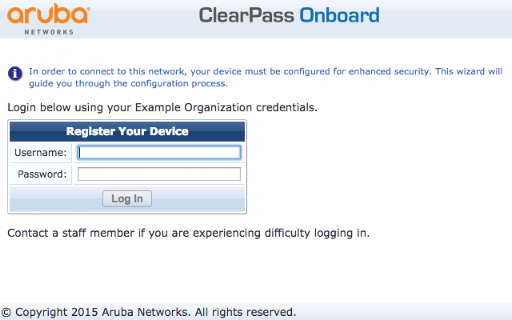
ClearPass Onboard screenshot

Links

Recommended Chrome extensions

Related listings from the same category, trending peers, and the same publisher portfolio.

Browse workflow
Sound Booster - increase volume up icon

Sound Booster - increase volume up

Sound-ultimate.com

Volume Booster helps boost sound video or music on any tab! Increase volume and bass booster, equalizer. Volume control.

Installs

3.0M+

Rating

★ 4.8

Web Threat Shield icon

Web Threat Shield

Webroot

Keeps you safe when browsing the web by identifying and blocking dangerous websites.

Installs

3.0M+

Rating

★ 2.0

TeraBox Download Assistant icon

TeraBox Download Assistant

terabox-developers

Supports screenshots, uploads, and other TeraBox features

Installs

3.0M+

Rating

★ 2.4

夸克网盘-网页嗅探 icon

夸克网盘-网页嗅探

广州市动悦信息技术有限公司

识别到网页资源时,可一键存夸克网盘

Installs

3.0M+

Rating

★ 1.6

Mendeley Web Importer icon

Mendeley Web Importer

Mendeley

Fast, convenient import of references and PDFs to your Mendeley Reference Manager library.

Installs

3.0M+

Rating

★ 2.0

Enable local file links icon

Enable local file links

Takashi Sugimoto (tksugimoto)

Make it possible to open by click a link to a local file that is disabled by Chrome.

Installs

3.0M+

Rating

★ 3.9

Microsoft Defender Browser Protection icon

Microsoft Defender Browser Protection

Microsoft Corporation

Protect yourself against online threats, like phishing and malicious websites, with real-time protection from Microsoft.

Installs

3.0M+

Rating

★ 3.1

Content Server Browser Web Extension icon

Content Server Browser Web Extension

OpenText Corporation

Content Server Browser Web Extension for Chrome

Installs

3.0M+

Rating

★ 2.8

金山收藏助手 icon

金山收藏助手

金山收藏助手

一键收藏,永久保存网页正文或片段到金山文档

Installs

2.0M+

Rating

★ 4.7

Evernote Web Clipper icon

Evernote Web Clipper

Evernote

Use the Evernote extension to save things you see on the web into your Evernote account.

Installs

2.0M+

Rating

★ 4.5