Download manager integration checklist icon

Download manager integration checklist Chrome Extension Analysis

Automation & Workflow Efficiency

Chrome extension ID: ghkcpcihdonjljjddkmjccibagkjohpi

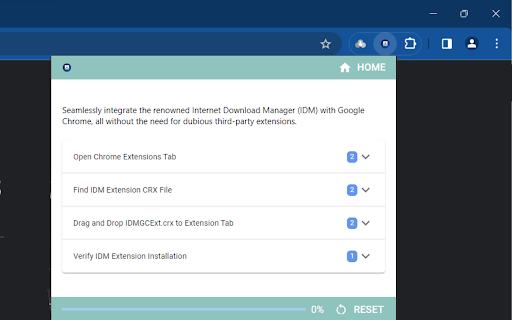
This extension acts as an instructional checklist and guide to assist users in integrating the Internet Download Manager (IDM) extension with their web browsers. It provides steps and information to help resolve integration issues.

Developer:Merin
Version:4.3.0
Size:222KiB
Last updated:

Overview

Installs

60K+

Rating

★ 4.2

44 reviews

Languages

1 locales

Includes English

Market analysis

Review-backed positioning, friction, and market signals for this Chrome extension.

Backed by review samples

Macro category

Automation & Workflow Efficiency

Pricing friction

Low review signal

Complaint intensity

Moderate review signal

Listing & review signals
Observed signals from store listing text and review samples.

Listing positioning

The product positions itself as a manual solution for users who have installed Internet Download Manager (IDM) but cannot get the download panel to appear in Chrome. It claims to provide a safe integration method while warning users about fake IDM modules available online.

Inferred product pattern

An instructional utility designed to guide users through the manual configuration of third-party software.

Review-backed pain points

Users reported concerns that the extension is a non-official third-party tool that could collect sensitive data, and some felt it was a waste of time because it only provides guidance rather than performing the integration itself.

Observed feature gaps

The extension serves as a guide rather than a direct functional integration tool, which leads users to seek the official IDM Integration Module instead.

Tags
IDM IntegrationBrowser UtilitySetup Guide
Target users

- IDM software users

- Chrome browser users

- Windows PC users

Primary use cases

- Troubleshooting IDM download panel visibility

- Manual IDM browser integration

Positive themes

- Helpful instructional content

- Successful setup of IDM in other browsers via the guide

Negative themes

- Security and authenticity concerns

- Perceived lack of functional value compared to official tools

Observed friction

- Performance complaints detected

- Privacy complaints detected

- No pricing friction observed in the listing or reviews.

Evidence boundary: Data synthesized from the store listing description and user reviews highlighting both successful configuration use cases and security-related skepticism. The review sample size is small, and negative feedback is heavily focused on the extension's perceived lack of official status.
Complaint summaries
Review-backed complaint signals grouped by operational area.

Support

No specific support or account complaints identified.

Reliability

Some users reported the extension was non-functional or a 'resource waster.'

Privacy

Users expressed skepticism regarding the extension's legitimacy, suggesting it could be used to collect sensitive data.

Access & pricing

- No clear monetization signal

- No account requirement observed

- No clear pricing signal

Store listing facts

Listing assets

- Screenshots: 1

- Videos: 0

- Languages: 1

Trust signals

No visible trust signal in the listing data.

Store metadata

- Version: 4.3.0

- Size: 222KiB

- Last updated:

Listing SEO keywords

Search intent keywords
Keyword signals for evaluating how users may discover, compare, or search for this extension category.

Core discovery

IDM integrationInternet Download Manager setupIDM download panel fixChrome IDM extension guide

Comparison

official IDM integration moduleIDM official extension

Problem

IDM download panel not showingIDM integration failedfake IDM extension

Alternative

Internet Download Manager official extensionIDM setup guide

Similar extensions

Jump to related discovery paths:

Screenshots

Download manager integration checklist screenshot

Recommended Chrome extensions

Related listings from the same category, trending peers, and the same publisher portfolio.

Browse education
Education Pro Browser Extension MV3 icon

Education Pro Browser Extension MV3

Ativion

Education Pro Browser Extension MV3 for use on Windows and Mac with EdPro client installed

Installs

400K+

Rating

★ 1.0

Scrible Extension icon

Scrible Extension

Scrible, Inc.

Smarter Web reading & research. Annotate, bookmark, save, cite, manage & share online articles. Use with your Scrible.com account.

Installs

400K+

Rating

★ 3.4

Certificate Enrollment for ChromeOS icon

Certificate Enrollment for ChromeOS

google.com

Request a certificate for your device.

Installs

400K+

Rating

★ 4.3

Add to Google Classroom icon

Add to Google Classroom

Canopy

This extension adds the current site to Google Classroom

Installs

400K+

Rating

★ 4.2

Trancy - AI Translator & Dual Subtitles icon

Trancy - AI Translator & Dual Subtitles

Trancy

Trancy provides bilingual subtitle for platforms like YouTube, Netflix, as well as AI translator for websites.

Installs

300K+

Rating

★ 4.4

Revision History: Writing Process Visibility for Google Docs & Slides icon

Revision History: Writing Process Visibility for Google Docs & Slides

Revision History

Built for teachers: See how students write, not just what they wrote. View the writing process in Google Docs & Slides.

Installs

300K+

Rating

★ 4.1

Knowt: Quizlet Import, AI Notes & Flashcards icon

Knowt: Quizlet Import, AI Notes & Flashcards

Knowt

Automatically import flashcards and notes from any video, PDF, article, or flashcard site. Knowt is the fastest way to study.

Installs

200K+

Rating

★ 4.9

Mouse Tooltip Translator - PDF & Netflix YouTube dual subs icon

Mouse Tooltip Translator - PDF & Netflix YouTube dual subs

ttop324

Mouse Tooltip Translator translate mouseover text using google translate. Support OCR, TTS, manga translator & pdf translator.

Installs

200K+

Rating

★ 4.7

Paperpile Extension icon

Paperpile Extension

Paperpile

Collect, organize, annotate and cite your research papers in Chrome.

Installs

200K+

Rating

★ 4.1

Talk & Comment: Voice Feedback & Audio Comments for Teachers icon

Talk & Comment: Voice Feedback & Audio Comments for Teachers

TalkandComment.com

Leave voice feedback on student work in Google Docs, Classroom or any page. Share one link; students listen on their phone.

Installs

200K+

Rating

★ 4.0