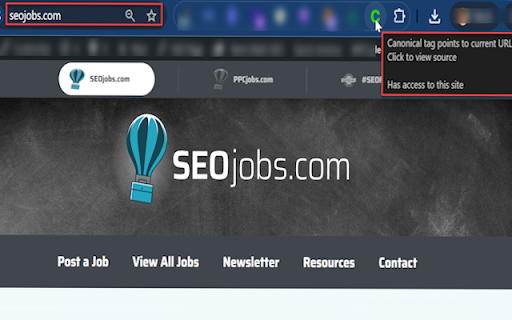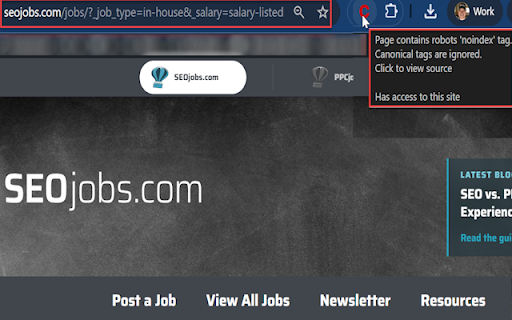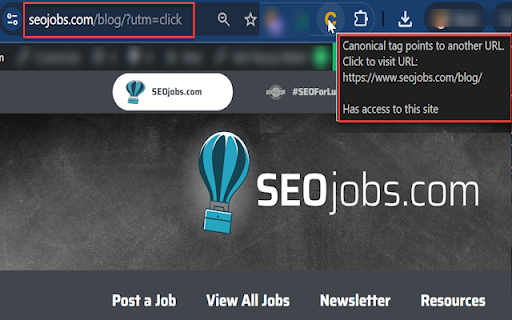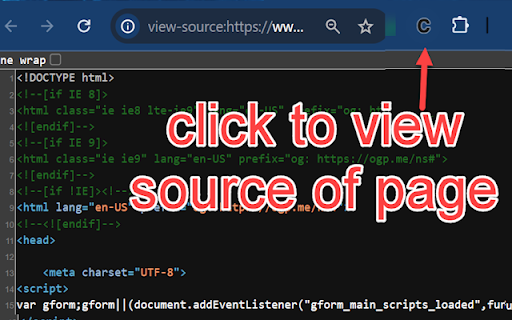
Inspect Canonical icon

Inspect Canonical Chrome Extension Analysis

SEO & Traffic Analytics

Chrome extension ID: glkngfenfpegejlggjfcmdobodjlfann

Inspect Canonical is a Chrome extension that analyzes the canonical tag of the current web page. It provides a color-coded status indicating if the page is self-canonical (GREEN), canonicalized to another URL (AMBER), or if there's an error such as noindex, missing/multiple tags, or incorrect placement (RED). It tests for seven specific conditions to determine the page's canonical status.

Developer:Nick LeRoy
Version:2.2
Size:20.86KiB
Last updated:

Overview

Installs

6K+

Rating

★ 4.5

11 reviews

Languages

1 locales

Includes English (United States)

Market analysis

Review-backed positioning, friction, and market signals for this Chrome extension.

Backed by review samples

Macro category

SEO & Traffic Analytics

Pricing friction

Low review signal

Complaint intensity

Moderate review signal

Listing & review signals
Observed signals from store listing text and review samples.

Listing positioning

The store listing positions Inspect Canonical as a lightweight and extremely easy Chrome extension designed for quickly checking the canonical tag of any URL. It highlights its color-coded status system (GREEN, AMBER, RED) for instant understanding of canonical tag validity and issues, aiming to save users from manually inspecting source code.

Inferred product pattern

A dedicated, lightweight utility for web developers and SEO professionals to quickly inspect and validate canonical tags on web pages, providing immediate, color-coded feedback on their status and potential issues.

Review-backed pain points

Users report that the extension intermittently stops working or displays incorrect canonical information, particularly when frequently switching between tabs. Additionally, a minor pain point is that clicking an amber status icon opens the canonical link in a new tab, which is not preferred by all users.

Observed feature gaps

The extension lacks an option to configure the behavior of clicking the canonical link (e.g., open in the same tab vs. a new tab), which was requested by a user.

Tags
Canonical CheckerSEO ToolWeb DevelopmentOn-Page SEO
Target users

- SEO professionals

- Web developers

- Digital marketers

- Content creators

Primary use cases

- Quickly verify the canonical status of a webpage

- Identify common canonical tag errors (e.g., noindex, multiple tags, incorrect placement)

- Confirm correct SEO setup for canonical URLs

- Troubleshoot indexing issues related to canonicalization

Positive themes

- Lightweight and not cumbersome like other SEO extensions

- Easy to use with a clear, color-coded status system

- Effective at quickly providing necessary canonical information

- Praised for its specific purpose and compactness

Negative themes

- Intermittent functionality, sometimes not working at all

- Fails to work correctly when switching between multiple tabs, showing incorrect status

- Canonical link click opens in a new tab, with some users preferring it to open in the same tab

Observed friction

- Performance complaints detected

- No pricing information or complaints related to payment were observed, suggesting the extension is free to use.

Evidence boundary: Analysis is based on the Chrome Web Store listing, including short and long descriptions, and 11 user reviews with a mix of high, low, and helpful ratings. The limited number of reviews (11 total) restricts the breadth and depth of insights into user experiences and potential recurring issues.
Complaint summaries
Review-backed complaint signals grouped by operational area.

Support

No specific complaints regarding customer support, account management, or refund issues were observed in the reviews.

Reliability

Several users reported reliability issues, including the extension 'not working' at all or failing to display correct canonical status, especially when rapidly switching between browser tabs.

Privacy

No privacy or security-related complaints were observed in the available reviews.

Access & pricing

- Free usage observed

- No account requirement observed

- Free plan or free usage claimed

Store listing facts

Listing assets

- Screenshots: 4

- Videos: 0

- Languages: 1

Trust signals

- Developer contact

- Official website

Store metadata

- Version: 2.2

- Size: 20.86KiB

- Last updated:

Listing SEO keywords

Search intent keywords
Keyword signals for evaluating how users may discover, compare, or search for this extension category.

Core discovery

canonical tag checkercheck canonical urlwebsite canonical tag toolseo canonical validation

Comparison

inspect canonical vs yoastcanonical checker alternativeseo extension canonical feature

Problem

canonical tag not workingincorrect canonical urlmultiple canonical tagsno canonical tag found chrome

Alternative

canonical checker chrome extension alternativerel canonical toolseo auditor extension

Similar extensions

Jump to related discovery paths:

Screenshots

Inspect Canonical screenshot

Links

Website: nickleroy.com

Recommended Chrome extensions

Related listings from the same category, trending peers, and the same publisher portfolio.

Browse developer
Netmirror Extension icon

Netmirror Extension

netmirror.art

Add, modify or remove a header for any request. https://netmirror.global/ Netmirror Mod Header (HTTP Headers) is an extension that…

Installs

700K+

Rating

★ 4.5

Tampermonkey BETA icon

Tampermonkey BETA

Jan Biniok

Change the web at will with userscripts

Installs

700K+

Rating

★ 4.8

Foxified icon

Foxified

foxified

Emulate firefox extensions in Chrome, Opera and other Chromium based browsers

Installs

700K+

Rating

★ 4.5

Postman Interceptor icon

Postman Interceptor

Postman

Capture requests from any website and send them to Postman Client.

Installs

700K+

Rating

★ 2.8

Talend API Tester - Free Edition icon

Talend API Tester - Free Edition

Qlik

Visually interact with REST, SOAP and HTTP APIs.

Installs

600K+

Rating

★ 4.8

[Deprecated] Google Analytics Debugger icon

[Deprecated] Google Analytics Debugger

Google Analytics

Prints useful information to the JavaScript console by enabling the debug version of the Google Analytics Javascript.

Installs

600K+

Rating

★ 3.7

Salesforce Inspector Reloaded icon

Salesforce Inspector Reloaded

Thomas Prouvot

Productivity tools for Salesforce administrators and developers to inspect data and metadata directly from the Salesforce UI.

Installs

600K+

Rating

★ 4.4

TikTok Pixel Helper icon

TikTok Pixel Helper

TikTok For Business

The TikTok Pixel Helper is a plug-in that monitors whether your TikTok Pixel is functioning properly.

Installs

600K+

Rating

★ 3.1

Detailed SEO Extension icon

Detailed SEO Extension

ahrefsseotoolbar

Get SEO insights at the click of a button to any website you're currently on. Built by full-time SEO's for daily analysis.

Installs

600K+

Rating

★ 4.8

Tag Assistant Companion icon

Tag Assistant Companion

Google

The Tag Assistant Companion extension works with Tag Assistant to help troubleshoot installation of gtag.js and Google Tag Manager.

Installs

500K+

Rating

★ 3.5