
Clear Cache Chrome Chrome Extension Analysis
Privacy, Security & Ad BlockersChrome extension ID: glkommiehgjnfidnifibaembchhcceap
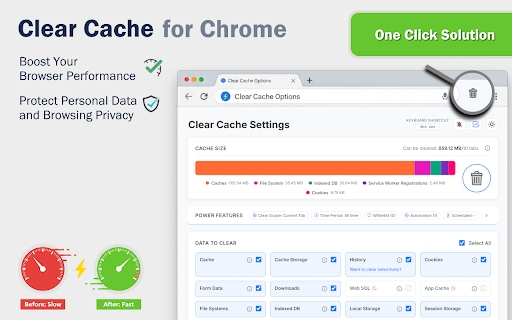
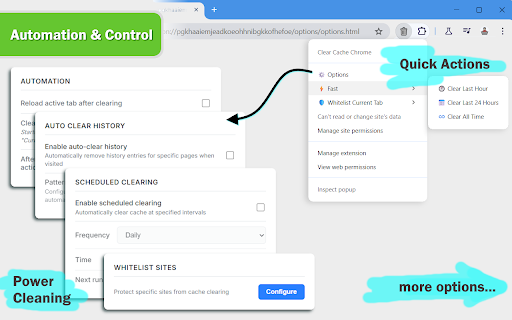
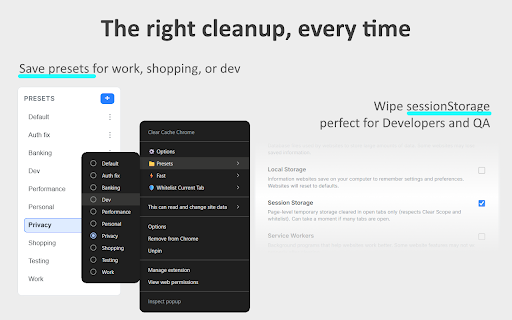
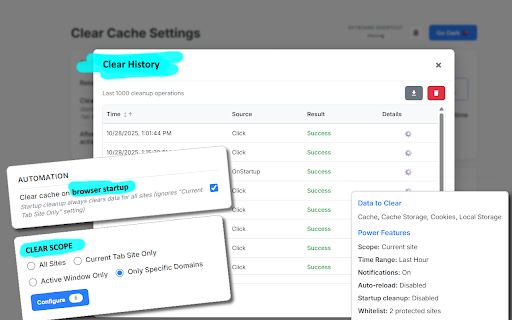
Clear Cache Chrome is a Chrome extension designed to help users manage and remove various types of browsing data, including cache, history, cookies, and downloads. It offers one-click clearing, selective data removal, scheduled cleaning, and automation features to improve browser speed and privacy.
Overview
Installs
10K+
Rating
★ 4.9
71 reviews
Languages
51 locales
Includes Deutsch, English, Filipino, Indonesia...
Market analysis
Review-backed positioning, friction, and market signals for this Chrome extension.
Macro category
Privacy, Security & Ad Blockers
Pricing friction
Low review signal
Complaint intensity
Moderate review signal
Listing positioning
The store listing positions 'Clear Cache Chrome' as an essential tool for instantly removing browser cache, history, downloads, and cookies with a single click. It emphasizes benefits such as faster browsing, enhanced privacy, and a clutter-free online experience to users frustrated with slow Chrome performance.
Inferred product pattern
A free utility tool for browser maintenance, focusing on automation and one-click data clearing for speed and privacy, which monetizes through in-app advertisements for the developer's other applications.
Review-backed pain points
Users expressed pain points regarding privacy due to Google Analytics usage, frustration with settings not persisting, and issues with certain automation features like clearing history on startup not being effective. The lack of settings synchronization was also noted.
Observed feature gaps
Observed feature gaps include the lack of a settings/whitelist synchronization feature across browsers. Some users also indicated that specific automation for history clearing on startup did not function as desired, suggesting a gap in expected functionality.
- Chrome users experiencing slow browser performance
- Privacy-conscious individuals looking to manage their online data
- Users seeking automated solutions for browser maintenance
- Individuals wanting a simple way to clear specific browsing data
- Instantly clearing browser cache and other data
- Automating data cleaning at scheduled intervals or events
- Selectively removing browsing data for specific domains or types
- Enhancing browser speed and performance
- Maintaining online privacy by regularly deleting personal browsing data
- Ease of use and one-click functionality
- Effectiveness in improving browser performance and speed
- Helpful automation features like auto-refresh after clearing
- Developer responsiveness to feature requests (e.g., interval cleaning)
- Fills a perceived gap in the market for effective cleaners
- Concerns about the extension transmitting usage data via Google Analytics
- Settings occasionally reverting to default, requiring re-setup
- Specific automation features (e.g., auto-clear history on startup) not working as expected
- Missing a sync feature for settings and whitelists across browsers
- Privacy complaints detected
- Pricing information is not available from the store listing or reviews, and there are no complaints related to payment or pricing.
Support
No specific support or account blocking complaints were observed. One review positively noted the developer's quick response to user inquiries.
Reliability
Users reported reliability issues such as settings occasionally resetting to default and specific automation features, like clearing history on browser startup, not working consistently.
Privacy
A user reported a privacy concern, stating that the extension transmits usage data via Google Analytics.
- Ad-supported model observed
- No account requirement observed
- Free plan or free usage claimed
Store listing facts
- Screenshots: 4
- Videos: 0
- Languages: 51
- Privacy policy
- Developer contact
- Official website
- Support link
- Version: 1.34.0
- Size: 602KiB
- Last updated:
Listing SEO keywords
Core discovery
Comparison
Problem
Alternative
Similar extensions
Jump to related discovery paths:
Screenshots
Links
Website: clear-browser.com
Privacy policy: https://clear-browser.com/privacy
Support links: https://clear-browser.com/#contact