SnapMark — Screenshot & Annotate icon

SnapMark Chrome Extension Analysis

Automation & Workflow Efficiency

Store listing title: SnapMark — Screenshot & Annotate

Chrome extension ID: hcemfcpppedhodjmeoccpniefibejdgc

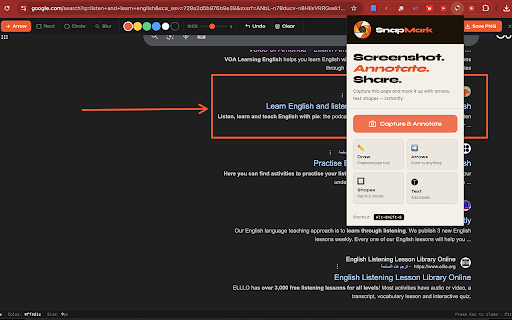
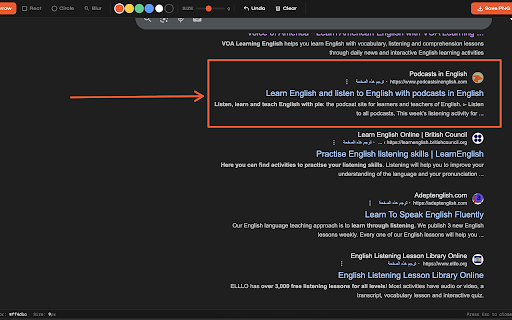
SnapMark is a Chrome extension that allows users to capture screenshots of any webpage and annotate them immediately. It offers tools like arrows, text, and shapes for highlighting. The annotated screenshots can be saved or copied to the clipboard.

Developer:ibrahem magdy
Version:1.0.0
Size:453KiB
Last updated:

Overview

Installs

0

Rating

0 reviews

Languages

1 locales

Includes English

Market analysis

Review-backed positioning, friction, and market signals for this Chrome extension.

No review samples found

Macro category

Automation & Workflow Efficiency

Pricing friction

Low review signal

Complaint intensity

Low review signal

Listing & review signals
Observed signals from store listing text and review samples.

Listing positioning

SnapMark positions itself as a free, no-account-needed tool for capturing and annotating webpages instantly. It emphasizes ease of use with a keyboard shortcut and a built-in annotation canvas for highlighting important information.

Inferred product pattern

A standalone utility extension focused on a specific task (screenshotting and annotation).

Review-backed pain points

Review-backed data is not available.

Observed feature gaps

Review-backed data is not available.

Tags
Screenshot AnnotationProductivity Tool
Target users

- Users needing to communicate visual information from web pages

- Individuals creating tutorials or bug reports

Primary use cases

- Webpage screenshotting

- Visual annotation

- Sharing annotated content

- Bug reporting

- Design feedback

Positive themes

No positive theme data.

Negative themes

No negative theme data.

Observed friction

- The listing explicitly states 'no account needed' and 'completely free,' indicating no pricing friction for core functionality.

Evidence boundary: Data extracted from the Chrome Web Store listing including title, short and long descriptions, and developer details. No user reviews are available to provide sentiment, detailed feature feedback, or user pain points.
Complaint summaries
Review-backed complaint signals grouped by operational area.

Support

No reviews are available to assess support or account-related complaints.

Reliability

No reviews are available to assess reliability or performance complaints.

Privacy

No reviews are available to assess privacy or security complaints.

Access & pricing

- Free usage observed

- No account requirement observed

- Free plan or free usage claimed

Store listing facts

Listing assets

- Screenshots: 2

- Videos: 0

- Languages: 1

Trust signals

- Developer contact

Store metadata

- Version: 1.0.0

- Size: 453KiB

- Last updated:

Listing SEO keywords

Search intent keywords
Keyword signals for evaluating how users may discover, compare, or search for this extension category.

Core discovery

screenshot chrome extensionannotate screenshotwebpage capturetake screenshot and annotate

Comparison

screenshot toolannotation app

Problem

how to screenshot and annotate webpageeasy web screenshot tool

Alternative

screenshot annotation alternativefree screenshot tool

Similar extensions

Jump to related discovery paths:

Screenshots

SnapMark — Screenshot & Annotate screenshot

Recommended Chrome extensions

Related listings from the same category, trending peers, and the same publisher portfolio.

Browse tools
myVocabs: Save Words and Expand Your Vocabulary Effortlessly icon

myVocabs: Save Words and Expand Your Vocabulary Effortlessly

ibrahem magdy

Save and learn new words effortlessly. Click to save, view later, and improve your vocabulary.

Installs

1K+

Rating

4.0

FishBubbles | Custom Theme for Chrome icon

FishBubbles | Custom Theme for Chrome

ibrahem magdy

Replace your default new tab with a fun, interactive fish animation that follows your mouse and pops bubbles!

Installs

424

Rating

4.6

Dark Mode icon

Dark Mode

Grephy

A global dark theme for the web.

Installs

1.0M+

Rating

3.6

AIPRM for ChatGPT icon

AIPRM for ChatGPT

AIPRM

AIPRM is your cheat code for ChatGPT. Adds a list of curated prompt templates and advanced features. Try today.

Installs

1.0M+

Rating

3.9

BlockSite Block Websites & Stay Focused icon

BlockSite Block Websites & Stay Focused

BlockSite

Stay focused and boost productivity: Custom blocklist, Scheduled site blocking, and Password protection.

Installs

1.0M+

Rating

4.5

Keywords Everywhere - Keyword Tool icon

Keywords Everywhere - Keyword Tool

Axeman Technology Solutions LLP

Keyword search volume, cpc and competition for 15+ websites like Google™ Search Console, YouTube™, Amazon™ & more

Installs

1.0M+

Rating

4.5

Enhancer for YouTube™ icon

Enhancer for YouTube™

Max RF

Take control of YouTube and boost your user experience!

Installs

1.0M+

Rating

4.7

WebChatGPT: Prompt library with web access icon

WebChatGPT: Prompt library with web access

WebChatGPT

Augment your ChatGPT prompts with relevant web search results through web browsing.

Installs

1.0M+

Rating

4.2

Transpose ▲▼ pitch ▹ speed ▹ loop icon

Transpose ▲▼ pitch ▹ speed ▹ loop

Transpose Studio

Change the pitch and speed of music and loop sections directly on YouTube, Spotify and many other streaming platforms.

Installs

1.0M+

Rating

4.5

NopeCHA: CAPTCHA Solver icon

NopeCHA: CAPTCHA Solver

NopeCHA, LLC

AI Solver for reCAPTCHA, hCAPTCHA, and all CAPTCHA.

Installs

1.0M+

Rating

4.3