Console Importer icon

Console Importer Chrome Extension Analysis

Developer & Designer Tools

Chrome extension ID: hgajpakhafplebkdljleajgbpdmplhie

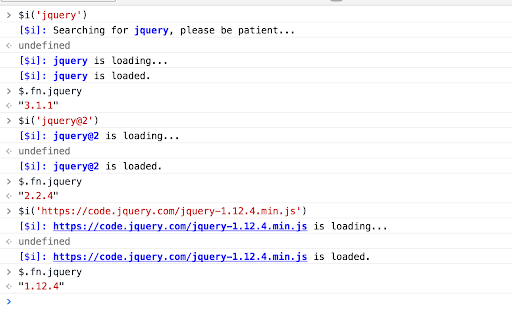
Console Importer is a developer-focused Chrome extension designed to facilitate the rapid injection of JS and CSS resources into the browser console. It enables developers to test APIs and npm packages quickly within their existing workflow.

Developer:Rongjian Zhang
Version:2.1.0
Size:9.55KiB
Last updated:

Overview

Installs

10K+

Rating

4.7

20 reviews

Languages

1 locales

Includes English

Market analysis

Review-backed positioning, friction, and market signals for this Chrome extension.

Backed by review samples

Macro category

Developer & Designer Tools

Pricing friction

Low review signal

Complaint intensity

Low review signal

Listing & review signals
Observed signals from store listing text and review samples.

Listing positioning

The product is positioned as a streamlined utility for developers to import JavaScript and CSS resources directly into the Chrome console using a single command. It focuses on simplifying the debugging process for web developers.

Inferred product pattern

A lightweight developer utility for rapid code injection and environment debugging via the browser console.

Review-backed pain points

Users reported difficulty importing ESM (ES Modules) packages like Vue, encountering 'undefined' reference errors for the $i command in certain Chrome versions, and confusion regarding how to uninstall imported modules.

Observed feature gaps

Support for modern ESM-based package imports and a dedicated mechanism for removing/unloading imported resources.

Tags
Developer ToolsJS DebuggingConsole UtilityResource Importer
Target users

- Web Developers

- Frontend Engineers

- Software Developers

Primary use cases

- Debugging npm packages in the console

- Quickly importing CSS and JS for testing

- Testing API effects in a live browser environment

Positive themes

- Highly helpful for debugging npm packages

- Efficient for quick API testing

- Streamlines developer workflows

Negative themes

- Incompatibility with ESM-based packages

- Command errors in specific Chrome versions

- Lack of clarity on how to uninstall imported modules

Observed friction

- No pricing information or friction was observed in the provided data.

Evidence boundary: Analysis conducted on the Chrome Web Store listing details and a set of user reviews. The review sample size is small (20 reviews), which may not fully capture the total user experience.
Complaint summaries
Review-backed complaint signals grouped by operational area.

Support

No direct support complaints, though users used reviews to ask technical questions.

Reliability

Some users reported the extension failing to function or specific console commands being unavailable in certain browser builds.

Privacy

No privacy or security complaints were observed.

Access & pricing

- No clear monetization signal

- No account requirement observed

- No clear pricing signal

Store listing facts

Listing assets

- Screenshots: 1

- Videos: 0

- Languages: 1

Trust signals

- Developer contact

- Official website

Store metadata

- Version: 2.1.0

- Size: 9.55KiB

- Last updated:

Listing SEO keywords

Search intent keywords
Keyword signals for evaluating how users may discover, compare, or search for this extension category.

Core discovery

import javascript consoleinject css chrome consoleconsole resource importerdeveloper debugging tool

Comparison

Chrome DevTools extensions

Problem

import esm package in consoleconsole $i not definedhow to uninstall console module

Alternative

DevTools snippet managerJavaScript injector

Similar extensions

Jump to related discovery paths:

Screenshots

Console Importer screenshot

Links

Website: github.com

Recommended Chrome extensions

Related listings from the same category, trending peers, and the same publisher portfolio.

Browse developer