Explain AI - Explain anything in its context icon

Explain AI Chrome Extension Analysis

AI & Writing Assistants

Store listing title: Explain AI - Explain anything in its context

Chrome extension ID: hgdhahipoomjkhbadikhoopfdkllpbgf

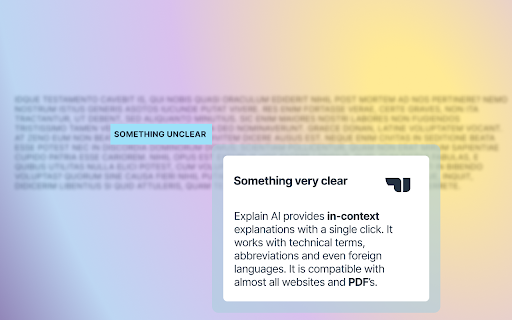
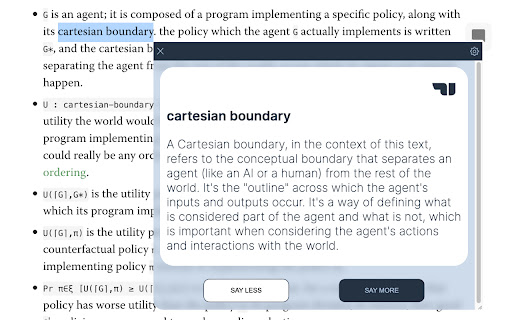
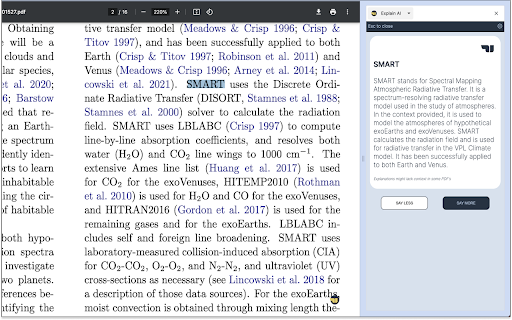
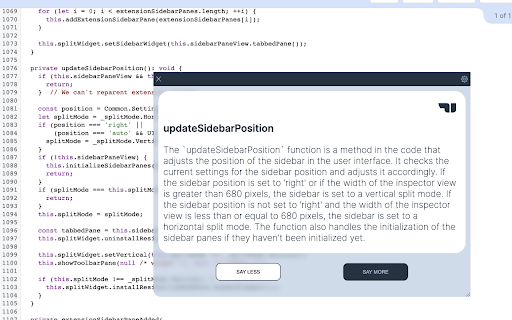
A Chrome extension that allows users to highlight words, phrases, technical terms, or foreign languages to receive immediate AI-generated explanations. It supports clarifying questions to help users deeply understand content without leaving their current page.

Version:1.5.1
Size:1.37MiB
Last updated:

Overview

Installs

2K+

Rating

★ 4.6

67 reviews

Languages

1 locales

Includes English

Market analysis

Review-backed positioning, friction, and market signals for this Chrome extension.

Backed by review samples

Macro category

AI & Writing Assistants

Pricing friction

Moderate review signal

Complaint intensity

Moderate review signal

Listing & review signals
Observed signals from store listing text and review samples.

Listing positioning

The product is positioned as an AI reading companion that provides precise explanations of highlighted text based on its context. It emphasizes saving time, enhancing understanding, and maintaining focus by eliminating the need to open new search tabs.

Inferred product pattern

Context-aware AI tooltip designed to reduce cognitive load during reading and research.

Review-backed pain points

Users report frustration with being forced to log in repeatedly after restarting the browser and a bug where follow-up questions occasionally trigger a 'null' response from the AI.

Observed feature gaps

Lack of Dark Mode, no support for Google Docs or certain PDFs, missing Google Sign-in functionality in settings, and lack of text-to-speech capabilities.

Tags
AI Contextual ExplainerReading AssistantStudy ToolLearning Productivity
Target users

- Students

- Researchers

- Journalists

- Programmers

- Language Learners

Primary use cases

- Simplifying complex legal jargon

- Defining technical terms in code or documentation

- Translating and explaining foreign language phrases in context

- Studying for interviews using learning materials

Positive themes

- Reduction of search friction

- High utility for complex subject matter

- Quick and accurate responses

- Effective for interview preparation

Negative themes

- Persistent login requirements

- Technical bugs with 'null' responses

- UI/UX shortcomings

- Confusion over usage limits

Observed friction

- Free-tier complaints detected

- Performance complaints detected

- Some users reported confusion regarding usage limits, specifically citing a limit of one explanation per day after creating an account.

Evidence boundary: Data extracted from the official store listing and a representative sample of high and low rating reviews. Analysis is based on a limited subset of total reviews.
Complaint summaries
Review-backed complaint signals grouped by operational area.

Support

No significant complaints; one user explicitly praised the developer for providing access based on their financial circumstances.

Reliability

Multiple users reported a technical bug where the extension returns 'null' when using the 'say more' feature or asking clarifying questions.

Privacy

No privacy or security complaints observed in the provided data.

Access & pricing

- Free entry with paid features

- Account required for core usage

- Limited free usage observed

Store listing facts

Listing assets

- Screenshots: 5

- Videos: 1

- Languages: 1

Trust signals

- Privacy policy

- Developer contact

- Official website

Store metadata

- Version: 1.5.1

- Size: 1.37MiB

- Last updated:

Listing SEO keywords

Search intent keywords
Keyword signals for evaluating how users may discover, compare, or search for this extension category.

Core discovery

contextual AI explainerAI reading assistantexplain text extensionAI jargon simplifier

Comparison

Explain AI vs Google Searchbest AI contextual dictionary

Problem

too many tabs for definitionscomplex technical jargonreading friction

Alternative

AI reading helper alternativecontextual AI tool

Similar extensions

Jump to related discovery paths:

Screenshots

Explain AI - Explain anything in its context screenshot

Links

Website: xplnai.com

Privacy policy: https://xplnai.com/privacy

Videos: Watch

Recommended Chrome extensions

Related listings from the same category, trending peers, and the same publisher portfolio.

Browse education
Tweet Toilet icon

Tweet Toilet

Zakaria El hjouji

A Chrome extension for tweeting directly from the browser.

Installs

53

Rating

★ 5.0

ImTranslator: Translator, Dictionary, TTS icon

ImTranslator: Translator, Dictionary, TTS

smartlink

Translator, Dictionary, Voice

Installs

900K+

Rating

★ 4.4

ProctorExam Activity Sharing icon

ProctorExam Activity Sharing

ProctorExam BV

Lets you share your browsing activity when taking an online exam on ProctorExam - https://www.proctorexam.com

Installs

800K+

Rating

★ 1.6

Voice In - Voice Typing & Speech-to-Text Dictation icon

Voice In - Voice Typing & Speech-to-Text Dictation

Dictanote

Voice typing in ChatGPT, Gmail, Google Docs & 10,000+ sites. Dictate emails, notes & AI prompts in 50+ languages.

Installs

700K+

Rating

★ 4.4

eJOY AI Dictionary icon

eJOY AI Dictionary

ejoy-english.com

Your ultimate knowledge and English learning tool to discover the world and upskill yourself. Translate video, websites and PDF.

Installs

700K+

Rating

★ 4.8

Translate for Chrome -Translator, Dictionary icon

Translate for Chrome -Translator, Dictionary

Translator App.

Translate words, phrases or text on any webpage. Full page translator and dictionary, text to speech (TTS) using Google Translate.

Installs

600K+

Rating

★ 4.6

Cite This For Me: Web Citer icon

Cite This For Me: Web Citer

Chegg Writing Tools

Automatically create website citations in the APA, MLA, Chicago, or Harvard referencing styles at the click of a button.

Installs

600K+

Rating

★ 3.8

GPTZero: AI Detection & Writing Replay icon

GPTZero: AI Detection & Writing Replay

chrome-extension-publisher

Bring AI detection, citation checks, live essay feedback, and writing replays directly into Google Docs and your workflow.

Installs

500K+

Rating

★ 4.7

Google Meet Attendance List icon

Google Meet Attendance List

MeetList

Easiest way to save the attendance list for your meetings or lectures

Installs

400K+

Rating

★ 4.7

Google Meet Breakout by Robert Hudek icon

Google Meet Breakout by Robert Hudek

Unknown developer

Only the teacher needs to install. Completely Free and your Data is Private. Google Classroom integration, Slider Control.

Installs

400K+

Rating

★ 4.3