Prism - Redline Tool icon

Prism Chrome Extension Analysis

Developer & Designer Tools

Store listing title: Prism - Redline Tool

Chrome extension ID: hkbhjllliedcceblibllaodamehmbfgm

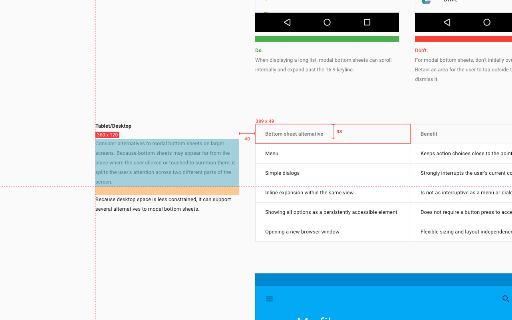
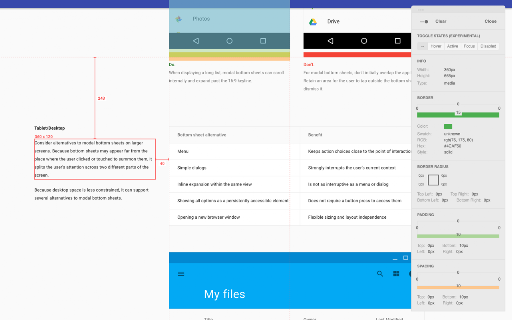
A developer and designer utility that enables users to inspect webpage elements to obtain comprehensive attribute details. It simplifies the process of gathering CSS-related specifications without using standard browser developer tools.

Developer:Johnny Hunter
Version:1.7.3
Size:88.43KiB
Last updated:

Overview

Installs

5K+

Rating

4.8

22 reviews

Languages

1 locales

Includes English (United States)

Market analysis

Review-backed positioning, friction, and market signals for this Chrome extension.

Backed by review samples

Macro category

Developer & Designer Tools

Pricing friction

Low review signal

Complaint intensity

Low review signal

Listing & review signals
Observed signals from store listing text and review samples.

Listing positioning

Prism positions itself as an effortless tool for extracting redline specifications directly from webpages. It focuses on capturing visual properties like size, color, spacing, and typography through simple hover and click interactions.

Inferred product pattern

A specialized visual inspection utility designed to streamline the design-to-development handoff by extracting CSS attributes via a simplified UI.

Review-backed pain points

Users expressed a desire for keyboard hotkeys to activate the tool and automate screenshots of redlined items. There is also minor friction regarding console log clutter and inconsistent spacing displays on different Mac systems.

Observed feature gaps

Lack of hotkeys/shortcuts, no automated screenshot/capture functionality for redlines, and lack of support for Axure RP 9.

Tags
Redline ToolDesign InspectorWeb InspectorUI/UX Tool
Target users

- Product Designers

- UI/UX Designers

- Web Developers

Primary use cases

- Extracting design specifications from live websites

- Inspecting typography and color values

- Verifying layout spacing and dimensions

Positive themes

- Easier alternative to Inspect Element

- Replaces multiple other extensions

- Essential for professional design workflows

- Intuitive design and interface

Negative themes

- Lack of keyboard shortcuts

- Inconvenient activation method

- Unnecessary console message pollution

Observed friction

- No pricing friction or monetization details were mentioned in the reviews.

Evidence boundary: Analysis based on the store listing description and a sample of user reviews highlighting workflow benefits and feature requests. The total number of reviews is relatively low (22), which may not represent the full user experience.
Complaint summaries
Review-backed complaint signals grouped by operational area.

Support

No support or account-related complaints were observed.

Reliability

One user reported inconsistent spacing displays between different Mac devices.

Privacy

No privacy or security complaints were observed.

Access & pricing

- No clear monetization signal

- No account requirement observed

- No clear pricing signal

Store listing facts

Listing assets

- Screenshots: 2

- Videos: 0

- Languages: 1

Trust signals

- Developer contact

Store metadata

- Version: 1.7.3

- Size: 88.43KiB

- Last updated:

Listing SEO keywords

Search intent keywords
Keyword signals for evaluating how users may discover, compare, or search for this extension category.

Core discovery

web redline tooldesign inspectorextract CSS propertiestypography inspectorweb spacing tool

Comparison

Inspect ElementZeppelin app

Problem

check web font colorfind web element spacingextract CSS size

Alternative

CSS inspectorUI inspectordesign specification tool

Similar extensions

Jump to related discovery paths:

Screenshots

Prism - Redline Tool screenshot

Recommended Chrome extensions

Related listings from the same category, trending peers, and the same publisher portfolio.

Browse developer
Google Analytics Debugger icon

Google Analytics Debugger

Google Analytics

Prints useful information to the JavaScript console by enabling the debug version of the Google Analytics Javascript.

Installs

600K+

Rating

4.2

Tag Assistant Companion icon

Tag Assistant Companion

Google

The Tag Assistant Companion extension works with Tag Assistant to help troubleshoot installation of gtag.js and Google Tag Manager.

Installs

500K+

Rating

3.1

Salesforce Inspector Reloaded icon

Salesforce Inspector Reloaded

Thomas Prouvot

Productivity tools for Salesforce administrators and developers to inspect data and metadata directly from the Salesforce UI.

Installs

500K+

Rating

4.8

Axure RP Extension for Chrome icon

Axure RP Extension for Chrome

Axure Software Solutions, Inc.

An extension that allows viewing of locally published Axure RP prototypes (HTML files) from Google Chrome.

Installs

500K+

Rating

3.3

Angular DevTools icon

Angular DevTools

Angular

Angular DevTools extends Chrome DevTools adding Angular specific debugging and profiling capabilities.

Installs

400K+

Rating

3.7

daily.dev | Where developers discover what's next icon

daily.dev | Where developers discover what's next

Daily Dev Ltd.

Developer news, personalized to your stack, in every new tab. Join 400,000+ developers. Free and open source.

Installs

400K+

Rating

4.8

SelectorsHub icon

SelectorsHub

Sanjay Kumar | SelectorsHub Founder

Locators Plugin to Auto Generate and Verify Playwright Locators, XPath & CSS Selectors.

Installs

400K+

Rating

4.8

SAML-tracer icon

SAML-tracer

SimpleSAMLphp

A debugger for viewing SAML messages

Installs

400K+

Rating

4.5

CSS Peeper icon

CSS Peeper

CSS Peeper

Inspect website styles in seconds. Supercharge your workflow, and save hours of work.

Installs

400K+

Rating

4.1

Font Finder icon

Font Finder

unixeco

An easy-to-use font inspector to get CSS styles of the selected element

Installs

400K+

Rating

4.5