Live Translate — bilingual subtitles icon

Live Translate Chrome Extension Analysis

Automation & Workflow Efficiency

Store listing title: Live Translate — bilingual subtitles

Chrome extension ID: hpaikmjapaejapaoldbfbobkkfkddeab

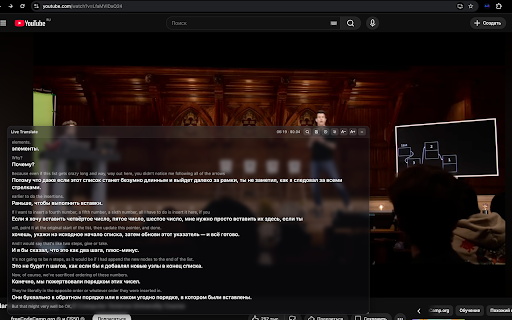
Live Translate generates real-time audio transcriptions and translations as a floating overlay on web content. It supports various web-based media and communication platforms, allowing users to choose between local privacy-first processing or higher-accuracy cloud-based recognition.

Developer:adamdoxaev
Version:1.0.0
Size:5.75MiB
Last updated:

Overview

Installs

171

Rating

★ 5.0

2 reviews

Languages

1 locales

Includes English (United States)

Market analysis

Review-backed positioning, friction, and market signals for this Chrome extension.

Backed by review samples

Macro category

Automation & Workflow Efficiency

Pricing friction

Low review signal

Complaint intensity

Low review signal

Listing & review signals
Observed signals from store listing text and review samples.

Listing positioning

The extension positions itself as a privacy-focused, BYOK (Bring Your Own Key) tool for generating real-time bilingual subtitles on any browser tab. It emphasizes flexibility by offering both cloud-based Mistral API integration and local on-device processing via WebGPU.

Inferred product pattern

Developer-centric, BYOK-based utility providing real-time audio processing overlays via browser APIs.

Review-backed pain points

Review-backed data is not available beyond general positive sentiment.

Observed feature gaps

No major feature gaps identified in reviews; the listing transparently notes technical requirements like WebGPU support for local mode.

Tags
Live SubtitlesTranslationAccessibilityWebGPUSpeech To Text
Target users

- Language learners

- Remote workers

- Students attending online lectures

- Users requiring real-time accessibility tools

Primary use cases

- Bilingual subtitle overlay for videos

- Live captioning for web meetings

- Real-time translation for online courses

Positive themes

- Ease of use and general utility

Negative themes

- No negative feedback reported in available samples

Observed friction

- Users must provide their own API key for cloud features, shifting direct costs to the user's Mistral account, while local features are free.

Evidence boundary: The evidence is derived from the Chrome Web Store listing, technical feature specifications, and user sentiment from the available review sample. Review-backed data is minimal due to the low volume of public reviews currently available.
Complaint summaries
Review-backed complaint signals grouped by operational area.

Support

No support complaints observed.

Reliability

No reliability complaints observed.

Privacy

No privacy complaints observed; the tool is marketed as a client-side solution without a developer server.

Access & pricing

- Free usage observed

- No account requirement observed

- Free plan or free usage claimed

Store listing facts

Listing assets

- Screenshots: 1

- Videos: 1

- Languages: 1

Trust signals

- Privacy policy

- Developer contact

Store metadata

- Version: 1.0.0

- Size: 5.75MiB

- Last updated:

Listing SEO keywords

Search intent keywords
Keyword signals for evaluating how users may discover, compare, or search for this extension category.

Core discovery

real-time subtitlesbrowser live captionbilingual translation extensionMistral AI transcriptionWebGPU speech to text

Comparison

Chrome live caption alternativevideo translator extension

Problem

cannot understand video languageno subtitles on meetings

Alternative

browser accessibility toolsaudio transcription tool

Similar extensions

Jump to related discovery paths:

Screenshots

Live Translate — bilingual subtitles screenshot

Links

Recommended Chrome extensions

Related listings from the same category, trending peers, and the same publisher portfolio.

Browse communication
Share link via email icon

Share link via email

Cobote

Adds a button and context menu item to send the page URL or a link URL via email

Installs

70K+

Rating

★ 3.9

Cursorful - Screen Recorder with Auto Zoom icon

Cursorful - Screen Recorder with Auto Zoom

Cursorful

Cursorful creates beautiful screen recordings with automatic zooms and pans that keep the viewer engaged.

Installs

60K+

Rating

★ 4.9

CrankWheel Screen Sharing icon

CrankWheel Screen Sharing

CrankWheel

Easier screen sharing. No app needed for viewers, even on their mobile. Record your screen or webcam.

Installs

60K+

Rating

★ 4.8

Mail Merge for Gmail - Mailmeteor icon

Mail Merge for Gmail - Mailmeteor

Mailmeteor

Free mail merge & mass email tool for Gmail, with email tracking and auto follow-ups

Installs

60K+

Rating

★ 4.8

ClassroomGo AI無邊際(學生) icon

ClassroomGo AI無邊際(學生)

雲動教育科技

1. 教師主控端支援Chrome OS、Mac、以及Windows系統,學生受控端支援已登入之Chromebook。 2. 可載入教師Google Classroom 開課資訊及上課學生清單,並可由教師主控端一覽上線學生受控端之螢幕畫面。 3.…

Installs

60K+

Rating

★ 1.4

Auto BCC for Gmail™ by cloudHQ icon

Auto BCC for Gmail™ by cloudHQ

cloudHQ

Setup automatic blind copies to your CRM or any other email address

Installs

60K+

Rating

★ 4.2

Private Grammar Checker - Harper icon

Private Grammar Checker - Harper

Elijah Potter

The private grammar checker for 21st Century English

Installs

50K+

Rating

★ 4.2

Amazon Q Business icon

Amazon Q Business

Amazon Q Business by Amazon Web Services

An enterprise AI assistant available to assist you when browsing the web.

Installs

50K+

Rating

★ 5.0

HTML Editor for Gmail by cloudHQ icon

HTML Editor for Gmail by cloudHQ

cloudHQ

HTML Editor for Gmail™ - code HTML email directly from Gmail

Installs

50K+

Rating

★ 4.0

Reminders for Google Calendar™ icon

Reminders for Google Calendar™

SMS Reminder for Google Calendar™

Send reminders by SMS/Text from your Google Calendar™. Use it for your customers or your own appointments.

Installs

50K+

Rating

★ 3.6