CodePrettify: JS, JSON, CSS & RSS Formatter icon

CodePrettify Chrome Extension Analysis

Developer & Designer Tools

Store listing title: CodePrettify: JS, JSON, CSS & RSS Formatter

Chrome extension ID: ijhgclhipdfnaphhcipbnblgoemcaioj

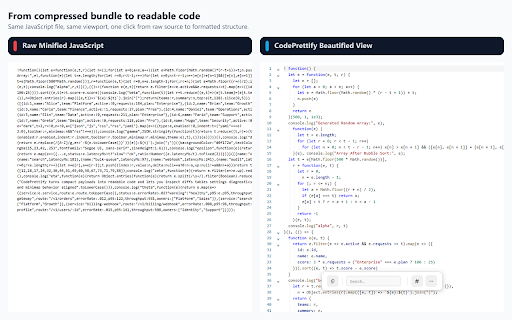
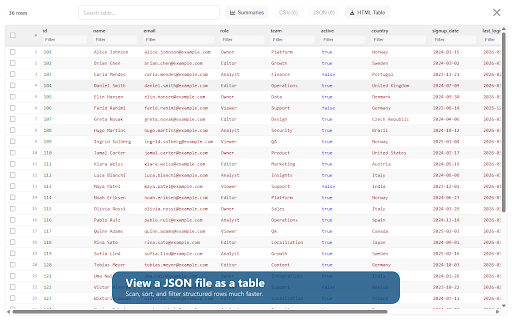
CodePrettify is a browser extension that beautifies and formats raw developer files like JSON, XML, CSS, and JavaScript. It offers an interactive viewer with collapsible code blocks, syntax highlighting, and tools to search or export code. Users can also execute JavaScript, test regular expressions, and make HTTP requests directly within their browser tab.

Developer:FixQuotes.com
Version:1.0.62
Size:1.15MiB
Last updated:

Overview

Installs

220

Rating

★ 4.8

4 reviews

Languages

13 locales

Includes Deutsch, English, Tiếng Việt, dansk...

Market analysis

Review-backed positioning, friction, and market signals for this Chrome extension.

Backed by review samples

Macro category

Developer & Designer Tools

Pricing friction

Low review signal

Complaint intensity

Low review signal

Listing & review signals
Observed signals from store listing text and review samples.

Listing positioning

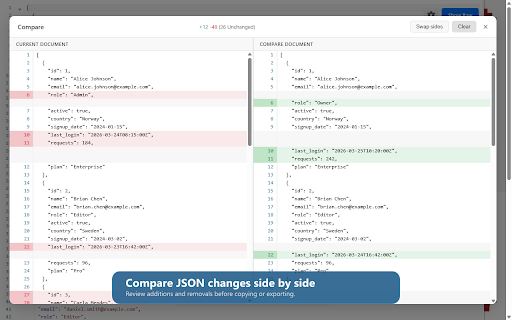
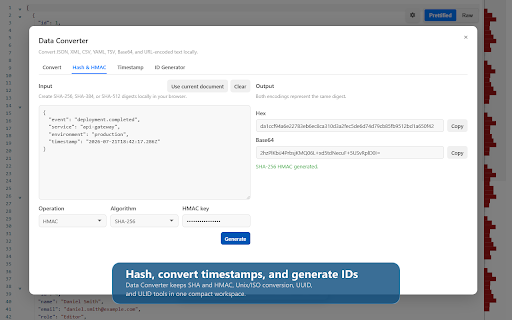
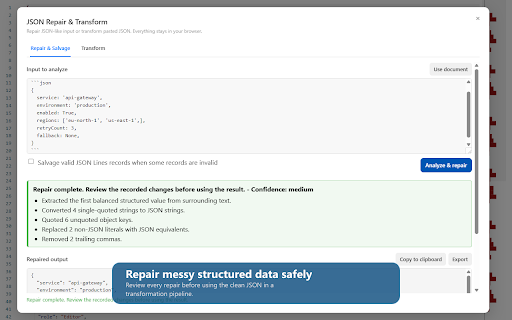
CodePrettify positions itself as an all-in-one developer companion that turns raw files in the browser into an IDE-like experience. It automatically formats, validates, navigates, and diffs multiple file types including JS, JSON, CSS, and RSS. The listing emphasizes advanced built-in features like a JS playground, an HTTP client, and a Regex tester, all running with 100% local processing for privacy.

Inferred product pattern

Local developer utility suite combining code formatting, playground execution, and networking tools.

Review-backed pain points

No review-backed pain points are available due to the extremely limited number of public reviews.

Observed feature gaps

No feature gaps identified from the current listing or reviews.

Tags
Code FormatterJSON ViewerHTTP ClientDeveloper ToolsRegex Tester
Target users

- Web Developers

- Software Engineers

- API Integrators

- Data Analysts working with JSON/XML

Primary use cases

- Formatting and beautifying raw JSON, XML, and CSS files in the browser

- Testing API requests with an integrated Postman-style HTTP client

- Validating and diffing code blocks using a side-by-side comparison tool

- Running sandboxed JavaScript code snippets directly in the browser

Positive themes

- Highly recommended utility for general coding tasks

Negative themes

- No negative themes identified due to limited review data

Observed friction

- No pricing friction was observed as the extension is listed as free with local processing and no visible payment gates.

Evidence boundary: Analyzed the Chrome Web Store listing metadata, developer-provided feature descriptions, and the single available 5-star user review praising its utility for developers. The evaluation is heavily reliant on the developer's feature claims as there is only one user review available in the provided dataset.
Complaint summaries
Review-backed complaint signals grouped by operational area.

Support

No support, account, or refund complaints have been reported in the reviews.

Reliability

No reliability or performance complaints have been reported in the reviews.

Privacy

No privacy or security complaints have been reported. The listing claims 100% local processing with zero external telemetry.

Access & pricing

- Free usage observed

- No account requirement observed

- Free plan or free usage claimed

Store listing facts

Listing assets

- Screenshots: 5

- Videos: 1

- Languages: 13

Trust signals

- Privacy policy

- Developer contact

- Official website

- Support link

Store metadata

- Version: 1.0.62

- Size: 1.15MiB

- Last updated:

Listing SEO keywords

Search intent keywords
Keyword signals for evaluating how users may discover, compare, or search for this extension category.

Core discovery

JSON Formatter Chrome ExtensionJS Prettify ToolCSS Beautifier ChromeOnline XML Formatter Extension

Comparison

JSON Viewer vs CodePrettifyPostman vs CodePrettify HTTP ClientJSONView alternative

Problem

format messy JSON in browsertest regex in chromepretty print minified JS

Alternative

JSONViewJSON FormatterPretty PrintJSON Editor

Similar extensions

Jump to related discovery paths:

Screenshots

CodePrettify: JS, JSON, CSS & RSS Formatter screenshot

Links

Recommended Chrome extensions

Related listings from the same category, trending peers, and the same publisher portfolio.

Browse developer
TabConnect: Browser Tab Screen Sharing icon

TabConnect: Browser Tab Screen Sharing

FixQuotes.com

Share your current browser tab with viewer links, live room controls, diagnostics, and chat.

Installs

206

Rating

★ —

Netmirror Extension icon

Netmirror Extension

netmirror.art

Add, modify or remove a header for any request. https://netmirror.global/ Netmirror Mod Header (HTTP Headers) is an extension that…

Installs

600K+

Rating

★ 4.4

Detailed SEO Extension icon

Detailed SEO Extension

ahrefsseotoolbar

Get SEO insights at the click of a button to any website you're currently on. Built by full-time SEO's for daily analysis.

Installs

600K+

Rating

★ 4.9

TikTok Pixel Helper icon

TikTok Pixel Helper

TikTok For Business

The TikTok Pixel Helper is a plug-in that monitors whether your TikTok Pixel is functioning properly.

Installs

600K+

Rating

★ 2.6

Google Analytics Debugger icon

Google Analytics Debugger

Google Analytics

Prints useful information to the JavaScript console by enabling the debug version of the Google Analytics Javascript.

Installs

600K+

Rating

★ 4.2

Salesforce Inspector Reloaded icon

Salesforce Inspector Reloaded

Thomas Prouvot

Productivity tools for Salesforce administrators and developers to inspect data and metadata directly from the Salesforce UI.

Installs

500K+

Rating

★ 4.8

Tag Assistant Companion icon

Tag Assistant Companion

Google

The Tag Assistant Companion extension works with Tag Assistant to help troubleshoot installation of gtag.js and Google Tag Manager.

Installs

500K+

Rating

★ 3.1

Axure RP Extension for Chrome icon

Axure RP Extension for Chrome

Axure Software Solutions, Inc.

An extension that allows viewing of locally published Axure RP prototypes (HTML files) from Google Chrome.

Installs

500K+

Rating

★ 3.3

User-Agent Switcher and Manager icon

User-Agent Switcher and Manager

rynu.smith

Spoof websites trying to gather information about your web navigation to deliver distinct content you may not want

Installs

400K+

Rating

★ 4.3

SelectorsHub icon

SelectorsHub

Sanjay Kumar | SelectorsHub Founder

Locators Plugin to Auto Generate and Verify Playwright Locators, XPath & CSS Selectors.

Installs

400K+

Rating

★ 4.8