Memo Notepad icon

Memo Notepad Chrome Extension Analysis

Tab & Bookmark Productivity

Chrome extension ID: ijnhpobnmoedhgifhodnagnkeoopnfkn

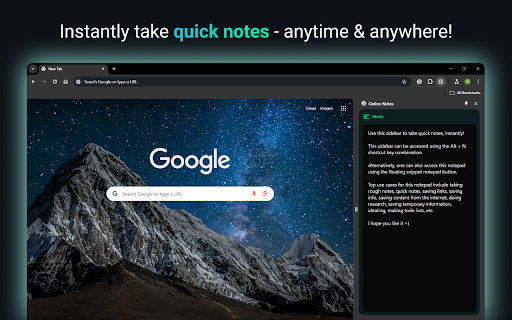
A browser-based notepad extension that provides a sidepanel for quick note-taking while browsing. It features auto-save functionality and uses local storage to ensure notes remain on the user's device.

Developer:team_bolt
Version:1.0.0
Size:156KiB
Last updated:

Overview

Installs

250

Rating

★ 4.0

1 reviews

Languages

1 locales

Includes English

Market analysis

Review-backed positioning, friction, and market signals for this Chrome extension.

Backed by review samples

Macro category

Tab & Bookmark Productivity

Pricing friction

Low review signal

Complaint intensity

Low review signal

Listing & review signals
Observed signals from store listing text and review samples.

Listing positioning

Memo Notepad positions itself as a lightweight tool to eliminate context switching and prevent time loss caused by frequent window jumps. It emphasizes speed, low resource usage, and a keyboard-first workflow to maintain user focus.

Inferred product pattern

A lightweight, local-first utility tool designed to provide non-intrusive note-taking via the Chrome sidepanel to minimize context switching.

Review-backed pain points

Users identified risks regarding data loss when browser cache or cookies are cleared, as well as a lack of clear instructions on how to export saved notes.

Observed feature gaps

Absence of data export options, lack of markdown/text formatting support, and no clear mechanism for long-term data backup outside of local storage.

Tags
Sidepanel NotepadQuick NotesProductivity Tool
Target users

- Students

- Product Managers

- Writers

- Online Shoppers

Primary use cases

- Taking notes during online lectures or readings

- Recording action items during digital meetings

- Capturing quick thoughts while browsing social media

- Managing grocery lists while shopping online

Positive themes

- Fast performance

- Convenient access

Negative themes

- Lack of export functionality

- Data persistence concerns

- Missing markdown support

Observed friction

- No pricing friction observed; the product is claimed to be free for all core features.

Evidence boundary: Analysis based on the Chrome Web Store listing and one 4-star user review. Extremely limited review sample size (one review) prevents broad sentiment validation.
Complaint summaries
Review-backed complaint signals grouped by operational area.

Support

No support complaints observed.

Reliability

One user reported potential reliability issues where notes are lost when the browser's cache or cookies are automatically cleared.

Privacy

No privacy complaints observed; the listing highlights local storage usage for privacy.

Access & pricing

- Free usage observed

- No account requirement observed

- Free plan or free usage claimed

Store listing facts

Listing assets

- Screenshots: 1

- Videos: 0

- Languages: 1

Trust signals

- Developer contact

- Official website

- Support link

Store metadata

- Version: 1.0.0

- Size: 156KiB

- Last updated:

Listing SEO keywords

Search intent keywords
Keyword signals for evaluating how users may discover, compare, or search for this extension category.

Core discovery

sidepanel notepadbrowser notesquick notes extensionchrome notepad

Comparison

Google KeepNotion sidebarSticky notes

Problem

context switchingtab overloadlosing focus

Alternative

markdown notepadbrowser notepad

Similar extensions

Jump to related discovery paths:

Screenshots

Memo Notepad screenshot

Links

Recommended Chrome extensions

Related listings from the same category, trending peers, and the same publisher portfolio.

Browse tools
Youtube Unblocked icon

Youtube Unblocked

team_bolt

Unblock YouTube & enjoy unrestricted access for free, using Youtube Unblocked!

Installs

100K+

Rating

★ 3.7

Gmail Inbox icon

Gmail Inbox

team_bolt

A blazingly-fast Gmail Inbox Client that loads your Gmail Inbox before the blink of an eye!⚡

Installs

1K+

Rating

★ 4.0

IE Tab icon

IE Tab

Blackfish Software

Display web pages using IE within Chrome. Use Java, Silverlight, ActiveX, Sharepoint, and more.

Installs

4.0M+

Rating

★ 4.0

Ad Blocker: Stands AdBlocker icon

Ad Blocker: Stands AdBlocker

Stands

Stands AdBlocker – it's a free ad blocker for YouTube, Twitch, Pop-Ups, Video Ads, and websites. Block ads everywhere with Stands!

Installs

4.0M+

Rating

★ 4.8

Google Dictionary (by Google) icon

Google Dictionary (by Google)

dictionary-extension-dev

View definitions easily as you browse the web.

Installs

4.0M+

Rating

★ 3.8

Microsoft Bing Search with Rewards icon

Microsoft Bing Search with Rewards

Microsoft Corporation

Use the Microsoft Rewards extension to find new ways to earn every day, easily track your points and set your default search to Bing

Installs

4.0M+

Rating

★ 4.4

Google Scholar Button icon

Google Scholar Button

scholar-chrome-extensions

Lookup scholarly articles as you browse the web.

Installs

4.0M+

Rating

★ 4.5

Immersive Translate: AI Web, PDF & Video Translator icon

Immersive Translate: AI Web, PDF & Video Translator

Immersive Translate

Free Translate Website, Translate PDF & Epub eBook, Translate Video Subtitles in Bilingual

Installs

3.0M+

Rating

★ 4.6

BetterTTV icon

BetterTTV

NightDev, LLC

BetterTTV enhances Twitch and YouTube with new features, emotes, and more.

Installs

3.0M+

Rating

★ 4.0

Monica: All-In-One AI Assist & Smartest  AI Agent icon

Monica: All-In-One AI Assist & Smartest AI Agent

Monica Team

One stop AI Assistant with GPT, Claude, Gemini: Chat, Write, Translate, Search, Summarize, image generator, video generation

Installs

3.0M+

Rating

★ 4.8