MATH Keys - Equation & Formula Editor icon

MATH Keys Chrome Extension Analysis

Developer & Designer Tools

Store listing title: MATH Keys - Equation & Formula Editor

Chrome extension ID: imcaiokpoocfeplmgemffhmdokiaallo

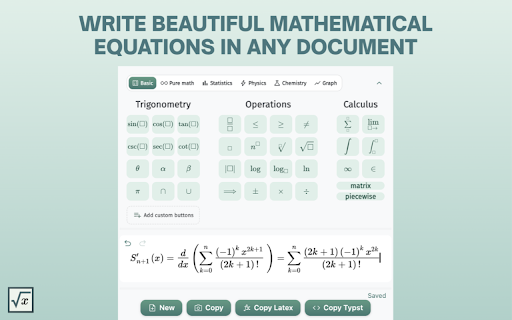
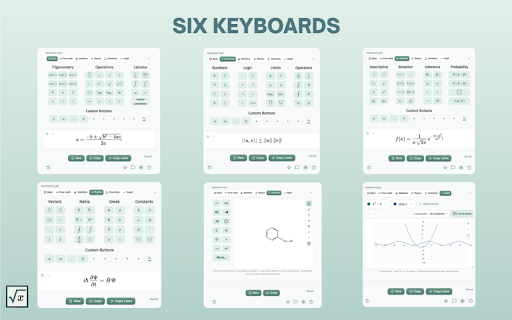
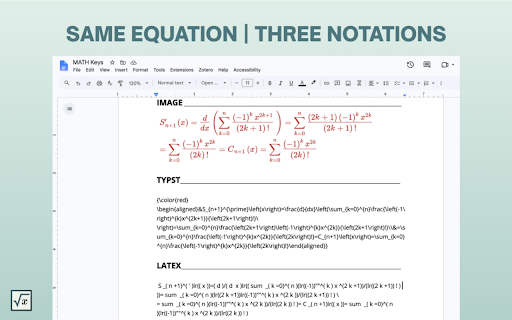
This Chrome extension provides an on-screen keyboard and interface for typing complex mathematical notation, including calculus, algebra, and trigonometry symbols. It outputs formulas as images for easy pasting into various document platforms like Google Docs or presentations.

Developer:anat
Version:5.0.4
Size:1.69MiB
Last updated:

Overview

Installs

60K+

Rating

4.8

311 reviews

Languages

52 locales

Includes Deutsch, English, Filipino, Indonesia...

Market analysis

Review-backed positioning, friction, and market signals for this Chrome extension.

Backed by review samples

Macro category

Developer & Designer Tools

Pricing friction

Low review signal

Complaint intensity

Moderate review signal

Listing & review signals
Observed signals from store listing text and review samples.

Listing positioning

MATH Keys positions itself as a free, user-friendly equation editor that simplifies the creation of mathematical symbols and formulas without requiring deep knowledge of LaTeX. It targets students, teachers, and academics by offering an intuitive interface that integrates with standard document workflows via copy-to-clipboard functionality.

Inferred product pattern

Free utility tool for academic productivity focusing on visual formula creation.

Review-backed pain points

Users find it frustrating that the extension window closes automatically when switching tabs or applications, which disrupts the writing workflow. There are also reported inconsistencies in the copy-to-clipboard function, occasionally requiring multiple attempts.

Observed feature gaps

Lack of sidebar-docking capability for multi-tasking and occasional friction with automated character substitution (auto-formatting interfering with standard typing).

Tags
Equation EditorLaTeXAcademic ToolsMath ProductivityFormula Creator
Target users

- Students

- Teachers

- Researchers

- Academic Professionals

Primary use cases

- Creating mathematical formulas for homework

- Developing classroom presentation materials

- Writing scientific reports

- Academic drafting

Positive themes

- Intuitive interface

- No LaTeX knowledge required

- Useful history feature

- Fast and easy integration with document tools

- Consistent utility for academic assignments

Negative themes

- Frequent closing of the extension window when switching tabs

- Unreliable copy-to-clipboard functionality

- Formatting/auto-correct interference with plain text

- Incompatibility with some spreadsheet applications

Observed friction

- Performance complaints detected

- No pricing friction; the tool is reported as completely free by the developer and confirmed as such by user feedback.

Evidence boundary: Extracted from public Chrome Web Store listing, developer release notes, and 14 user reviews spanning multiple languages and user types. Review data is limited to user-provided feedback; technical bugs reported may have been resolved in subsequent updates not yet reflected in all reviews.
Complaint summaries
Review-backed complaint signals grouped by operational area.

Support

Minimal support-related complaints; frustration is directed primarily at UX/UI limitations rather than lack of support.

Reliability

Some users report that the extension window closes too easily during tab switching and occasionally fails to copy the generated formula to the clipboard.

Privacy

No privacy or security complaints identified in the provided review samples.

Access & pricing

- Free usage observed

- No account requirement observed

- Free plan or free usage claimed

Store listing facts

Listing assets

- Screenshots: 4

- Videos: 0

- Languages: 52

Trust signals

- Privacy policy

- Developer contact

- Official website

- Support link

Store metadata

- Version: 5.0.4

- Size: 1.69MiB

- Last updated:

Listing SEO keywords

Search intent keywords
Keyword signals for evaluating how users may discover, compare, or search for this extension category.

Core discovery

online equation editorlatex formula generatormath symbol keyboardchrome extension math editoreasy equation creator

Comparison

MathQuill alternativeGoogle Docs equation editor

Problem

how to type math symbolslatex is too hardequation editor for teachers

Alternative

equatio alternativemath type alternatives

Similar extensions

Jump to related discovery paths:

Screenshots

MATH Keys - Equation & Formula Editor screenshot

Links

Recommended Chrome extensions

Related listings from the same category, trending peers, and the same publisher portfolio.

Browse education