Canvas Dark Mode icon

Canvas Dark Mode Chrome Extension Analysis

Tab & Bookmark Productivity

Chrome extension ID: jbfgmfpakhabhhpefblmehnadjjkadna

A browser extension that applies a dark theme to the Canvas Learning Management System. It is an open-source project designed to make the bright Canvas interface more comfortable for nighttime use.

Developer:rtdegrandis
Version:1.2.0
Size:25.67KiB
Last updated:

Overview

Installs

50K+

Rating

★ 4.6

142 reviews

Languages

1 locales

Includes English

Market analysis

Review-backed positioning, friction, and market signals for this Chrome extension.

Backed by review samples

Macro category

Tab & Bookmark Productivity

Pricing friction

Low review signal

Complaint intensity

Moderate review signal

Listing & review signals
Observed signals from store listing text and review samples.

Listing positioning

The product is positioned as a utility to reduce eye strain and support circadian rhythms for users working late on Canvas. It aims to provide a dark mode interface for all Instructure-hosted domains.

Inferred product pattern

A niche UI/UX enhancement tool specifically targeting a single major educational platform.

Review-backed pain points

Users report frequent 'invisible text' issues where font colors remain dark against a dark background or white against a white background, particularly in the inbox, gradebook, and discussion modules.

Observed feature gaps

The extension lacks complete CSS coverage for various Canvas sub-pages, resulting in white popups, unreadable headers, and unstyled tables.

Tags
Dark ModeCanvas LMSEye Strain ReliefStudent Tools
Target users

- Students

- Educators

- Online Learners

Primary use cases

- Late-night studying

- Reducing eye strain on Canvas LMS

- Improving nighttime accessibility

Positive themes

- Reduces eye strain during long study sessions

- Helps with nighttime usability

Negative themes

- Poor color contrast on specific pages

- Invisible text due to improper font/background coloring

- Inconsistent application across different Canvas modules

Observed friction

- No pricing friction observed as the product is described as an open-source project.

Evidence boundary: Analysis based on the product description and user reviews highlighting both the benefits of eye strain relief and specific UI visibility failures. Review samples focus primarily on the functional failures of the dark mode implementation on specific Canvas sub-pages.
Complaint summaries
Review-backed complaint signals grouped by operational area.

Support

No specific support or account-related complaints were identified in the reviews.

Reliability

Reliability issues stem from inconsistent UI application, where certain elements like sidebars, inbox messages, and discussion replies do not render correctly.

Privacy

No privacy or security complaints were observed.

Access & pricing

- Free usage observed

- No account requirement observed

- Free plan or free usage claimed

Store listing facts

Listing assets

- Screenshots: 2

- Videos: 0

- Languages: 1

Trust signals

- Developer contact

- Official website

- Support link

Store metadata

- Version: 1.2.0

- Size: 25.67KiB

- Last updated:

Listing SEO keywords

Search intent keywords
Keyword signals for evaluating how users may discover, compare, or search for this extension category.

Core discovery

Canvas dark modeCanvas LMS dark themeDark mode for Instructure

Comparison

Canvas dark mode extensionCanvas eye strain relief

Problem

Canvas bright screenCanvas white backgroundCanvas eye strain

Alternative

Canvas dark themeLMS dark mode

Similar extensions

Jump to related discovery paths:

Screenshots

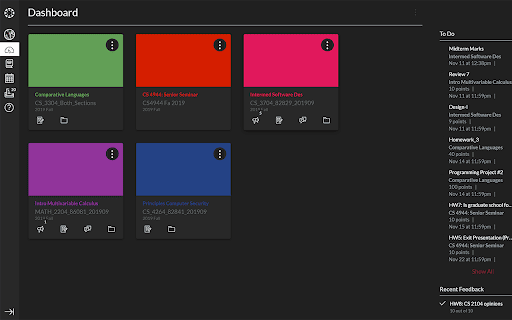
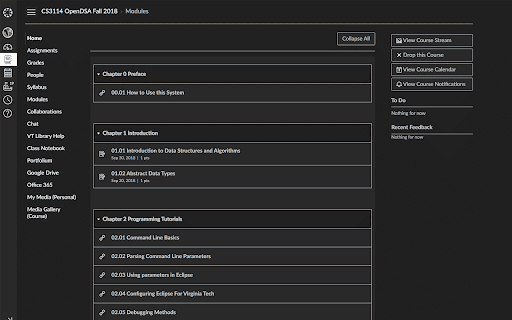
Canvas Dark Mode screenshot

Links

Recommended Chrome extensions

Related listings from the same category, trending peers, and the same publisher portfolio.

Browse workflow