Hyland NilRead WinMan icon

Hyland NilRead WinMan Chrome Extension Analysis

Automation & Workflow Efficiency

Chrome extension ID: jkchgejbjikoopancfjpbofabaoceohd

Hyland NilRead WinMan is a specialized enterprise utility designed to enable specific display and connectivity features for the NilRead medical imaging viewer when running in Chrome. It requires an existing user license and connectivity to a Hyland NilRead server to operate.

Version:1.3
Size:12.45KiB
Last updated:

Overview

Installs

500K+

Rating

★ 1.7

6 reviews

Languages

1 locales

Includes English

Market analysis

Review-backed positioning, friction, and market signals for this Chrome extension.

Backed by review samples

Macro category

Automation & Workflow Efficiency

Pricing friction

Moderate review signal

Complaint intensity

High review signal

Listing & review signals
Observed signals from store listing text and review samples.

Listing positioning

The extension is positioned as a bridge between the browser and the Hyland NilRead Viewer application. It facilitates multi-monitor and single-tab URL invocation for enterprise users of the NilRead platform.

Inferred product pattern

Enterprise-specific browser bridge for legacy/specialized software.

Review-backed pain points

Users frequently report that the extension does not function as intended, preventing them from accessing medical imaging results.

Observed feature gaps

The product lacks intuitive feedback for users who do not have an active enterprise backend, leading to confusion among patients or users attempting to use it as a standalone tool.

Tags
Medical ImagingWorkflow AutomationBrowser IntegrationEnterprise Tool
Target users

- Medical imaging professionals

- Hyland NilRead enterprise users

Primary use cases

- Supporting multi-monitor displays for NilRead

- URL invocation of imaging viewer within Chrome

Positive themes

- Successful enabling of multi-monitor support across browsers

Negative themes

- Complete functional failure

- Inability to access medical images

- Frustration regarding product purpose vs. user expectations

Observed friction

- Payment required for meaningful usage

- Performance complaints detected

- The extension is gated behind an enterprise license; friction arises when non-enterprise users attempt to use it as a standalone utility.

Evidence boundary: Evidence is derived from Chrome Web Store user reviews detailing functional failures and one instance of successful multi-monitor implementation. The sample size is small (6 reviews), which may not represent the experience of the entire user base.
Complaint summaries
Review-backed complaint signals grouped by operational area.

Support

Users express frustration with standardized support responses provided by the developer.

Reliability

Multiple reports state the extension fails to perform its core function, preventing access to medical results.

Privacy

No specific privacy complaints found.

Access & pricing

- Enterprise pricing observed

- Account required for core usage

- Paid-only usage observed

Store listing facts

Listing assets

- Screenshots: 1

- Videos: 0

- Languages: 1

Trust signals

- Developer contact

Store metadata

- Version: 1.3

- Size: 12.45KiB

- Last updated:

Listing SEO keywords

Search intent keywords
Keyword signals for evaluating how users may discover, compare, or search for this extension category.

Core discovery

NilRead extensionHyland medical imaging browser supportNilRead multi-monitor chrome

Comparison

NilRead browser plugin

Problem

NilRead not workingcannot view medical imagesHyland extension failure

Alternative

medical imaging viewer tools

Similar extensions

Jump to related discovery paths:

Screenshots

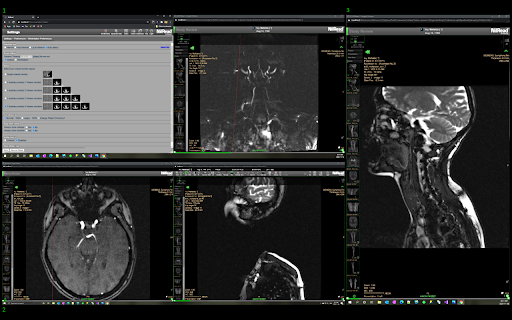
Hyland NilRead WinMan screenshot

Recommended Chrome extensions

Related listings from the same category, trending peers, and the same publisher portfolio.

Browse workflow
Perceptive Content LearnMode icon

Perceptive Content LearnMode

Hyland Software, Inc.

Perceptive Content LearnMode enables application plan linking from Project Titan and Perceptive Content Management Console

Installs

8K+

Rating

★ —

Sound Booster - increase volume up icon

Sound Booster - increase volume up

Sound-ultimate.com

Volume Booster helps boost sound video or music on any tab! Increase volume and bass booster, equalizer. Volume control.

Installs

2.0M+

Rating

★ 4.5

Адаптер Рутокен Коннект icon

Адаптер Рутокен Коннект

АО "Актив-Софт"

Защищенное TLS-соединение в браузере по ГОСТу с Рутокен

Installs

2.0M+

Rating

★ 1.6

Pop up blocker for Chrome™ - Poper Blocker icon

Pop up blocker for Chrome™ - Poper Blocker

dingosolutions

Block popups, ads, cookie requests, trackers, notifications, ads on social media & more. A clean browsing experience starts today.

Installs

2.0M+

Rating

★ 4.8

AI Grammar Checker & Paraphraser – LanguageTool icon

AI Grammar Checker & Paraphraser – LanguageTool

lt-extension-publisher

Instantly Enhance Your Texts with LanguageTool’s Grammar Checker and Paraphrasing Tool

Installs

2.0M+

Rating

★ 4.7

Momentum icon

Momentum

Momentum

Transform your browser into a beautifully designed tab that helps you feel calm, keep focus, and stay energized.

Installs

2.0M+

Rating

★ 4.5

My Apps Secure Sign-in Extension icon

My Apps Secure Sign-in Extension

Microsoft

My Apps Secure Sign-in Extension

Installs

2.0M+

Rating

★ 2.2

Web Signer icon

Web Signer

Softplan Websigner Developers

Extensão para assinatura digital no browser

Installs

2.0M+

Rating

★ 3.0

Evernote Web Clipper icon

Evernote Web Clipper

Evernote

Use the Evernote extension to save things you see on the web into your Evernote account.

Installs

2.0M+

Rating

★ 4.7

Google Scholar PDF Reader icon

Google Scholar PDF Reader

scholar-chrome-extensions

Supercharge your paper reading: follow references, skim outline, jump to figures, cite and save.

Installs

2.0M+

Rating

★ 4.1