MFA (Multi Factor Authentication Assistant) icon

MFA (Multi Factor Authentication Assistant) Chrome Extension Analysis

Automation & Workflow Efficiency

Chrome extension ID: jlbompidiohdlmfegemphbamnglbpajj

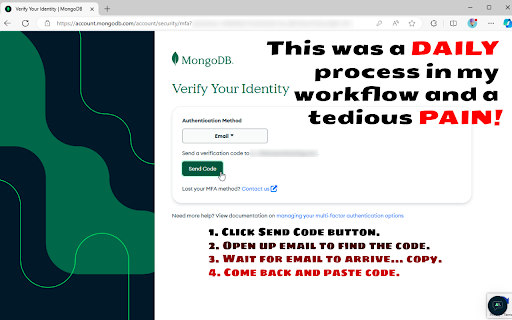
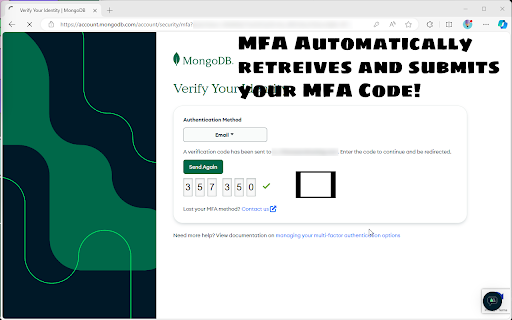
This Chrome extension automatically fetches MFA codes from a user's Gmail account and fills them into authentication forms. It aims to eliminate the manual steps of checking email and copying codes during login processes.

Developer:June07
Version:1.1.3
Size:71.74KiB
Last updated:

Overview

Installs

236

Rating

0 reviews

Languages

1 locales

Includes English

Market analysis

Review-backed positioning, friction, and market signals for this Chrome extension.

No review samples found

Macro category

Automation & Workflow Efficiency

Pricing friction

Low review signal

Complaint intensity

Low review signal

Listing & review signals
Observed signals from store listing text and review samples.

Listing positioning

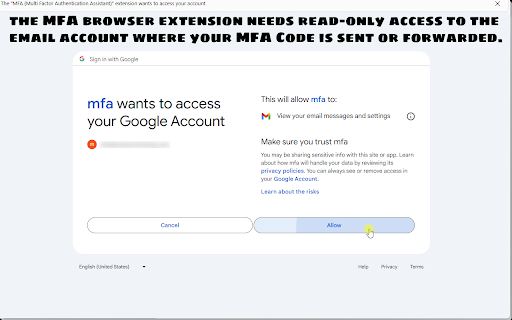
The product positions itself as a productivity tool designed to streamline the multi-factor authentication process by automating code retrieval. It emphasizes security and transparency through read-only OAuth access and an open-source codebase.

Inferred product pattern

A developer-focused utility tool that automates security workflows via email-based MFA retrieval.

Review-backed pain points

review-backed data is not available

Observed feature gaps

No feature gaps observed from the provided listing; review-backed evidence is missing.

Tags
MFA AutofillDeveloper ToolsGmail AutomationProductivity Tool
Target users

- Developers

- Security-conscious professionals

- Users with frequent re-authentication requirements

Primary use cases

- Automating MFA code entry

- Reducing manual email checking during authentication

- Streamlining development workflows

Positive themes

- review-backed data is not available

Negative themes

- review-backed data is not available

Observed friction

- No pricing information is provided in the product listing.

Evidence boundary: Data extracted from the Chrome Web Store product title, long description, and developer information. No user reviews were available to provide sentiment, performance validation, or complaint data.
Complaint summaries
Review-backed complaint signals grouped by operational area.

Support

No support or account complaints observed due to lack of reviews.

Reliability

No reliability or performance complaints observed due to lack of reviews.

Privacy

No privacy complaints observed; the listing explicitly claims read-only OAuth and client-side operation.

Access & pricing

- No clear monetization signal

- Login needed for core features

- No clear pricing signal

Store listing facts

Listing assets

- Screenshots: 3

- Videos: 0

- Languages: 1

Trust signals

- Privacy policy

- Developer contact

- Official website

- Support link

Store metadata

- Version: 1.1.3

- Size: 71.74KiB

- Last updated:

Listing SEO keywords

Search intent keywords
Keyword signals for evaluating how users may discover, compare, or search for this extension category.

Core discovery

MFA autofillmulti-factor authentication assistantGmail MFA automationautofill MFA codes

Comparison

MFA automation toolsMFA code retriever

Problem

manual MFA entrytedious authenticationMFA email delay

Alternative

password managersauthenticator apps

Similar extensions

Jump to related discovery paths:

Screenshots

MFA (Multi Factor Authentication Assistant) screenshot

Links

Recommended Chrome extensions

Related listings from the same category, trending peers, and the same publisher portfolio.

Browse developer