Node Inspector Manager (NIM) icon

Node Inspector Manager (NIM) Chrome Extension Analysis

Developer & Designer Tools

Chrome extension ID: gnhhdgbaldcilmgcpfddgdbkhjohddkj

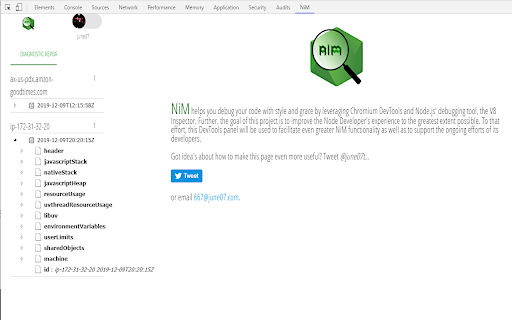
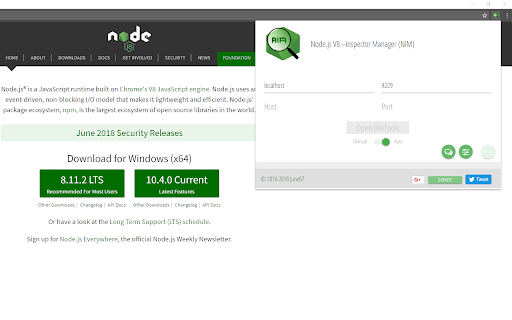
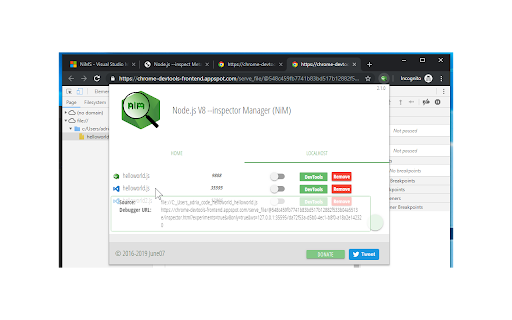
NiM is a Chrome extension that automates the connection between Node.js debugger instances and the Chrome DevTools interface. It provides controls to automatically open, close, and manage debugger windows for local and remote Node.js processes.

Developer:June07
Version:3.13.3
Size:686KiB
Last updated:

Overview

Installs

10K+

Rating

4.4

97 reviews

Languages

40 locales

Includes Deutsch, English, Indonesia, Kiswahili...

Market analysis

Review-backed positioning, friction, and market signals for this Chrome extension.

Backed by review samples

Macro category

Developer & Designer Tools

Pricing friction

Moderate review signal

Complaint intensity

High review signal

Listing & review signals
Observed signals from store listing text and review samples.

Listing positioning

NiM positions itself as a specialized utility for streamlining the Node.js debugging workflow by managing the lifecycle of Chrome DevTools. It promises to eliminate manual URL copying and tab management by automatically detecting Node inspect sessions.

Inferred product pattern

Utility-first development tool that pivoted to aggressive ad-supported monetization, causing significant sentiment degradation among existing users.

Review-backed pain points

Users express frustration regarding intrusive ad-driven tab behavior, high resource usage (CPU), and aggressive permission requirements (email address).

Observed feature gaps

Lack of an easy on/off toggle for focus management, potential conflicts with local mock servers on common ports, and issues with static IP configuration for remote debugging.

Tags
Node.jsDebuggingDevToolsWorkflow Automation
Target users

- Node.js Developers

- Backend Engineers

- Full Stack Developers

Primary use cases

- Automated Node.js debugging

- Remote server inspection

- Managing multiple debug sessions

Positive themes

- Saves time on manual setup

- Effective fix for broken debugger configurations

- Works well with nodemon

Negative themes

- Aggressive monetization through unwanted ad-based tab opening

- High CPU consumption

- Unexpected behavior with local port 8080 polling

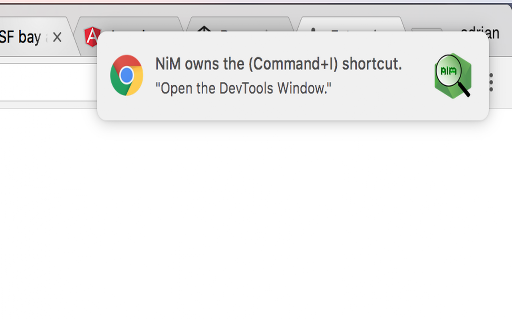
- Focus stealing during development

Observed friction

- Free-tier complaints detected

- Performance complaints detected

- Privacy complaints detected

- Users report dissatisfaction with the 'aggressive' monetization strategy, specifically the automatic opening of ad-laden tabs as a method of promotion/monetization.

Evidence boundary: Evidence gathered from a mix of high-rated functional praise and recent low-rated complaints regarding intrusive ad behavior and performance issues. Reviews span several years (2017-2024), reflecting significant changes in product behavior and monetization over time.
Complaint summaries
Review-backed complaint signals grouped by operational area.

Support

Minimal explicit support complaints, though users find the developer's defensive response to monetization criticism frustrating.

Reliability

Reports of high CPU usage and unintended polling of local ports (e.g., 8080), causing interference with other development tools.

Privacy

Concerns regarding the mandatory requirement to share an email address and general skepticism about the extension's data practices.

Access & pricing

- Ad-supported model observed

- Account required for core usage

- Free plan or free usage claimed

Store listing facts

Listing assets

- Screenshots: 5

- Videos: 0

- Languages: 40

Trust signals

- Privacy policy

- Developer contact

- Official website

Store metadata

- Version: 3.13.3

- Size: 686KiB

- Last updated:

Listing SEO keywords

Search intent keywords
Keyword signals for evaluating how users may discover, compare, or search for this extension category.

Core discovery

Node.js debugging extensionChrome DevTools for Nodenode --inspect manager

Comparison

NiM vs chrome://inspectNode.js debugger alternatives

Problem

NiM high CPU usageNiM intrusive adsNode.js inspector connection issues

Alternative

VSCode debuggerChrome inspect tool

Similar extensions

Jump to related discovery paths:

Screenshots

Node Inspector Manager (NIM) screenshot

Links

Website: june07.com

Privacy policy: https://privacy.june07.com/

Recommended Chrome extensions

Related listings from the same category, trending peers, and the same publisher portfolio.

Browse developer
MFA (Multi Factor Authentication Assistant) icon

MFA (Multi Factor Authentication Assistant)

June07

Autofill your MFA codes

Installs

236

Rating

Talend API Tester - Free Edition icon

Talend API Tester - Free Edition

Qlik

Visually interact with REST, SOAP and HTTP APIs.

Installs

600K+

Rating

4.8

Detailed SEO Extension icon

Detailed SEO Extension

ahrefsseotoolbar

Get SEO insights at the click of a button to any website you're currently on. Built by full-time SEO's for daily analysis.

Installs

600K+

Rating

4.9

TikTok Pixel Helper icon

TikTok Pixel Helper

TikTok For Business

The TikTok Pixel Helper is a plug-in that monitors whether your TikTok Pixel is functioning properly.

Installs

600K+

Rating

2.6

Google Analytics Debugger icon

Google Analytics Debugger

Google Analytics

Prints useful information to the JavaScript console by enabling the debug version of the Google Analytics Javascript.

Installs

600K+

Rating

4.2

Salesforce Inspector Reloaded icon

Salesforce Inspector Reloaded

Thomas Prouvot

Productivity tools for Salesforce administrators and developers to inspect data and metadata directly from the Salesforce UI.

Installs

500K+

Rating

4.8

Tag Assistant Companion icon

Tag Assistant Companion

Google

The Tag Assistant Companion extension works with Tag Assistant to help troubleshoot installation of gtag.js and Google Tag Manager.

Installs

500K+

Rating

3.1

Axure RP Extension for Chrome icon

Axure RP Extension for Chrome

Axure Software Solutions, Inc.

An extension that allows viewing of locally published Axure RP prototypes (HTML files) from Google Chrome.

Installs

500K+

Rating

3.3

daily.dev | Where developers discover what's next icon

daily.dev | Where developers discover what's next

Daily Dev Ltd.

Developer news, personalized to your stack, in every new tab. Join 400,000+ developers. Free and open source.

Installs

400K+

Rating

4.8

Angular DevTools icon

Angular DevTools

Angular

Angular DevTools extends Chrome DevTools adding Angular specific debugging and profiling capabilities.

Installs

400K+

Rating

3.7