InstantReply Buttons for Gmail icon

InstantReply Buttons for Gmail Chrome Extension Analysis

Automation & Workflow Efficiency

Chrome extension ID: jmcajpbnkcmpoajjgfojgjbbhjjcejah

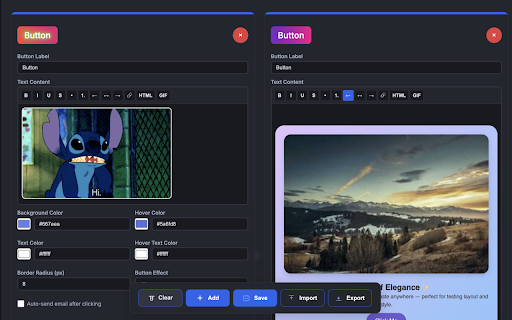
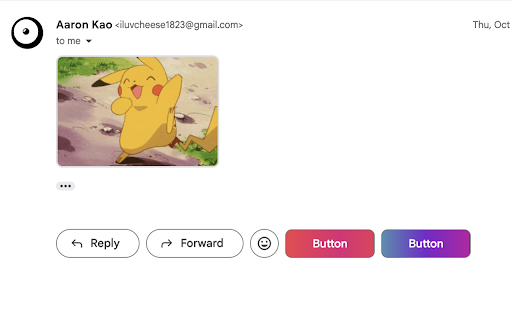
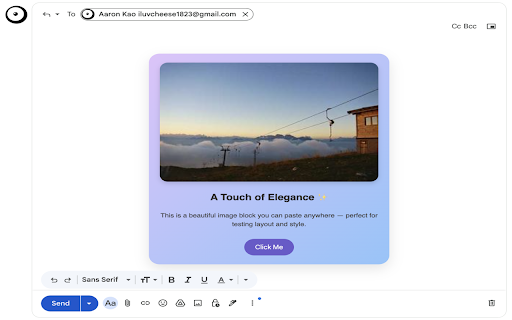
InstantReply Buttons for Gmail is a Chrome extension that enables users to create custom buttons directly within Gmail. These buttons can insert rich text content, links, HTML snippets, or GIFs into emails with a single click, offering visual customization, a live preview, and optional auto-send capabilities. Configurations can be saved, exported, and reused across sessions.

Developer:Aaron Kao
Version:5.5
Size:58.35KiB
Last updated:

Overview

Installs

249

Rating

5.0

6 reviews

Languages

1 locales

Includes English (United States)

Market analysis

Review-backed positioning, friction, and market signals for this Chrome extension.

Backed by review samples

Macro category

Automation & Workflow Efficiency

Pricing friction

Moderate review signal

Complaint intensity

Moderate review signal

Listing & review signals
Observed signals from store listing text and review samples.

Listing positioning

The store listing positions the product as a tool to transform the Gmail workflow by adding fully customizable, one-click buttons. It emphasizes creating and inserting rich, pre-formatted text, links, HTML, or GIFs into emails, styled exactly as desired, to achieve fast, beautiful, and consistent email content.

Inferred product pattern

A Gmail enhancement tool that allows users to create and quickly insert templated responses and various content types (text, HTML, GIFs) using custom, one-click buttons, aiming to streamline email communication workflows for efficiency and consistency.

Review-backed pain points

A primary pain point identified is the current limitation in rich text support for the templates themselves. Additionally, users experience a UI bug where custom reply buttons do not consistently appear when navigating through Gmail folders or labels, necessitating a manual page refresh. There's also evidence of developer unresponsiveness to user feedback and bug reports.

Observed feature gaps

Based on the listing and a review, observed feature gaps include full rich text editing capabilities directly within the button content creation and automatic, consistent display of custom buttons across all Gmail views without requiring manual page refreshes.

Tags
Gmail ProductivityEmail TemplatesWorkflow AutomationCustom ButtonsRich Text
Target users

- Sales professionals

- Support teams

- Recruiters

- Internal communicators

- Any Gmail user seeking to streamline repetitive email tasks

Primary use cases

- Sending templated sales and support responses

- Crafting outreach and recruiting messages

- Delivering internal updates and status reports

- Adding frequent sign-offs and signatures to emails

Positive themes

- Works as expected

- Useful extension

Negative themes

- Lacks full rich text support within templates

- Custom buttons do not appear when selecting new folders/labels, requiring page refresh

- Developer unresponsiveness to reported issues/feature requests

Observed friction

- Payment required for meaningful usage

- Performance complaints detected

- No pricing friction or complaints are available in the current review data. The listing states it's "FREE ONLY FOR THE FIRST 500 USERS," indicating a future paid model for new users, but this has not yet generated review-backed complaints.

Evidence boundary: This analysis is based on the product's Chrome Web Store listing, including its short and long descriptions, key features, privacy policy, and developer update log. It also incorporates insights from 3 user reviews, all rated 5-stars, with one providing detailed feedback on features and support. The primary limitation is the small sample size of reviews, all of which are 5-star. While one review offers detailed constructive criticism, the overall sentiment distribution might not fully represent the broader user base or potential issues that would typically be highlighted in lower-rated feedback.
Complaint summaries
Review-backed complaint signals grouped by operational area.

Support

One detailed 5-star review explicitly states that an email was sent to the developer regarding issues, but regrettably, no replies were received so far, indicating a lack of developer support.

Reliability

A user reported a bug where custom reply buttons would not be shown when a new folder or label was selected in Gmail, requiring a page refresh for them to appear. The listing's update history also shows several bug fixes related to Gmail UI changes.

Privacy

No privacy or security complaints were found in the available reviews. The listing explicitly states that user data stays local in the browser via Chrome storage and that GIF search uses GIPHY's API only when explicitly initiated by the user.

Access & pricing

- Free entry with paid features

- No account requirement observed

- Limited free usage observed

Store listing facts

Listing assets

- Screenshots: 3

- Videos: 1

- Languages: 1

Trust signals

- Developer contact

Store metadata

- Version: 5.5

- Size: 58.35KiB

- Last updated:

Listing SEO keywords

Search intent keywords
Keyword signals for evaluating how users may discover, compare, or search for this extension category.

Core discovery

gmail quick replyemail template extensioncustom gmail buttonsone click email replygmail workflow automation

Comparison

instant reply buttons vs [competitor]gmail templates vs instantreplycanned responses alternative

Problem

slow gmail repliesrepetitive emails gmailgmail productivity issuesemail template management

Alternative

gmail quick reply alternativeemail template extension alternativecustom button for gmail alternative

Similar extensions

Jump to related discovery paths:

Screenshots

InstantReply Buttons for Gmail screenshot

Links

Videos: Watch

Recommended Chrome extensions

Related listings from the same category, trending peers, and the same publisher portfolio.

Browse communication
Mail Merge for Gmail - Mailmeteor icon

Mail Merge for Gmail - Mailmeteor

Mailmeteor

Free mail merge & mass email tool for Gmail, with email tracking and auto follow-ups

Installs

60K+

Rating

4.8

Cursorful - Screen Recorder with Auto Zoom icon

Cursorful - Screen Recorder with Auto Zoom

Cursorful

Cursorful creates beautiful screen recordings with automatic zooms and pans that keep the viewer engaged.

Installs

60K+

Rating

4.9

Auto BCC for Gmail™ by cloudHQ icon

Auto BCC for Gmail™ by cloudHQ

cloudHQ

Setup automatic blind copies to your CRM or any other email address

Installs

60K+

Rating

4.2

Amazon Q Business icon

Amazon Q Business

Amazon Q Business by Amazon Web Services

An enterprise AI assistant available to assist you when browsing the web.

Installs

50K+

Rating

5.0

CrankWheel Screen Sharing icon

CrankWheel Screen Sharing

CrankWheel

Easier screen sharing. No app needed for viewers, even on their mobile. Record your screen or webcam.

Installs

50K+

Rating

4.8

Reminders for Google Calendar™ icon

Reminders for Google Calendar™

SMS Reminder for Google Calendar™

Send reminders by SMS/Text from your Google Calendar™. Use it for your customers or your own appointments.

Installs

50K+

Rating

3.6

Fax.Plus - HIPAA Fax Online icon

Fax.Plus - HIPAA Fax Online

Alohi SA

Secure HIPAA fax service to send fax online and receive online fax on local, toll-free, and International fax numbers.

Installs

50K+

Rating

3.6

Private Grammar Checker - Harper icon

Private Grammar Checker - Harper

Elijah Potter

The private grammar checker for 21st Century English

Installs

40K+

Rating

4.2

Kommodo Screen Recorder & SOP icon

Kommodo Screen Recorder & SOP

kgrauer

Record screen and get a magical SOP with an AI Summary

Installs

40K+

Rating

4.7

HTML Editor for Gmail by cloudHQ icon

HTML Editor for Gmail by cloudHQ

cloudHQ

HTML Editor for Gmail™ - code HTML email directly from Gmail

Installs

40K+

Rating

4.0