Needle Inspector — DevTools & MCP for three.js icon

Needle Inspector Chrome Extension Analysis

Developer & Designer Tools

Store listing title: Needle Inspector — DevTools & MCP for three.js

Chrome extension ID: jonplpbnhmanoekkgcepnedhghflblmo

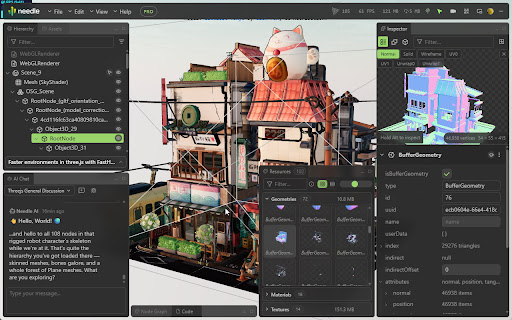
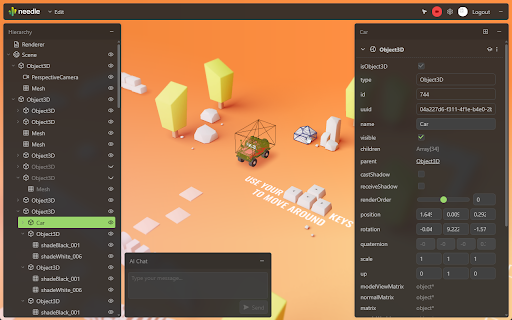
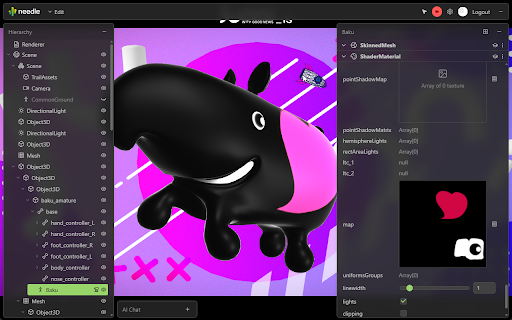
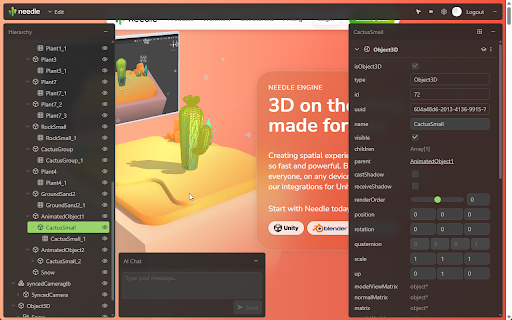
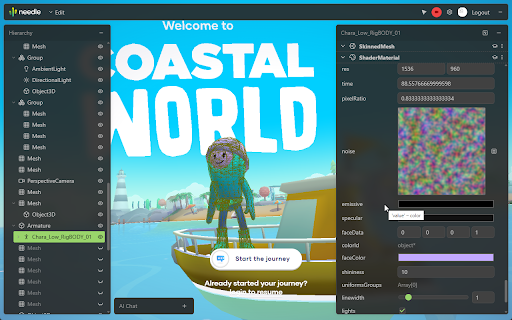
A specialized DevTools extension for three.js, react-three-fiber, and Needle Engine. It enables developers to inspect 3D scene structures, modify object properties on the fly, monitor performance, and connect local AI assistants via MCP.

Version:2.7.3
Size:6.43MiB
Last updated:

Overview

Installs

5K+

Rating

★ 5.0

35 reviews

Languages

1 locales

Includes English

Market analysis

Review-backed positioning, friction, and market signals for this Chrome extension.

Backed by review samples

Macro category

Developer & Designer Tools

Pricing friction

Low review signal

Complaint intensity

Low review signal

Listing & review signals
Observed signals from store listing text and review samples.

Listing positioning

The product is positioned as a professional 3D development environment integrated directly into the browser. It emphasizes eliminating 'blind development' by providing visual scene hierarchies, real-time editing, and AI-powered assistance for three.js projects.

Inferred product pattern

A niche developer utility that mirrors the functionality of a full 3D game engine's inspector within a web browser, augmented by AI protocols.

Review-backed pain points

Users reported that the extension may conflict with other tools like threejs-devtool, preventing them from working simultaneously. One user noted that memory warnings (indicated in red) lack specific instructions on how to optimize.

Observed feature gaps

Compatibility with other three.js debugging extensions and more detailed actionable optimization suggestions for performance warnings.

Tags
Three.js Debugger3D Scene InspectorWebGL DevelopmentAI AssistantNeedle Engine
Target users

- three.js developers

- WebGL developers

- 3D web designers

- Students learning three.js

- Technical analysts of 3D websites

Primary use cases

- Debugging 3D scene hierarchies

- Real-time adjustment of 3D transforms and materials

- Performance monitoring of WebGL scenes

- AI-assisted scene analysis via MCP

- Capturing documented screenshots of 3D projects

Positive themes

- Unity/Unreal-like debugging experience

- Efficiency of camera and transform adjustments

- Utility of the fly camera for exploration

- Effectiveness of the MCP server for AI-assisted coding

- Ability to analyze third-party three.js websites

Negative themes

- Conflict with other three.js developer extensions

- Vague memory usage warnings

Observed friction

- No pricing friction observed in available data.

Evidence boundary: Analysis conducted using the Chrome Web Store listing and a sample of 10 high-rating user reviews. Review sample size is small; monetization details are inferred from the absence of payment mentions in the listing.
Complaint summaries
Review-backed complaint signals grouped by operational area.

Support

No support or account complaints observed.

Reliability

Generally reliable, with one reported conflict with a similar third-party tool.

Privacy

No privacy or security complaints observed.

Access & pricing

- Free usage observed

- No account requirement observed

- Free plan or free usage claimed

Store listing facts

Listing assets

- Screenshots: 5

- Videos: 1

- Languages: 1

Trust signals

- Privacy policy

- Developer contact

- Official website

Store metadata

- Version: 2.7.3

- Size: 6.43MiB

- Last updated:

Listing SEO keywords

Search intent keywords
Keyword signals for evaluating how users may discover, compare, or search for this extension category.

Core discovery

three.js inspectorWebGL debuggerthree.js devtoolsreact-three-fiber toolsNeedle Engine inspector

Comparison

three.js editor vs Needle Inspectorthreejs-devtool alternativeUnity vs three.js debugging

Problem

three.js debugging frustrationthree.js blind developmentWebGL scene hierarchy viewthree.js performance monitoring

Alternative

three.js editorthreejs-devtoolWebGL inspector

Similar extensions

Jump to related discovery paths:

Screenshots

Needle Inspector — DevTools & MCP for three.js screenshot

Links

Website: needle.tools

Privacy policy: https://needle.tools/eula/

Videos: Watch

Recommended Chrome extensions

Related listings from the same category, trending peers, and the same publisher portfolio.

Browse developer