Tab Flick Lite ✨ — switch your tabs fast, like on Windows or macOS icon

Tab Flick Lite ✨ Chrome Extension Analysis

Tab & Bookmark Productivity

Store listing title: Tab Flick Lite ✨ — switch your tabs fast, like on Windows or macOS

Chrome extension ID: kdddoanokjocdkbkmgnkkcemjepknlgm

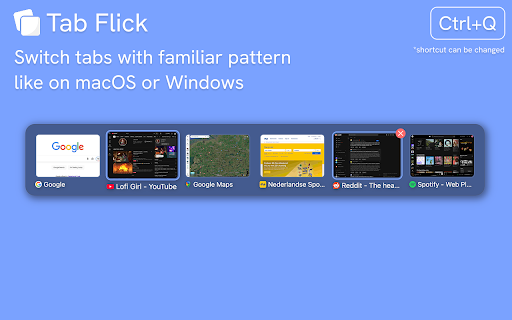
Tab Flick is a lightweight browser extension that enables a 'Most Recently Used' (MRU) tab switcher triggered by a customizable keyboard shortcut. It allows users to quickly cycle through and select open tabs via an overlay, aiming to reduce navigation friction.

Version:0.2.2
Size:33.41KiB
Last updated:

Overview

Installs

1K+

Rating

★ 5.0

18 reviews

Languages

1 locales

Includes English

Market analysis

Review-backed positioning, friction, and market signals for this Chrome extension.

Backed by review samples

Macro category

Tab & Bookmark Productivity

Pricing friction

Low review signal

Complaint intensity

Low review signal

Listing & review signals
Observed signals from store listing text and review samples.

Listing positioning

Tab Flick positions itself as a streamlined productivity utility that brings familiar OS-level 'Alt+Tab' functionality to browser tabs. It emphasizes muscle memory and rapid navigation, positioning itself as a solution for users seeking the tab-switching experience found in specialized browsers like Arc.

Inferred product pattern

Utility-focused productivity enhancer providing a specific OS-like UX shortcut to browser functionality.

Review-backed pain points

Users generally express high satisfaction, with primary 'pain' manifesting as feature requests for more complex shortcut behaviors (e.g., persistent toggling) rather than functional dissatisfaction.

Observed feature gaps

Lack of a native 'persistent' stay-on-screen mode for the switcher similar to full OS task managers, and uncertainty regarding compatibility with niche or modified browser builds.

Tags
Tab SwitcherKeyboard ShortcutsProductivity ToolWorkflow OptimizationMRU Tabs
Target users

- Power users

- Multitaskers

- Browser keyboard-shortcut enthusiasts

- Users transitioning from Arc browser

Primary use cases

- Rapidly switching between open tabs

- Managing many open browser tabs via keyboard

- Maintaining tab-switching muscle memory across platforms

Positive themes

- Ease of integration with existing workflows

- Successful replication of Arc browser's tab-switching experience

- Cross-platform compatibility

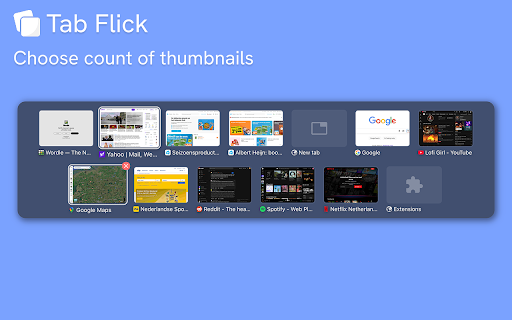
- Presence of thumbnail previews

Negative themes

- Requests for extended shortcut functionality

- Requests for persistent overlay modes

- Compatibility queries for specific custom browsers

Observed friction

- No pricing friction observed; the extension appears to be free to use without gated features.

Evidence boundary: Evidence based on user reviews praising the product's speed, cross-platform functionality, and its utility as a replacement for built-in browser tab navigation. Review sample size is small, though sentiment is consistently positive with no critical complaints reported.
Complaint summaries
Review-backed complaint signals grouped by operational area.

Support

No support complaints identified.

Reliability

No reliability complaints identified; reports indicate stable performance across different operating systems.

Privacy

No privacy complaints identified.

Access & pricing

- Free usage observed

- No account requirement observed

- Free plan or free usage claimed

Store listing facts

Listing assets

- Screenshots: 3

- Videos: 1

- Languages: 1

Trust signals

- Developer contact

Store metadata

- Version: 0.2.2

- Size: 33.41KiB

- Last updated:

Listing SEO keywords

Search intent keywords
Keyword signals for evaluating how users may discover, compare, or search for this extension category.

Core discovery

chrome tab switchermru tab extensionalt tab for browserbrowser tab managerkeyboard shortcut tab navigation

Comparison

Arc browser switchertab switcher alternativekeyboard tab manager

Problem

slow tab switchingtoo many tabs openbrowser navigation fatigue

Alternative

tab session managerquick tab switcher extension

Similar extensions

Jump to related discovery paths:

Screenshots

Tab Flick Lite ✨ — switch your tabs fast, like on Windows or macOS screenshot

Links

Videos: Watch

Recommended Chrome extensions

Related listings from the same category, trending peers, and the same publisher portfolio.

Browse tools
Spotlight Lingo 🌎. Translate Subtitles: Youtube, Netflix, Amazon Prime icon

Spotlight Lingo 🌎. Translate Subtitles: Youtube, Netflix, Amazon Prime

Eugene Gluhotorenko

Point your mouse to a subtitles word to translate it on Netflix, Amazon Prime, YouTube 🇬🇧🇪🇸🇩🇪🇫🇷🇮🇹🇷🇺

Installs

9K+

Rating

★ 3.9

PrintFriendly: Print, PDF Editor & Full Page Screenshot icon

PrintFriendly: Print, PDF Editor & Full Page Screenshot

PrintFriendly

Print clean web pages, save as PDF, edit PDFs, and capture full-page screenshots. Integrates with ChatGPT, Claude, and Gemini.

Installs

1.0M+

Rating

★ 4.6

Ecosia - The search engine that plants trees icon

Ecosia - The search engine that plants trees

Ecosia GmbH

This extension sets your search engine to Ecosia and customizes your new tab page so you can plant trees with every search.

Installs

1.0M+

Rating

★ 4.7

Chat with all AI models (Gemini, Claude, DeepSeek…) & AI Agents | AITOPIA icon

Chat with all AI models (Gemini, Claude, DeepSeek…) & AI Agents | AITOPIA

AITOPIA AI Sidebar

AI Agent Marketplace & AI Sidebar with all AI models (Gemini, Claude, DeepSeek & more) and hundreds of AI Agents

Installs

1.0M+

Rating

★ 4.9

Mobile simulator - responsive testing tool icon

Mobile simulator - responsive testing tool

François Duprat

Phone Simulator — Free Chrome Extension to test and preview your site on 80+ devices.

Installs

1.0M+

Rating

★ 4.9

NaturalReader - AI Text to Speech icon

NaturalReader - AI Text to Speech

NaturalSoft Limited

Read aloud any text with realistic AI voices, compatible with webpages, kindle Ebooks, Google Docs, PDF, Emails, and more.

Installs

1.0M+

Rating

★ 4.2

Transpose: pitch ▸ speed ▸ loop icon

Transpose: pitch ▸ speed ▸ loop

Transpose

Change pitch and speed, loop sections and practice music directly on YouTube, Spotify and other supported sites.

Installs

1.0M+

Rating

★ 4.5

Keywords Everywhere - Keyword Tool icon

Keywords Everywhere - Keyword Tool

Axeman Technology Solutions LLP

Keyword search volume, cpc and competition for 15+ websites like Google™ Search Console, YouTube™, Amazon™ & more

Installs

1.0M+

Rating

★ 4.5

Ruffle - Flash Emulator icon

Ruffle - Flash Emulator

ruffle

Puts Flash back on the web where it belongs.

Installs

1.0M+

Rating

★ 4.3

AIPRM for ChatGPT icon

AIPRM for ChatGPT

AIPRM

AIPRM is your cheat code for ChatGPT. Adds a list of curated prompt templates and advanced features. Try today.

Installs

1.0M+

Rating

★ 3.9