Adobe Experience Cloud Visual Editing Helper icon

Adobe Experience Cloud Visual Editing Helper Chrome Extension Analysis

Developer & Designer Tools

Chrome extension ID: kgmjjkfjacffaebgpkpcllakjifppnca

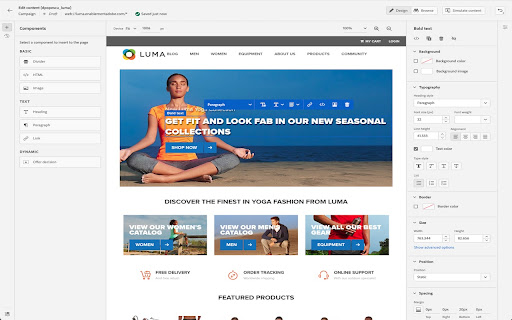
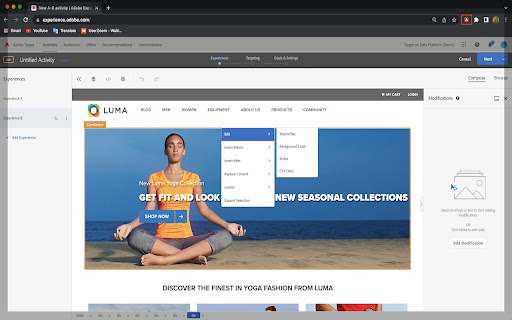
This Chrome extension facilitates the use of visual WYSIWYG editors within Adobe Target and Adobe Journey Optimizer. It addresses technical hurdles by removing iframe busting headers and adjusting cookie attributes to enable seamless website loading and editing for personalization tasks. The extension is designed to simplify the process of personalizing web content for users of Adobe's Experience Cloud.

Developer:Adobe Inc.
Version:1.5.8
Size:202KiB
Last updated:

Overview

Installs

20K+

Rating

2.9

19 reviews

Languages

1 locales

Includes English

Market analysis

Review-backed positioning, friction, and market signals for this Chrome extension.

Backed by review samples

Macro category

Developer & Designer Tools

Pricing friction

Low review signal

Complaint intensity

High review signal

Listing & review signals
Observed signals from store listing text and review samples.

Listing positioning

The Visual Editing Helper extension is positioned as a solution for Adobe Experience Cloud users to load their websites into Adobe Target or Adobe Journey Optimizer for visual personalization. It aims to resolve site-loading issues and enable authoring even for users whose IT developers have not yet implemented the necessary Adobe products.

Inferred product pattern

A helper utility extension designed to enable specific features of a larger SaaS platform by overcoming technical browser limitations.

Review-backed pain points

Multiple users report that the extension is not working, fails to load pages, or is incompatible with current browser versions and Adobe's latest UIs. This leads to significant frustration and a reliance on older, unsupported tools.

Observed feature gaps

The primary gap is the observed unreliability and failure to function as advertised for a significant portion of users. Users also express a desire for such functionality to be built directly into the core product rather than requiring a separate extension.

Tags
Visual EditorWeb PersonalizationAdobe Experience CloudDeveloper ToolWeb Authoring
Target users

- Adobe Experience Cloud users

- Digital marketers

- Web developers

- Content editors

Primary use cases

- Website personalization

- Visual content editing

- Adobe Target integration

- Adobe Journey Optimizer integration

Positive themes

- Works correctly with the new Adobe Target UI layout for some users.

Negative themes

- The extension frequently does not work as expected, requiring workarounds.

- Incompatibility issues with current Chromium versions and Adobe's frontend.

- Users are forced to rely on older, deprecated extensions due to this one's failure.

- Lack of clear official documentation and support for the extension.

Observed friction

- Performance complaints detected

- The extension itself is free to use. Pricing friction would relate to the underlying Adobe Experience Cloud products.

Evidence boundary: Reviews indicate both positive and negative experiences. Some users find the extension works with newer Adobe UI versions, while a substantial number report it is not working, incompatible with browser updates, or requires workarounds, leading them to use older extensions. The review count is relatively low (19), and the average score is below 3. A single positive review exists, but is heavily outweighed by negative feedback, suggesting potential widespread issues.
Complaint summaries
Review-backed complaint signals grouped by operational area.

Support

Reviews suggest a lack of clear official documentation and reliance on workarounds for this extension.

Reliability

A significant number of users report the extension is not working, fails to load pages, or is incompatible with recent browser updates, indicating critical reliability issues.

Privacy

No privacy-related complaints were observed in the provided reviews.

Access & pricing

- No clear monetization signal

- No clear access signal

- Free plan or free usage claimed

Store listing facts

Listing assets

- Screenshots: 2

- Videos: 0

- Languages: 1

Trust signals

- Privacy policy

- Developer contact

Store metadata

- Version: 1.5.8

- Size: 202KiB

- Last updated:

Listing SEO keywords

Search intent keywords
Keyword signals for evaluating how users may discover, compare, or search for this extension category.

Core discovery

Adobe Experience Cloud extensionVisual editing helperAdobe Target personalizationJourney Optimizer WYSIWYGChrome extension web authoring

Comparison

Adobe Target Enhanced Experience ComposerOld VEC Helper extension

Problem

site loading issuesvisual editor not workingiframe bustingSameSite cookie Nonecontent personalization errors

Alternative

Adobe Target VEC HelperEnhanced Composer

Similar extensions

Jump to related discovery paths:

Screenshots

Adobe Experience Cloud Visual Editing Helper screenshot

Links

Recommended Chrome extensions

Related listings from the same category, trending peers, and the same publisher portfolio.

Browse developer