WPSNIFFER - WordPress Theme, Plugin & Hosting icon

WPSNIFFER Chrome Extension Analysis

Developer & Designer Tools

Store listing title: WPSNIFFER - WordPress Theme, Plugin & Hosting

Chrome extension ID: kihhefcbenhkjgjhchanjfhhflaojldn

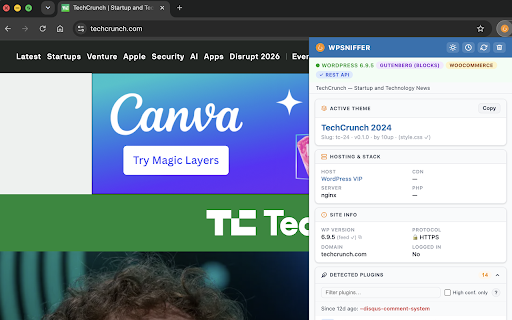
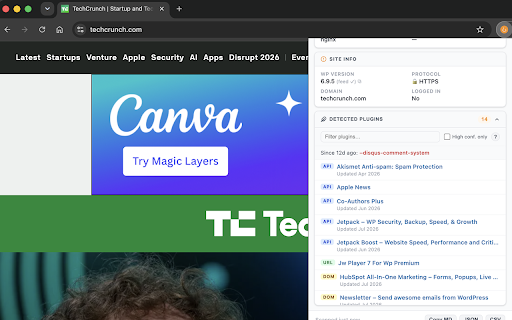
WPSNIFFER is a developer-focused tool designed to identify the technical stack of WordPress websites. It scans active themes and provides information about the underlying plugins and hosting environment.

Version:4.6
Size:74.65KiB
Last updated:

Overview

Installs

10K+

Rating

3.7

84 reviews

Languages

1 locales

Includes English (United States)

Market analysis

Review-backed positioning, friction, and market signals for this Chrome extension.

Backed by review samples

Macro category

Developer & Designer Tools

Pricing friction

Low review signal

Complaint intensity

High review signal

Listing & review signals
Observed signals from store listing text and review samples.

Listing positioning

The extension positions itself as a utility for detecting the WordPress theme, plugins, version, and hosting provider of any WordPress site. It aims to provide direct links to the theme or search results for further exploration.

Inferred product pattern

A technical inspection utility for WordPress that struggles with reliability and accurate data extraction.

Review-backed pain points

Users frequently report that the extension fails to detect themes or plugins even on known WordPress sites. There are also complaints regarding irrelevant redirects to ThemeForest and concerns about data privacy.

Observed feature gaps

Lack of visual indicator in the extension icon to show if detection was successful; limited detection accuracy for common themes.

Tags
WordPress DetectorTheme IdentifierPlugin ScannerWP Analytics
Target users

- Web Developers

- WordPress Designers

- Competitor Researchers

Primary use cases

- Identifying website themes

- Analyzing plugin stacks

- Researching WordPress hosting

Positive themes

No positive theme data.

Negative themes

- Inaccurate detection

- Failure to identify plugins/host

- Unreliable theme identification

- Privacy concerns

Observed friction

- Performance complaints detected

- Privacy complaints detected

- No pricing friction mentioned in the provided data.

Evidence boundary: Extracted from the product listing and a sample of low-rating/helpful user reviews. The provided review sample contains only low-rating reviews, which may skew the sentiment towards negative experiences.
Complaint summaries
Review-backed complaint signals grouped by operational area.

Support

Users reported that the developer's website appeared to be offline.

Reliability

High level of reliability complaints; users claim it often returns 'No Theme Detected' on valid WordPress sites.

Privacy

Some users expressed concerns regarding the potential interception of browsing data.

Access & pricing

- No clear monetization signal

- No account requirement observed

- No clear pricing signal

Store listing facts

Listing assets

- Screenshots: 2

- Videos: 1

- Languages: 1

Trust signals

- Privacy policy

- Developer contact

- Official website

Store metadata

- Version: 4.6

- Size: 74.65KiB

- Last updated:

Listing SEO keywords

Search intent keywords
Keyword signals for evaluating how users may discover, compare, or search for this extension category.

Core discovery

WordPress theme detectorWP plugin identifierWordPress host detectorWordPress version checker

Comparison

WappalyzerBuiltWith

Problem

WordPress theme not detectedWordPress plugin sniffer error

Alternative

WordPress inspectorWP stack analyzer

Similar extensions

Jump to related discovery paths:

Screenshots

WPSNIFFER - WordPress Theme, Plugin & Hosting screenshot

Links

Recommended Chrome extensions

Related listings from the same category, trending peers, and the same publisher portfolio.

Browse developer