Disable HTML5 Autoplay icon

Disable HTML5 Autoplay Chrome Extension Analysis

Privacy, Security & Ad Blockers

Chrome extension ID: kikloppfnbcdnhjaflimkecgfkopkagp

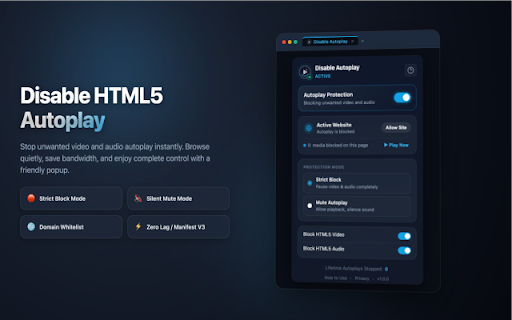
A Chrome extension designed to intercept and disable the automatic playback of HTML5 video and audio elements. It provides users with options to either strictly block or mute autoplay, with a whitelisting feature for preferred domains.

Developer:Extensions
Version:1.0.0
Size:79.26KiB
Last updated:

Overview

Installs

143

Rating

★ —

0 reviews

Languages

1 locales

Includes English (United States)

Market analysis

Review-backed positioning, friction, and market signals for this Chrome extension.

No review samples found

Macro category

Privacy, Security & Ad Blockers

Pricing friction

Low review signal

Complaint intensity

Low review signal

Listing & review signals
Observed signals from store listing text and review samples.

Listing positioning

The product is positioned as a solution to disruptive, data-consuming, and embarrassing autoplay media on the web. It emphasizes user control, system performance via Manifest V3, and strict local privacy.

Inferred product pattern

Single-purpose utility extension focused on enhancing browser UX by removing unwanted automated behaviors.

Review-backed pain points

Review-backed data is not available.

Observed feature gaps

No review-backed feature gaps available.

Tags
Autoplay BlockerMedia ControlProductivity ToolHTML5 Utility
Target users

- Heavy news readers

- Professionals in quiet environments

- Users with limited data plans

- Power users/Multitaskers

Primary use cases

- Blocking auto-playing videos on news websites

- Preventing sudden audio in public or office spaces

- Reducing bandwidth and battery consumption from background media

Positive themes

No positive theme data.

Negative themes

No negative theme data.

Observed friction

- No pricing friction observed; the product appears to be free.

Evidence boundary: Analysis based exclusively on the public store listing. No user reviews were available to validate listing claims or identify real-world pain points.
Complaint summaries
Review-backed complaint signals grouped by operational area.

Support

No support complaints available.

Reliability

No reliability complaints available.

Privacy

No privacy complaints available.

Access & pricing

- Free usage observed

- No account requirement observed

- Free plan or free usage claimed

Store listing facts

Listing assets

- Screenshots: 1

- Videos: 0

- Languages: 1

Trust signals

- Privacy policy

- Developer contact

Store metadata

- Version: 1.0.0

- Size: 79.26KiB

- Last updated:

Listing SEO keywords

Search intent keywords
Keyword signals for evaluating how users may discover, compare, or search for this extension category.

Core discovery

disable html5 autoplaystop autoplay videosblock autoplay audiochrome autoplay blocker

Comparison

best autoplay blocker chromedisable autoplay vs browser settings

Problem

annoying auto playing videosstop videos starting automaticallystop audio autoplay

Alternative

html5 autoplay blocker alternativemute autoplay extension

Similar extensions

Jump to related discovery paths:

Screenshots

Disable HTML5 Autoplay screenshot

Links

Recommended Chrome extensions

Related listings from the same category, trending peers, and the same publisher portfolio.

Browse tools
Roblox Server Finder - RSF icon

Roblox Server Finder - RSF

Extensions

Find the best servers for your Roblox experience. Filter by player count and join instantly.

Installs

716

Rating

★ 3.0

Sider: Chat with all AI: GPT-5, Claude, DeepSeek, Gemini, Grok icon

Sider: Chat with all AI: GPT-5, Claude, DeepSeek, Gemini, Grok

ChatGPT Sidebar

ChatGPT, DeepSeek, Gemini, Claude, Grok all in one AI sidebar, for AI search, read, and write.

Installs

5.0M+

Rating

★ 4.9

Norton Safe Search icon

Norton Safe Search

NortonLifeLock Inc

Search safely online by enabling Norton Safe Search as your default search provider for maximum protection on Chrome.

Installs

5.0M+

Rating

★ 2.7

Shazam: Find song names from your browser icon

Shazam: Find song names from your browser

Shazam

Identify music, search lyrics & more

Installs

5.0M+

Rating

★ 4.7

Google Input Tools icon

Google Input Tools

cloud-input-team

Input Tools lets you type in the language of your choice.

Installs

4.0M+

Rating

★ 3.7

IE Tab icon

IE Tab

Blackfish Software

Display web pages using IE within Chrome. Use Java, Silverlight, ActiveX, Sharepoint, and more.

Installs

4.0M+

Rating

★ 4.0

Ad Blocker: Stands AdBlocker icon

Ad Blocker: Stands AdBlocker

Stands

Stands AdBlocker – it's a free ad blocker for YouTube, Twitch, Pop-Ups, Video Ads, and websites. Block ads everywhere with Stands!

Installs

4.0M+

Rating

★ 4.8

Google Dictionary (by Google) icon

Google Dictionary (by Google)

dictionary-extension-dev

View definitions easily as you browse the web.

Installs

4.0M+

Rating

★ 3.8

Microsoft Bing Search with Rewards icon

Microsoft Bing Search with Rewards

Microsoft Corporation

Use the Microsoft Rewards extension to find new ways to earn every day, easily track your points and set your default search to Bing

Installs

4.0M+

Rating

★ 4.4

Google Scholar Button icon

Google Scholar Button

scholar-chrome-extensions

Lookup scholarly articles as you browse the web.

Installs

4.0M+

Rating

★ 4.5