Testing Reading Speed icon

Testing Reading Speed Chrome Extension Analysis

Automation & Workflow Efficiency

Chrome extension ID: kmkdgnfgallnjpdldcmplbggbmkgcgdl

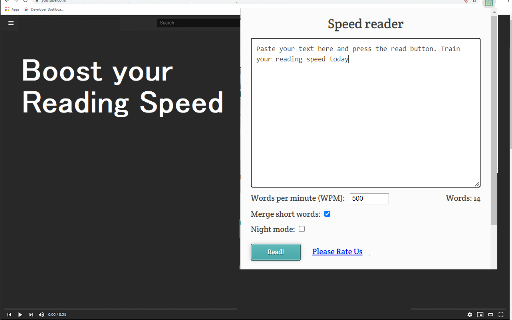
This is a speed reading training tool that flashes text on the screen at customizable speeds to encourage faster reading habits. Users can copy and paste text into the interface to read at rates ranging from 200 to 1000 words per minute.

Version:4.0.0
Size:119KiB
Last updated:

Overview

Installs

3K+

Rating

4.3

16 reviews

Languages

41 locales

Includes Deutsch, English, Filipino, Indonesia...

Market analysis

Review-backed positioning, friction, and market signals for this Chrome extension.

Backed by review samples

Macro category

Automation & Workflow Efficiency

Pricing friction

Low review signal

Complaint intensity

Moderate review signal

Listing & review signals
Observed signals from store listing text and review samples.

Listing positioning

The store listing positions this extension as a training tool designed to increase reading speed by eliminating subvocalization. It highlights the ability to adjust word-per-minute pacing to save time and boost knowledge absorption.

Inferred product pattern

Utility-focused productivity tool based on repetitive text rendering.

Review-backed pain points

Users find the current text input process inefficient, requiring multiple steps (copy-paste-launch) rather than direct browser-based reading or integration, and express frustration over the lack of customization options for window size and font.

Observed feature gaps

Lack of hotkey support, absence of a 'read selected text' context menu feature, and limited UI/font configuration settings.

Tags
Speed ReadingProductivityEducationReading Assistant
Target users

- Students

- Knowledge Workers

- Researchers

- Casual Readers

Primary use cases

- Improving reading speed

- Consuming online articles efficiently

- Reducing subvocalization during reading

Positive themes

- Effective at increasing reading speed

- Simple and easy to use

- Helps with information retention

- Reduces eye strain with large fonts

Negative themes

- Cumbersome text input workflow

- Lack of keyboard shortcuts

- Limited UI customization

- Language localization issues

Observed friction

- No pricing friction reported; the extension is marketed as free.

Evidence boundary: The analysis is based on user reviews highlighting specific UX workflow frustrations regarding text input and a general positive reception for the core reading speed function. Review sample size is relatively small and includes feedback in multiple languages, which may not capture the full range of potential technical issues.
Complaint summaries
Review-backed complaint signals grouped by operational area.

Support

No specific support or refund complaints identified.

Reliability

Minor complaints regarding functional UI visibility and language support.

Privacy

No privacy or security concerns identified in reviews.

Access & pricing

- Free usage observed

- No account requirement observed

- Free plan or free usage claimed

Store listing facts

Listing assets

- Screenshots: 1

- Videos: 0

- Languages: 41

Trust signals

- Privacy policy

- Developer contact

- Official website

- Support link

Store metadata

- Version: 4.0.0

- Size: 119KiB

- Last updated:

Listing SEO keywords

Search intent keywords
Keyword signals for evaluating how users may discover, compare, or search for this extension category.

Core discovery

speed reading extensionread faster onlinereading speed trainerchrome speed reading tool

Comparison

best speed reading appspeed read alternative

Problem

how to read fastersave time readingstop subvocalization

Alternative

speed reader for chrometext pacer

Similar extensions

Jump to related discovery paths:

Screenshots

Testing Reading Speed screenshot

Links

Recommended Chrome extensions

Related listings from the same category, trending peers, and the same publisher portfolio.

Browse education