Postorollo – LinkedIn Post Analytics icon

Postorollo Chrome Extension Analysis

Social Media Growth & Marketing

Store listing title: Postorollo – LinkedIn Post Analytics

Chrome extension ID: kodphmclbplllkmigjjpnhhbofajnhli

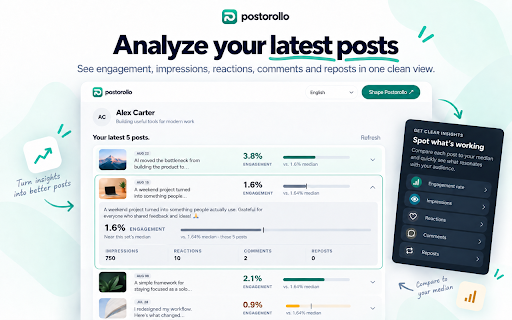
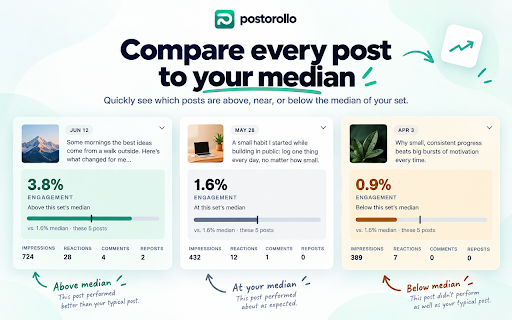
Postorollo is a Chrome extension that integrates with LinkedIn to help users analyze the performance of their published posts. By extracting and contextualizing post data, it assists creators and professionals in identifying patterns and developing content strategies based on historical performance.

Developer:Peipus agency
Version:0.4.7
Size:92.04KiB
Last updated:

Overview

Installs

0

Rating

★ —

0 reviews

Languages

6 locales

Includes Deutsch, English, español, français...

Market analysis

Review-backed positioning, friction, and market signals for this Chrome extension.

No review samples found

Macro category

Social Media Growth & Marketing

Pricing friction

Low review signal

Complaint intensity

Low review signal

Listing & review signals
Observed signals from store listing text and review samples.

Listing positioning

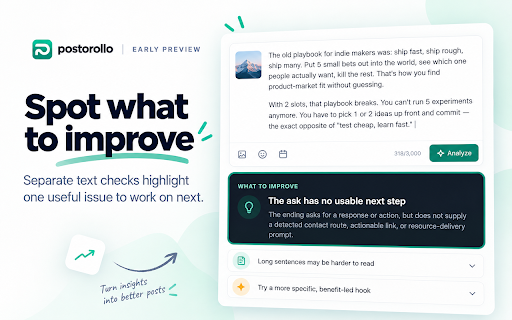
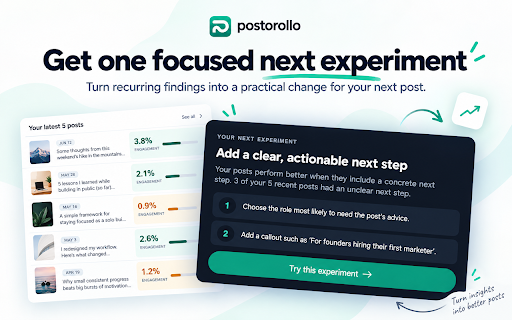
Postorollo positions itself as an analytical layer for LinkedIn creators, shifting the focus from raw vanity metrics to evidence-based content experimentation. It emphasizes a structured workflow that helps users move from post performance analysis to actionable hypotheses for future content.

Inferred product pattern

Single-purpose browser-based analytical overlay for social media platforms.

Review-backed pain points

Review-backed data is not available.

Observed feature gaps

Review-backed data is not available.

Tags
LinkedIn AnalyticsContent StrategyCreator ToolsPerformance Metrics
Target users

- LinkedIn Creators

- Founders

- Consultants

- Social Media Marketers

Primary use cases

- Analyzing individual LinkedIn post performance

- Identifying content patterns across published posts

- Formulating content hypotheses for future testing

Positive themes

No positive theme data.

Negative themes

No negative theme data.

Observed friction

- Review-backed data is not available.

Evidence boundary: Data derived exclusively from the provided Chrome Web Store listing details. No user reviews or public sentiment data are currently available for this extension.
Complaint summaries
Review-backed complaint signals grouped by operational area.

Support

Review-backed data is not available.

Reliability

Review-backed data is not available.

Privacy

Review-backed data is not available.

Access & pricing

- No clear monetization signal

- No clear access signal

- No clear pricing signal

Store listing facts

Listing assets

- Screenshots: 4

- Videos: 0

- Languages: 6

Trust signals

- Privacy policy

- Developer contact

- Official website

- Support link

Store metadata

- Version: 0.4.7

- Size: 92.04KiB

- Last updated:

Listing SEO keywords

Search intent keywords
Keyword signals for evaluating how users may discover, compare, or search for this extension category.

Core discovery

LinkedIn post analyticsLinkedIn performance trackercontent experiment tool

Comparison

LinkedIn analytics toolsocial media metrics plugin

Problem

LinkedIn engagement analysisimprove LinkedIn content

Alternative

LinkedIn creator toolsLinkedIn growth hack extension

Similar extensions

Jump to related discovery paths:

Screenshots

Postorollo – LinkedIn Post Analytics screenshot

Links

Recommended Chrome extensions

Related listings from the same category, trending peers, and the same publisher portfolio.

Browse communication
CSV to Google Sheets – Open CSV Instantly icon

CSV to Google Sheets – Open CSV Instantly

Peipus agency

Open CSV files in Google Sheets in 1–2 clicks. Skip manual upload and import steps and start working instantly.

Installs

1K+

Rating

★ 5.0

Mouse Highlight & Annotation Tool icon

Mouse Highlight & Annotation Tool

Peipus agency

Highlight your cursor and draw temporary annotations on any webpage. Useful for presentations, demos, and screen sharing.

Installs

223

Rating

★ 5.0

Amazon Q Business icon

Amazon Q Business

Amazon Q Business by Amazon Web Services

An enterprise AI assistant available to assist you when browsing the web.

Installs

50K+

Rating

★ 5.0

HTML Editor for Gmail by cloudHQ icon

HTML Editor for Gmail by cloudHQ

cloudHQ

HTML Editor for Gmail™ - code HTML email directly from Gmail

Installs

50K+

Rating

★ 4.0

Reminders for Google Calendar™ icon

Reminders for Google Calendar™

SMS Reminder for Google Calendar™

Send reminders by SMS/Text from your Google Calendar™. Use it for your customers or your own appointments.

Installs

50K+

Rating

★ 3.6

Fax.Plus - HIPAA Fax Online icon

Fax.Plus - HIPAA Fax Online

Alohi SA

Secure HIPAA fax service to send fax online and receive online fax on local, toll-free, and International fax numbers.

Installs

50K+

Rating

★ 3.6

Kommodo Screen Recorder & SOP icon

Kommodo Screen Recorder & SOP

kgrauer

Record screen and get a magical SOP with an AI Summary

Installs

40K+

Rating

★ 4.7

SendSafely Encryption for Chrome and Gmail icon

SendSafely Encryption for Chrome and Gmail

SendSafely.com

Chrome extension that provides end-to-end encryption for Gmail. Encrypt private emails and securely share files up to 10GB.

Installs

40K+

Rating

★ 4.9

VisualSP icon

VisualSP

visualsp-app-administrators

VisualSP is the enterprise help assistant that delivers answers and guidance for any web site when and where customers need them.

Installs

40K+

Rating

★ 4.6

Noise Cancelling App icon

Noise Cancelling App

AI Webcam Effects

AI mic noise cancellation for calls, streams, and recording. Share with friends to enjoy clear sound in every conversation!

Installs

40K+

Rating

★ 4.8