ColorPal: Color Picker & Eyedropper icon

ColorPal Chrome Extension Analysis

Developer & Designer Tools

Store listing title: ColorPal: Color Picker & Eyedropper

Chrome extension ID: mbnpegpimodgjmlbfhkkdgbcfjmgpoad

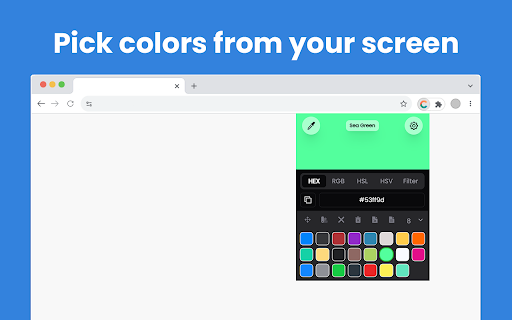
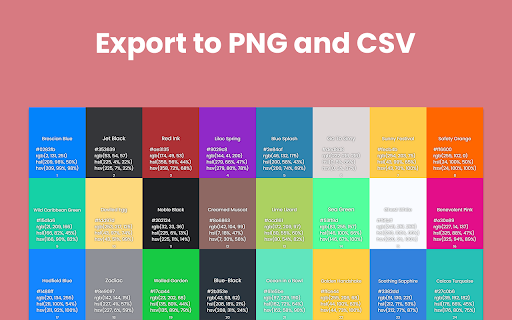
ColorPal is a browser extension that allows users to pick colors from any website and generate color palettes. It supports HEX, RGB, HSL, and HSV formats and enables users to download color data as images or CSV files.

Developer:Nikos Daridis
Version:2.0.3
Size:15.45MiB
Last updated:

Overview

Installs

5K+

Rating

4.3

16 reviews

Languages

54 locales

Includes Deutsch, English, English (United Kingdom), English (United States)...

Market analysis

Review-backed positioning, friction, and market signals for this Chrome extension.

Backed by review samples

Macro category

Developer & Designer Tools

Pricing friction

Low review signal

Complaint intensity

Moderate review signal

Listing & review signals
Observed signals from store listing text and review samples.

Listing positioning

ColorPal is positioned as an advanced, privacy-focused alternative to existing color pickers like ColorZilla. It emphasizes its open-source nature and the ability to extract multiple color formats without requiring browser permissions.

Inferred product pattern

A lightweight utility extension focused on color extraction and palette management for design workflows.

Review-backed pain points

Users reported that recent updates may have regressed the tool's functionality, making it feel broken or outdated. There is also a demand for a 'stay on top' window feature for live color inspection.

Observed feature gaps

The tool lacks support for ChromeOS (Chromebooks) and does not feature a persistent 'always on top' viewing window for live color tracking.

Tags
Color PickerEyedropper ToolPalette GeneratorDesign Utilities
Target users

- Web Developers

- UI/UX Designers

- Digital Artists

Primary use cases

- Extracting color codes from web elements

- Creating and saving color palettes

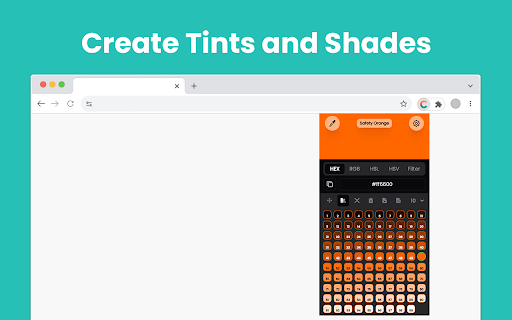
- Generating color tints and shades for CSS

Positive themes

- Ease of use

- Effective palette creation

- Works well on zoomed web pages

- Privacy-centric (no permissions required)

Negative themes

- Recent functional regressions

- Unappealing user interface

- Lack of ChromeOS support

Observed friction

- Performance complaints detected

- No pricing friction or payment complaints observed.

Evidence boundary: Data extracted from the Chrome Web Store listing and a sample of user reviews. Analysis is based on a relatively small sample size of 16 reviews.
Complaint summaries
Review-backed complaint signals grouped by operational area.

Support

No support or account-related complaints observed.

Reliability

Some users claim the extension's functionality has significantly degraded following recent updates.

Privacy

No privacy complaints observed; users highlighted the lack of required permissions as a benefit.

Access & pricing

- No clear monetization signal

- No account requirement observed

- No clear pricing signal

Store listing facts

Listing assets

- Screenshots: 3

- Videos: 0

- Languages: 54

Trust signals

- Developer contact

- Official website

Store metadata

- Version: 2.0.3

- Size: 15.45MiB

- Last updated:

Listing SEO keywords

Search intent keywords
Keyword signals for evaluating how users may discover, compare, or search for this extension category.

Core discovery

color pickereyedropper extensionhex color code extractorrgb color pickercolor palette generator

Comparison

ColorZillaGecoColor Pick

Problem

color picker not workingeyedropper brokencolor picker chromebook

Alternative

web design color toolscss gradient toolscolor swatch generator

Similar extensions

Jump to related discovery paths:

Screenshots

ColorPal: Color Picker & Eyedropper screenshot

Links

Recommended Chrome extensions

Related listings from the same category, trending peers, and the same publisher portfolio.

Browse developer