PDF to JPG — Image to PDF, No Upload | PixFit icon

PDF to JPG — Image to PDF, No Upload Chrome Extension Analysis

Automation & Workflow Efficiency

Store listing title: PDF to JPG — Image to PDF, No Upload | PixFit

Chrome extension ID: mhnenccjoleabbkbdonipoljgjecjoad

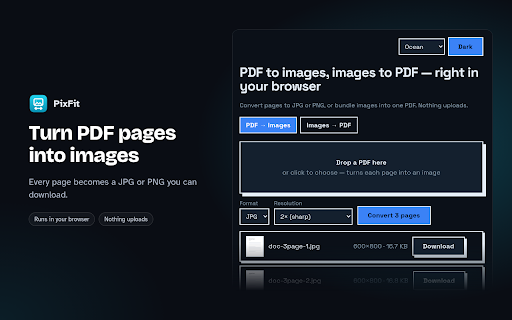
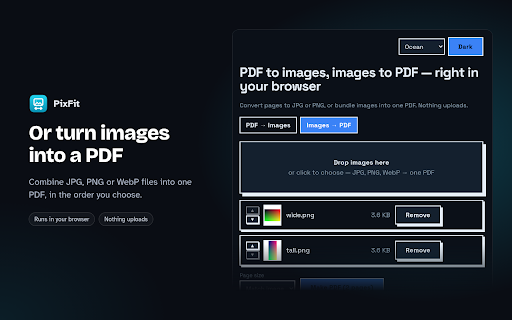
PixFit is a productivity extension that converts PDF pages into JPG/PNG formats and compiles images into PDF documents. It offers on-device processing to ensure user privacy and includes a Pro version for advanced features like high-DPI rendering and ZIP exports.

Developer:Mr.Rage
Version:1.2.0
Size:954KiB
Last updated:

Overview

Installs

3

Rating

★ —

0 reviews

Languages

1 locales

Includes English

Market analysis

Review-backed positioning, friction, and market signals for this Chrome extension.

No review samples found

Macro category

Automation & Workflow Efficiency

Pricing friction

Low review signal

Complaint intensity

Low review signal

Listing & review signals
Observed signals from store listing text and review samples.

Listing positioning

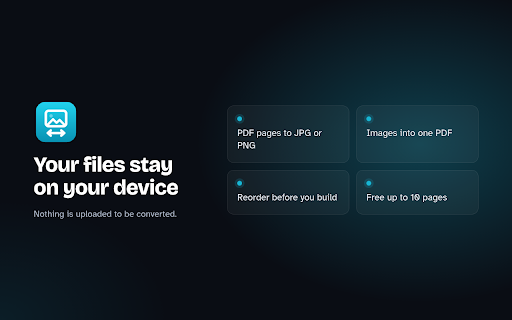
The product positions itself as a privacy-first, local-only utility for converting file formats. It emphasizes that all processing happens on-device without uploading data to external servers.

Inferred product pattern

A privacy-centric, local-first utility tool utilizing a freemium model with a one-time purchase for professional features.

Review-backed pain points

Review-backed data is not available.

Observed feature gaps

The listing implies that high-resolution (300 DPI) and bulk ZIP exporting are reserved for the Pro version.

Tags
PDF ConverterImage to PDFPrivacy ToolOn-Device Utility
Target users

- Privacy-conscious users

- Office workers

- Students

- Content creators

Primary use cases

- Extracting images from PDF documents

- Combining multiple images into a single PDF

- Converting web-based PDFs to local image files

Positive themes

- Review-backed data is not available.

Negative themes

- Review-backed data is not available.

Observed friction

- No review data available.

Evidence boundary: Data extracted from the Chrome Web Store product listing and description. No user reviews were available to provide sentiment or identify real-world pain points.
Complaint summaries
Review-backed complaint signals grouped by operational area.

Support

No review data available.

Reliability

No review data available.

Privacy

No review data available.

Access & pricing

- Free entry with paid features

- No account requirement observed

- Limited free usage observed

Store listing facts

Listing assets

- Screenshots: 3

- Videos: 0

- Languages: 1

Trust signals

- Developer contact

- Official website

Store metadata

- Version: 1.2.0

- Size: 954KiB

- Last updated:

Listing SEO keywords

Search intent keywords
Keyword signals for evaluating how users may discover, compare, or search for this extension category.

Core discovery

PDF to JPGImage to PDFConvert PDF to PNGOn-device PDF converter

Comparison

iLovePDFSmallPDFAdobe Acrobat

Problem

secure PDF conversionconvert PDF to image offlineprivacy-safe PDF tools

Alternative

local PDF to image converterbrowser extension PDF to JPGoffline image to PDF tool

Similar extensions

Jump to related discovery paths:

Screenshots

PDF to JPG — Image to PDF, No Upload | PixFit screenshot

Links

Website: mr.rage

Recommended Chrome extensions

Related listings from the same category, trending peers, and the same publisher portfolio.

Browse tools
HEIC to JPG — Convert HEIC Photos | HEICFlip icon

HEIC to JPG — Convert HEIC Photos | HEICFlip

Mr.Rage

Convert HEIC/HEIF photos to JPG, PNG, or PDF right in your browser. No uploads, no watermark, no sign-up.

Installs

25

Rating

★ —

Compress Video — Trim, Crop & GIF | ClipFit icon

Compress Video — Trim, Crop & GIF | ClipFit

Mr.Rage

Compress, convert, trim, crop & GIF videos right in your browser. No uploads, no watermark, no sign-up.

Installs

20

Rating

★ —

Shazam: Find song names from your browser icon

Shazam: Find song names from your browser

Shazam

Identify music, search lyrics & more

Installs

5.0M+

Rating

★ 4.7

Microsoft Bing Homepage & Search for Chrome icon

Microsoft Bing Homepage & Search for Chrome

Microsoft Corporation

Set Microsoft Bing as your default homepage and default search engine

Installs

5.0M+

Rating

★ 3.8

Google Input Tools icon

Google Input Tools

cloud-input-team

Input Tools lets you type in the language of your choice.

Installs

4.0M+

Rating

★ 4.0

IE Tab icon

IE Tab

Blackfish Software

Display web pages using IE within Chrome. Use Java, Silverlight, ActiveX, Sharepoint, and more.

Installs

4.0M+

Rating

★ 4.3

Google Dictionary (by Google) icon

Google Dictionary (by Google)

dictionary-extension-dev

View definitions easily as you browse the web.

Installs

4.0M+

Rating

★ 4.4

Immersive Translate: AI Web, PDF & Video Translator icon

Immersive Translate: AI Web, PDF & Video Translator

Immersive Translate

Free Translate Website, Translate PDF & Epub eBook, Translate Video Subtitles in Bilingual

Installs

3.0M+

Rating

★ 3.9

Ad Blocker: Stands AdBlocker icon

Ad Blocker: Stands AdBlocker

Stands

Stands AdBlocker – it's a free ad blocker for YouTube, Twitch, Pop-Ups, Video Ads, and websites. Block ads everywhere with Stands!

Installs

3.0M+

Rating

★ 4.8

Monica: All-In-One AI Assist & Smartest  AI Agent icon

Monica: All-In-One AI Assist & Smartest AI Agent

Monica Team

One stop AI Assistant with GPT, Claude, Gemini: Chat, Write, Translate, Search, Summarize, image generator, video generation

Installs

3.0M+

Rating

★ 4.9