Canvas Page Folders icon

Canvas Page Folders Chrome Extension Analysis

Automation & Workflow Efficiency

Chrome extension ID: oedghiclldgapmpgcplfjjfdkfehlkpp

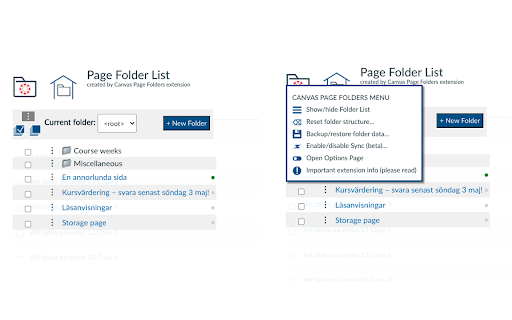
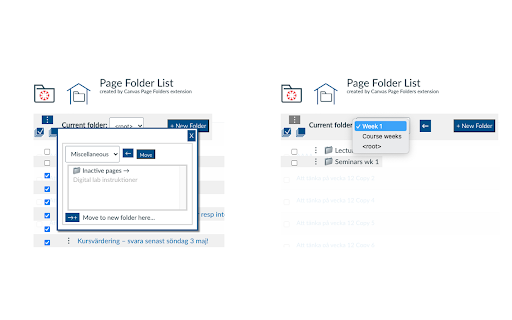
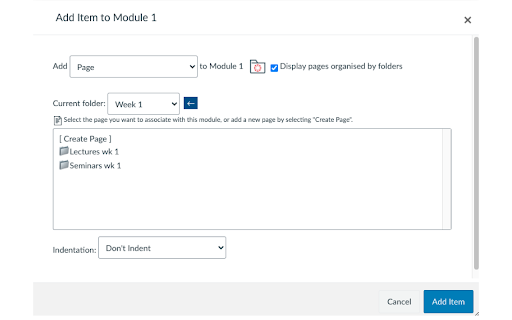
This extension allows users to create, rename, move, and delete folders to organize Canvas LMS pages. It includes features to view organized pages within modules and uses a designated Canvas page to sync folder structures among users with the extension.

Version:1.1.3
Size:1.39MiB
Last updated:

Overview

Installs

135

Rating

5.0

2 reviews

Languages

1 locales

Includes English (United States)

Market analysis

Review-backed positioning, friction, and market signals for this Chrome extension.

Backed by review samples

Macro category

Automation & Workflow Efficiency

Pricing friction

Low review signal

Complaint intensity

Low review signal

Listing & review signals
Observed signals from store listing text and review samples.

Listing positioning

The product positions itself as an organizational utility for Canvas LMS users to manage pages through a folder and sub-folder system. It aims to provide structured navigation for courses with high page volumes and offers experimental synchronization capabilities between users.

Inferred product pattern

A productivity utility that adds structural organizational layers (folders) to the Canvas LMS interface.

Review-backed pain points

No review-backed pain points available.

Observed feature gaps

Users indicate that folder organization is a feature that should be natively available in Canvas LMS.

Tags
Canvas LMSPage OrganizationLMS ProductivityInstructor Tools
Target users

- Canvas LMS instructors

- Educators

- Course designers

Primary use cases

- Organizing large numbers of Canvas pages into folders

- Managing course module content structure

- Syncing folder structures between users

Positive themes

- Provides essential organization for instructors

- Adds useful functionality missing from the native Canvas platform

Negative themes

No negative theme data.

Observed friction

- No pricing information is provided in the store listing or reviews.

Evidence boundary: Data extracted from the Chrome Web Store listing and two high-rating reviews. Extremely limited review sample size (2 reviews).
Complaint summaries
Review-backed complaint signals grouped by operational area.

Support

No support complaints were observed.

Reliability

No reliability or performance complaints were observed.

Privacy

No privacy or security complaints were observed.

Access & pricing

- No clear monetization signal

- No account requirement observed

- No clear pricing signal

Store listing facts

Listing assets

- Screenshots: 3

- Videos: 1

- Languages: 1

Trust signals

- Privacy policy

- Developer contact

- Official website

Store metadata

- Version: 1.1.3

- Size: 1.39MiB

- Last updated:

Listing SEO keywords

Search intent keywords
Keyword signals for evaluating how users may discover, compare, or search for this extension category.

Core discovery

Canvas LMS foldersCanvas page organizationCanvas LMS instructor toolsOrganize Canvas pages

Comparison

Canvas native page organization

Problem

unorganized Canvas pagesCanvas LMS folder management

Alternative

Canvas LMS pluginsLMS organization tools

Similar extensions

Jump to related discovery paths:

Screenshots

Canvas Page Folders screenshot

Links

Recommended Chrome extensions

Related listings from the same category, trending peers, and the same publisher portfolio.

Browse education
Canvas Quick Student View icon

Canvas Quick Student View

Old Pike Software

Adds the Student View link to all pages in Canvas. Look for the spectacles icon at the top right.

Installs

2K+

Rating

5.0

MentiPlus icon

MentiPlus

Old Pike Software

Mentimeter formatting extension. Change a graph column's colour or the format of the axis text using a contextual menu

Installs

1K+

Rating

Speechify — Text to Speech icon

Speechify — Text to Speech

Speechify

Read aloud any Google Doc, PDF, webpage, or book with text to speech (TTS). Natural sounding voices in 60+ languages & 1,000 voices.

Installs

900K+

Rating

4.6

Tasks for Canvas – now supporting Blackboard, D2L Brightspace icon

Tasks for Canvas – now supporting Blackboard, D2L Brightspace

BetterCampus

A better to-do list sidebar for Canvas, Blackboard, and D2L Brightspace.

Installs

800K+

Rating

4.7

ImTranslator: Translator, Dictionary, TTS icon

ImTranslator: Translator, Dictionary, TTS

smartlink

Translator, Dictionary, Voice

Installs

800K+

Rating

4.4

eJOY AI Dictionary icon

eJOY AI Dictionary

ejoy-english.com

Your ultimate knowledge and English learning tool to discover the world and upskill yourself. Translate video, websites and PDF.

Installs

700K+

Rating

4.8

Mote for Google Chrome™ icon

Mote for Google Chrome™

Mote Technologies, Inc.

The literacy platform for Chrome: Mote’s Sidebar and integrations address barriers in learning to read, write, speak and listen.

Installs

700K+

Rating

4.6

ProctorExam Activity Sharing icon

ProctorExam Activity Sharing

ProctorExam BV

Lets you share your browsing activity when taking an online exam on ProctorExam - https://www.proctorexam.com

Installs

700K+

Rating

1.6

Voice In - Voice Typing & Speech-to-Text Dictation icon

Voice In - Voice Typing & Speech-to-Text Dictation

Dictanote

Voice typing in ChatGPT, Gmail, Google Docs & 10,000+ sites. Dictate emails, notes & AI prompts in 50+ languages.

Installs

600K+

Rating

4.4

Translate for Chrome -Translator, Dictionary icon

Translate for Chrome -Translator, Dictionary

Translator App.

Translate words, phrases or text on any webpage. Full page translator and dictionary, text to speech (TTS) using Google Translate.

Installs

600K+

Rating

4.7