HTMLエラーチェッカー Chrome Extension Analysis
Developer & Designer ToolsChrome extension ID: ohdllebchmmponnofchalfkegpjojcaf
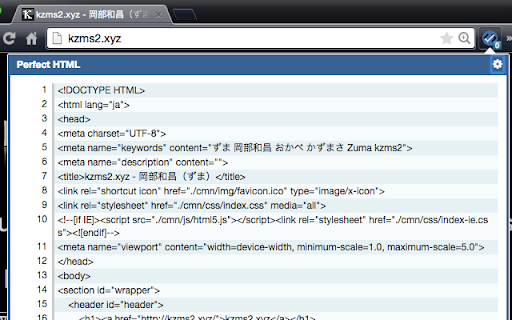
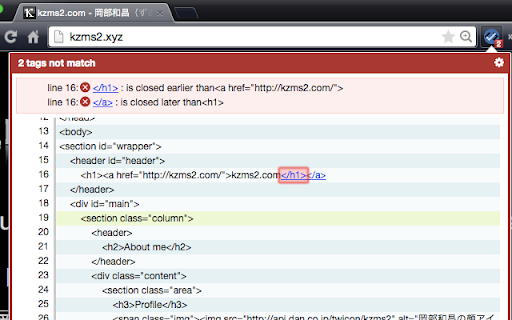
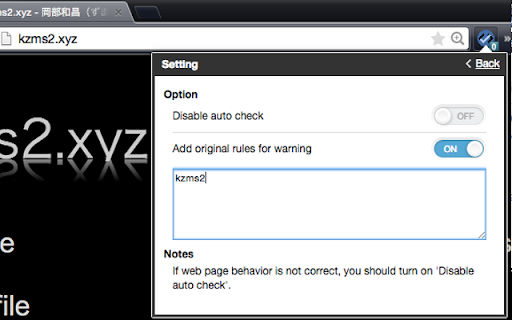
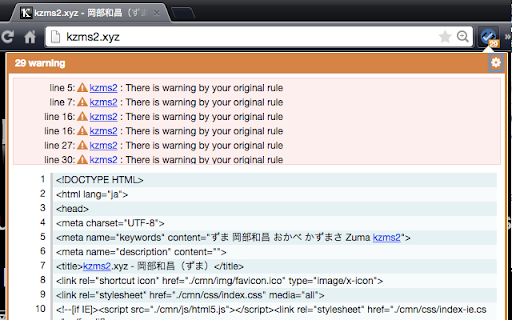
An extension designed to scan webpage source code for HTML syntax issues, specifically identifying unclosed or mismatched tags. It alerts developers and designers with an error counter badge directly on the browser's toolbar. It includes a toggle for automatic scanning and supports localized checks.
Overview
Installs
60K+
Rating
★ 4.3
96 reviews
Languages
3 locales
Includes English, 中文(中国), 日本語
Market analysis
Review-backed positioning, friction, and market signals for this Chrome extension.
Macro category
Developer & Designer Tools
Pricing friction
Low review signal
Complaint intensity
Moderate review signal
Listing positioning
HTMLエラーチェッカー (HTML Error Checker) positions itself as a lightweight developer tool that automatically detects missing or mismatched HTML start and end tags directly in the browser. It displays the error count as a badge icon on the extension button for quick identification. The tool highlights privacy by processing code entirely via client-side JavaScript without transmitting source code externally.
Inferred product pattern
A client-side browser developer tool utility that operates entirely on the active tab DOM to scan for markup syntax anomalies.
Review-backed pain points
Users frequently report getting stuck on an infinite 'Please reload :(' loop on various websites, making the extension unusable for those pages. Additionally, it causes functional issues on specific sites with forms or administrative panels (e.g., Sakura Internet Control Panel), and strictly flags legally-omitted HTML closing tags (like <p> and <li>), causing unnecessary noise.
Observed feature gaps
The extension lacks a way to whitelist or ignore optional closing tags (such as <p> and <li>) which leads to false positives. It also struggles with complex parsing scenarios, such as HTML tags placed inside attribute strings (e.g., title attributes) or platform-specific template tags like WordPress pagination comments.
- Web Developers
- Frontend Engineers
- Web Designers
- Blogger and WordPress Theme Customizers
- Validating HTML tag nesting and closure on live web pages
- Debugging layout breakage caused by missing HTML tags
- Quickly checking syntax errors during website development and template customization
- Saves time by reducing manual HTML inspection steps
- Provides an easy-to-read, visual display of syntax errors
- Generally convenient for quick web page audits in Chrome
- Stuck on 'Please reload' error loop
- Annoying alerts for optional closing tags like <p> and <li>
- Disrupts standard browsing or web forms when active
- Fails to parse tags nested within HTML attributes or comments
- Performance complaints detected
- No pricing friction was observed as the extension is listed as a free utility and there are no complaints regarding payment walls or fees.
Support
There are no direct mentions of customer support complaints, though users express unresolved technical bugs like the infinite reload state.
Reliability
Users report reliability issues where the tool gets stuck in a 'Please reload :(' status. It also interferes with standard webpage functionality, especially on pages containing forms, making normal browsing difficult unless the extension is disabled.
Privacy
No privacy concerns were raised by users. The extension store description explicitly claims that all processing is done locally via client-side JavaScript without transmitting data to external servers.
- Free usage observed
- No account requirement observed
- Free plan or free usage claimed
Store listing facts
- Screenshots: 4
- Videos: 1
- Languages: 3
- Developer contact
- Official website
- Version: 0.6.0.2
- Size: 388KiB
- Last updated:
Listing SEO keywords
Core discovery
Comparison
Problem
Alternative
Similar extensions
Jump to related discovery paths:
Screenshots