Tab Merge icon

Tab Merge Chrome Extension Analysis

Tab & Bookmark Productivity

Chrome extension ID: olcjnbnibcfbehmfnkomljcgelbggjkf

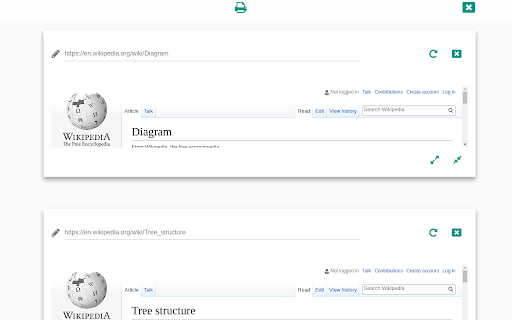
This extension allows users to merge active browser tabs into one view. It is designed to assist users in printing or saving multiple web pages as a single PDF document by creating a unified rendering interface.

Developer:Nikolay Gechev
Version:2.2.1
Size:141KiB
Last updated:

Overview

Installs

5K+

Rating

2.2

39 reviews

Languages

1 locales

Includes English

Market analysis

Review-backed positioning, friction, and market signals for this Chrome extension.

Backed by review samples

Macro category

Tab & Bookmark Productivity

Pricing friction

Low review signal

Complaint intensity

High review signal

Listing & review signals
Observed signals from store listing text and review samples.

Listing positioning

Tab Merge positions itself as a utility tool to consolidate multiple open Chrome tabs into a single page. It further markets itself as a solution for converting web pages into PDF format for mobile-friendly printing via the Chrome Print tool.

Inferred product pattern

Legacy browser utility that has become non-functional due to lack of maintenance and web standard updates.

Review-backed pain points

Users consistently report that the extension fails to render content, often returning 'refused to connect' errors or blank pages, and that key interface buttons frequently stop functioning.

Observed feature gaps

The extension lacks robust error handling for dynamic or authenticated websites and fails to reliably capture and render modern web page content as a PDF.

Tags
Tab ManagementPrint UtilityPDF Converter
Target users

- Power users

- Research-focused professionals

- Users requiring batch printing of web pages

Primary use cases

- Merging multiple browser tabs into one page

- Converting web pages to PDF for mobile printing

Positive themes

- Utility for batch printing workflows

- Historical reliability before updates

Negative themes

- Frequent blank page errors

- Failure to load website content

- Broken UI buttons (Print/Hide interface)

- Lack of developer responsiveness

Observed friction

- Performance complaints detected

- No pricing friction reported; the extension is free but effectively non-functional.

Evidence boundary: Analysis is based on multiple user reviews spanning several years highlighting consistent failure to render content and lack of developer updates. Review data is focused on performance complaints; no technical documentation is available to verify current state vs. historical issues.
Complaint summaries
Review-backed complaint signals grouped by operational area.

Support

Significant complaints regarding total lack of developer communication and failure to address reported bugs over several years.

Reliability

High incidence of performance failure; users report the extension results in blank pages, error screens, or broken rendering for the majority of websites.

Privacy

No specific privacy or security complaints found in the available sample.

Access & pricing

- Free usage observed

- No account requirement observed

- Free plan or free usage claimed

Store listing facts

Listing assets

- Screenshots: 1

- Videos: 0

- Languages: 1

Trust signals

- Developer contact

Store metadata

- Version: 2.2.1

- Size: 141KiB

- Last updated:

Listing SEO keywords

Search intent keywords
Keyword signals for evaluating how users may discover, compare, or search for this extension category.

Core discovery

merge chrome tabsprint multiple tabs as pdfchrome tab manager

Comparison

tab merge alternativechrome tab printer extension

Problem

tab merge not workingchrome extension blank page

Alternative

best tab manager extensionbulk print web pages

Similar extensions

Jump to related discovery paths:

Screenshots

Tab Merge screenshot

Recommended Chrome extensions

Related listings from the same category, trending peers, and the same publisher portfolio.

Browse education