Design Mode - Page's Rich Text Editor icon

Design Mode Chrome Extension Analysis

Developer & Designer Tools

Store listing title: Design Mode - Page's Rich Text Editor

Chrome extension ID: omdilgkadhcoliihkpbgpkdcpogkbhah

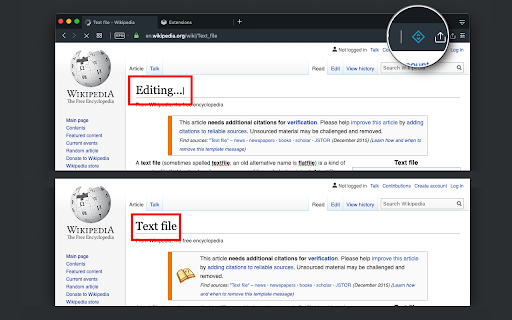
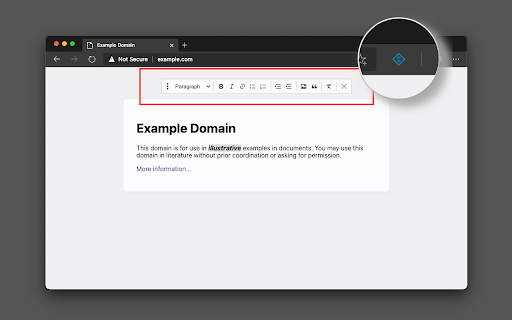
Design Mode is a Chrome extension that enables contenteditable attributes on any webpage. It allows users to edit text, insert images, change formatting, and remove web elements in real-time.

Developer:brian.girko
Version:0.2.4
Size:64.37KiB
Last updated:

Overview

Installs

3K+

Rating

★ 4.7

15 reviews

Languages

14 locales

Includes Deutsch, English, Nederlands, español...

Market analysis

Review-backed positioning, friction, and market signals for this Chrome extension.

Backed by review samples

Macro category

Developer & Designer Tools

Pricing friction

Low review signal

Complaint intensity

Low review signal

Listing & review signals
Observed signals from store listing text and review samples.

Listing positioning

The product positions itself as a way to transform any webpage into an editable document similar to Microsoft Word or Open Office. It highlights the ability to modify content, drag assets, and manage HTML elements directly within the browser.

Inferred product pattern

A lightweight utility tool for on-the-fly DOM manipulation and visual content editing.

Review-backed pain points

Users noted that modifications are not persistent after a page reload and requested more granular styling options such as font and color selection.

Observed feature gaps

Limited styling capabilities (no font or color controls) and lack of support for editing 'about:blank' or 'data:text/html' pages.

Tags
Rich Text EditorWeb Design ToolPage EditorContent Prototyping
Target users

- Web Developers

- Content Editors

- UI/UX Designers

- QA Testers

Primary use cases

- Rapid webpage content prototyping

- Visualizing text and layout changes without code

- Creating customized screenshots of modified web pages

Positive themes

- Fast performance

- Ability to edit offline without using Chrome Developer Tools

- Effective prevention of accidental button clicks

Negative themes

- Lack of color and font customization

- Loss of edits upon page reload

Observed friction

- No pricing friction observed; reviews suggest the tool is provided for free.

Evidence boundary: Analysis based on store description and user reviews highlighting utility, styling limitations, and persistence issues. Data is based on a small sample size of 15 reviews.
Complaint summaries
Review-backed complaint signals grouped by operational area.

Support

No support complaints observed.

Reliability

Users reported that changes do not persist when the page is reloaded.

Privacy

No privacy complaints observed.

Access & pricing

- Free usage observed

- No account requirement observed

- Free plan or free usage claimed

Store listing facts

Listing assets

- Screenshots: 2

- Videos: 1

- Languages: 14

Trust signals

- Developer contact

- Official website

Store metadata

- Version: 0.2.4

- Size: 64.37KiB

- Last updated:

Listing SEO keywords

Search intent keywords
Keyword signals for evaluating how users may discover, compare, or search for this extension category.

Core discovery

design mode extensionweb page editorrich text editor chromeedit website text

Comparison

MS Word for webChrome Inspect alternativecontenteditable tool

Problem

edit webpage contentmodify website layoutchange text on website

Alternative

Page EditorWeb Designer ModeText Editor Extension

Similar extensions

Jump to related discovery paths:

Screenshots

Design Mode - Page's Rich Text Editor screenshot

Links

Website: add0n.com

Videos: Watch

Recommended Chrome extensions

Related listings from the same category, trending peers, and the same publisher portfolio.

Browse developer