Keep Awake icon

Keep Awake Chrome Extension Analysis

Automation & Workflow Efficiency

Chrome extension ID: oplfdlafcahjlcflbiobjpommkmmlfcf

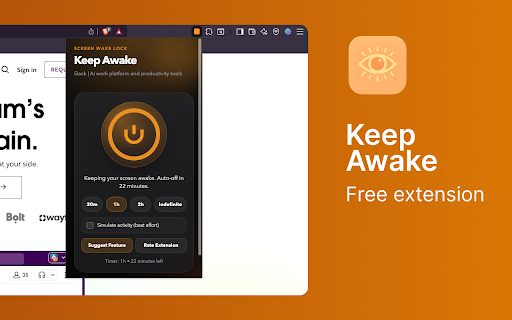
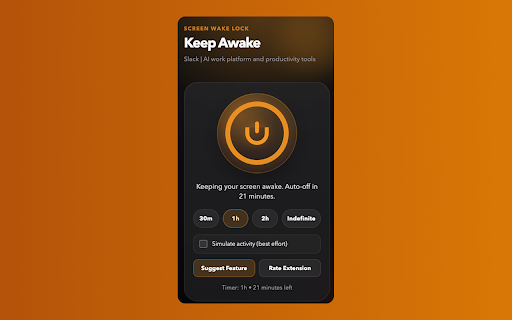
Keep Awake is a Chrome extension designed to prevent your computer screen from going to sleep. It offers a simple one-button toggle to keep the screen active indefinitely or for preset timer durations. The extension also includes a keyboard shortcut for quick activation and an optional activity simulation mode.

Version:1.0.4
Size:52.48KiB
Last updated:

Overview

Installs

56

Rating

★ 5.0

2 reviews

Languages

1 locales

Includes English

Market analysis

Review-backed positioning, friction, and market signals for this Chrome extension.

Backed by review samples

Macro category

Automation & Workflow Efficiency

Pricing friction

Low review signal

Complaint intensity

Low review signal

Listing & review signals
Observed signals from store listing text and review samples.

Listing positioning

This Chrome extension is positioned as a simple, one-tap solution to prevent screens from sleeping during presentations, long reads, or while viewing dashboards. It emphasizes ease of use with a single toggle and optional timer functionality.

Inferred product pattern

A utility extension that directly manipulates browser or system settings to prevent sleep modes, prioritizing simplicity and privacy.

Review-backed pain points

No significant pain points are evident from the limited review data. The single review states it 'works as intended'.

Observed feature gaps

No feature gaps are immediately apparent from the listing or reviews, though more advanced scheduling options could be a future consideration.

Tags
Keep AwakeScreen LockProductivity Tool
Target users

- Users giving presentations

- Individuals reading long articles

- Dashboard viewers

- Developers

Primary use cases

- Preventing screen timeout during critical tasks

- Maintaining screen visibility for dashboards

- Ensuring uninterrupted viewing of long content

Positive themes

- Works as intended

- Amazing functionality

Negative themes

No negative theme data.

Observed friction

- The extension is free to use and claims no data is collected, thus no pricing friction is observed.

Evidence boundary: Evidence is derived from the Chrome Web Store listing details and a single review. The review data is extremely limited, consisting of only one review. Therefore, broad conclusions about user sentiment or common pain points cannot be made.
Complaint summaries
Review-backed complaint signals grouped by operational area.

Support

No support, account, or refund complaints are present in the provided review data.

Reliability

No reliability or performance complaints are present in the provided review data. The single review indicates it works as intended.

Privacy

The extension explicitly states 'No data collected. No accounts. No tracking. Settings saved locally on your device,' addressing potential privacy concerns.

Access & pricing

- Free usage observed

- No account requirement observed

- Free plan or free usage claimed

Store listing facts

Listing assets

- Screenshots: 2

- Videos: 0

- Languages: 1

Trust signals

- Privacy policy

- Developer contact

- Official website

- Support link

Store metadata

- Version: 1.0.4

- Size: 52.48KiB

- Last updated:

Listing SEO keywords

Search intent keywords
Keyword signals for evaluating how users may discover, compare, or search for this extension category.

Core discovery

keep awake chrome extensionprevent screen sleepstop screen from sleepingdisable screen timeoutpresentation tool chrome

Comparison

alternative to screensaverscreensaver disabler

Problem

screen turns offcomputer sleepsdisplay goes blackauto lock screen

Alternative

anti sleep extensionstay awake tool

Similar extensions

Jump to related discovery paths:

Screenshots

Keep Awake screenshot

Links

Recommended Chrome extensions

Related listings from the same category, trending peers, and the same publisher portfolio.

Browse tools
Auto Clicker icon

Auto Clicker

Alanas Kalinauskas

Auto-click at any speed. Pick a target or follow your cursor. No tracking. No data leaves your device.

Installs

520

Rating

★ 5.0

Bass Booster icon

Bass Booster

Alanas Kalinauskas

Add deep, clean bass to any tab. Presets for Soft, Deep, and Max. No data collected.

Installs

472

Rating

★ 5.0

Planet Search icon

Planet Search

Free VPN Planet

Enchanced default search engine.

Installs

2.0M+

Rating

★ 3.1

Lightshot (screenshot tool) icon

Lightshot (screenshot tool)

Skillbrains

Simple and convenient screenshot tool. Select an area, edit your screenshot and upload it to the server.

Installs

2.0M+

Rating

★ 3.4

NaturalReader - AI Text to Speech icon

NaturalReader - AI Text to Speech

NaturalSoft Limited

NaturalReader reads text aloud on the pages you browse, including emails, online documents, PDFs and ebooks.

Installs

1.0M+

Rating

★ 4.1

Keywords Everywhere - Keyword Tool icon

Keywords Everywhere - Keyword Tool

Axeman Technology Solutions LLP

Keyword search volume, cpc and competition for 15+ websites like Google™ Search Console, YouTube™, Amazon™ & more

Installs

1.0M+

Rating

★ 3.3

BlockSite Block Websites & Stay Focused icon

BlockSite Block Websites & Stay Focused

BlockSite

Stay focused and boost productivity: Custom blocklist, Scheduled site blocking, and Password protection.

Installs

1.0M+

Rating

★ 4.5

Ruffle - Flash Emulator icon

Ruffle - Flash Emulator

ruffle

Puts Flash back on the web where it belongs.

Installs

1.0M+

Rating

★ 4.7

PrintFriendly: Print, PDF Editor & Full Page Screenshot icon

PrintFriendly: Print, PDF Editor & Full Page Screenshot

PrintFriendly

Print clean web pages, save as PDF, edit PDFs, and capture full-page screenshots. Integrates with ChatGPT, Claude, and Gemini.

Installs

1.0M+

Rating

★ 4.9

Kimi icon

Kimi

Kimi

Kimi Browser Extension — for AI agents. AI can open pages, click, fill forms, extract info, and automate web tasks.

Installs

1.0M+

Rating

★ 3.9