Web Editor Chrome Extension Analysis
Developer & Designer ToolsChrome extension ID: pdmlhckofhkhebmcplblcijijgjiakcm
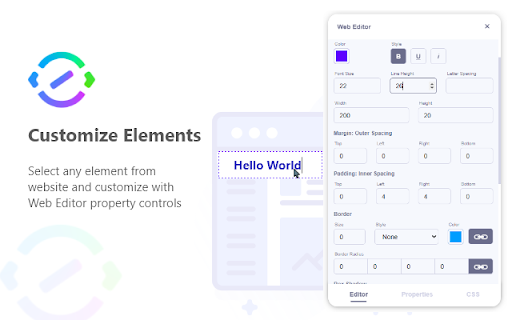
Web Editor is a Chrome extension that allows users to inspect website elements, alter their properties, insert content, and design pages visually. It aims to simplify website customization for users who may not have deep technical expertise.
Overview
Installs
10K+
Rating
★ 4.2
34 reviews
Languages
1 locales
Includes English
Market analysis
Review-backed positioning, friction, and market signals for this Chrome extension.
Macro category
Developer & Designer Tools
Pricing friction
Low review signal
Complaint intensity
Moderate review signal
Listing positioning
This Chrome extension positions itself as a handy tool for customizing websites and creating designs without requiring extensive technical knowledge. It emphasizes an enhanced way to inspect, alter, and visualize website elements.
Inferred product pattern
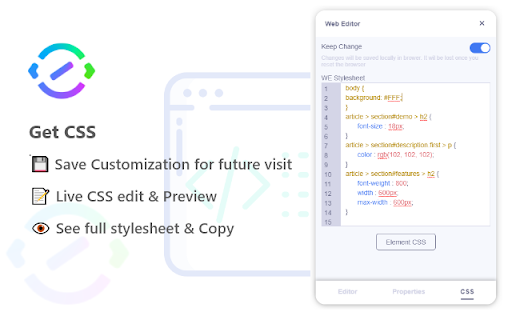
Client-side website editor with visual manipulation and CSS inspection capabilities, potentially lacking persistent storage.
Review-backed pain points
Users report that changes made by the extension do not persist after refreshing the page. There are also complaints about the UI being unintuitive, a lack of an undo function (CTRL+Z), and that the generated CSS is overly specific and impractical for actual code editing. Some users also experience issues with the extension's buttons not responding or the CSS window not appearing.
Observed feature gaps
The extension appears to lack a persistent save feature for edited pages, meaning changes are lost on refresh. An undo/redo functionality (like CTRL+Z) is also missing. The generated CSS could be more user-friendly, referencing class names rather than complex selectors. Some users also wish for the ability to save snapshots of edited webpages as HTML files.
- Website designers
- Web developers
- Content creators
- Hobbyists
- Website customization
- Website element inspection
- Design prototyping
- Content alteration
- Useful for website customization and design
- Appreciated for its ability to edit website elements
- Requests for enhanced saving and snapshot features
- Issues with UI not being user-friendly
- Inability to undo changes
- Generated CSS is not practical for code modification
- Changes not persisting after page refresh
- Extension buttons not responding or showing CSS window
- Inability to save edited pages for future use
- Performance complaints detected
- The extension is free to use, with no reported pricing friction.
Support
No specific complaints about support were observed. Some users did inquire about functionality issues and toggles not working.
Reliability
Users report that changes do not persist after refreshing the page, and that the extension's buttons sometimes do not respond or show the CSS window, indicating reliability issues.
Privacy
No privacy complaints were observed.
- Free usage observed
- No clear access signal
- Free plan or free usage claimed
Store listing facts
- Screenshots: 6
- Videos: 0
- Languages: 1
- Developer contact
- Version: 1.0.9
- Size: 68.98KiB
- Last updated:
Listing SEO keywords
Core discovery
Comparison
Problem
Alternative
Similar extensions
Jump to related discovery paths:
Screenshots