Web Page Reader TTS Text To Speech icon

Web Page Reader TTS Text To Speech Chrome Extension Analysis

Tab & Bookmark Productivity

Chrome extension ID: anafkmjpnlnmmengalcgbkkplfpeckia

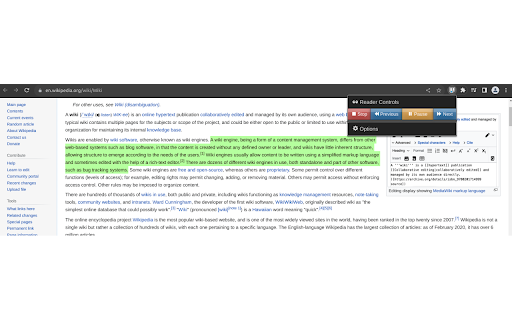
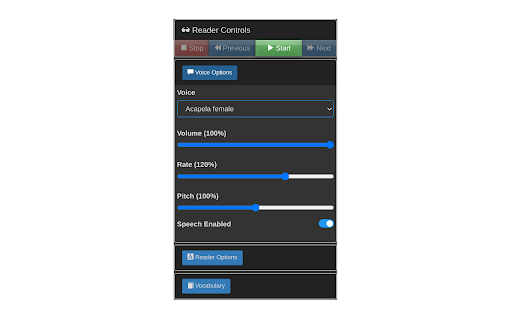
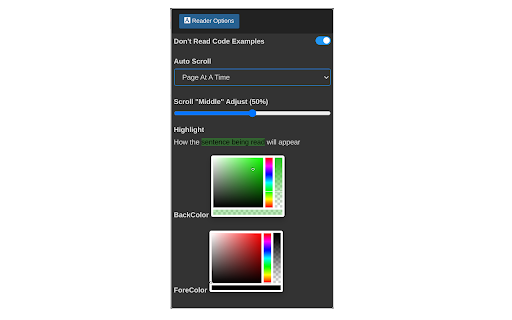
Web Page Reader TTS Text To Speech is a Chrome extension designed to read web pages aloud using text-to-speech technology. It highlights text sentence by sentence as it reads, offering customizable voice settings, pitch, speaking rate, and visual display options for the highlighted text. It also includes features for skipping code sections and controlling scrolling behavior.

Developer:Cosmologix
Version:0.7.2
Size:371KiB
Last updated:

Overview

Installs

3K+

Rating

3.0

45 reviews

Languages

1 locales

Includes English

Market analysis

Review-backed positioning, friction, and market signals for this Chrome extension.

Backed by review samples

Macro category

Tab & Bookmark Productivity

Pricing friction

Low review signal

Complaint intensity

High review signal

Listing & review signals
Observed signals from store listing text and review samples.

Listing positioning

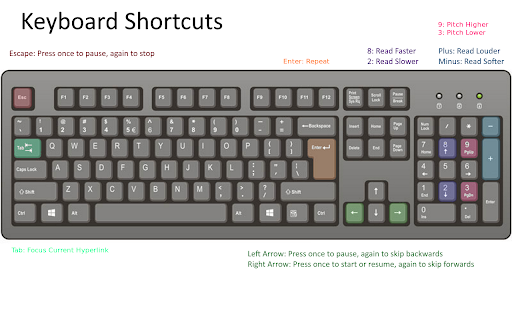
This extension positions itself as a 100% free, privacy-focused web page reader that uses Text To Speech (TTS). It highlights sentences automatically without requiring text selection and boasts no registration, no ads, and no data sharing. The listing emphasizes ease of use, extensive customization options, and keyboard controls.

Inferred product pattern

A completely free, privacy-focused Chrome extension offering basic web page text-to-speech functionality with some customization for voice and display, primarily aimed at accessibility and productivity.

Review-backed pain points

Many users report that the core text-to-speech functionality simply 'did not work at all' or stopped reading without reason. There are also complaints about the extension slowing down their device, reading too slowly even at the highest speed, and inaccurately reading web content by vocalizing hyperlinks and symbols. Users also noted bugs with the reader controls not resetting properly after stopping.

Observed feature gaps

Reviewers express a need for significantly faster reading speed options (e.g., up to 4x current max) and the ability to use alternative voice APIs like Windows voices. The listing itself mentions a 'Vocabulary feature' with custom dictionaries 'coming soon,' indicating a known future addition.

Tags
Text To SpeechWeb ReaderProductivity ToolAccessibilityLearning Aid
Target users

- Students cramming for exams

- Individuals with vision impairments

- Multitaskers

- Adults engaged in continuing education

- Language learners

- Users who prefer hands-free content consumption

Primary use cases

- Hands-free consumption of web content

- Enhancing learning and study efficiency

- Improving accessibility for users with visual challenges

- Facilitating language acquisition through spoken text

- Assisting with information absorption during multitasking

Positive themes

- The extension works for some users

- Does not open new separate windows unlike other similar tools

Negative themes

- Core functionality often fails to work or stops unexpectedly

- Causes performance issues, such as slowing down the device

- Reading speed is perceived as too slow even at maximum settings

- Inaccurate reading, including blurting out non-coherent hyperlinks and symbols

- Interface bugs where controls (e.g., pause/start) do not reset correctly

Observed friction

- Performance complaints detected

- The extension is positioned as 100% free with no hidden costs, registration, or ads, eliminating any pricing friction for users.

Evidence boundary: The analysis is based on the provided Chrome Web Store listing, including the short and long descriptions, and a sample of 10 English reviews. The review sample, while indicative of critical issues and user needs, is not a full sentiment distribution and predominantly features lower-rated feedback.
Complaint summaries
Review-backed complaint signals grouped by operational area.

Support

While there are no explicit complaints about support, the high volume of 'not working' reviews suggests users are experiencing critical issues that require developer attention and troubleshooting.

Reliability

Users frequently report severe reliability issues, including the extension not working at all, stopping unexpectedly mid-page, and slowing down their Chromebooks. This indicates significant functional instability.

Privacy

There are no privacy complaints. The listing explicitly states 'No data sharing,' positioning it as a privacy-friendly option.

Access & pricing

- Free usage observed

- No account requirement observed

- Free plan or free usage claimed

Store listing facts

Listing assets

- Screenshots: 4

- Videos: 0

- Languages: 1

Trust signals

- Developer contact

Store metadata

- Version: 0.7.2

- Size: 371KiB

- Last updated:

Listing SEO keywords

Search intent keywords
Keyword signals for evaluating how users may discover, compare, or search for this extension category.

Core discovery

text to speech chromeweb page readerread aloud extensiontts extensionbrowser tts free

Comparison

web page reader vs read aloudbest text to speech chrome extension

Problem

chrome tts not workingweb page reader slowtext to speech extension issues

Alternative

text to speech reader alternativesread aloud extension alternatives

Similar extensions

Jump to related discovery paths:

Screenshots

Web Page Reader TTS Text To Speech screenshot

Recommended Chrome extensions

Related listings from the same category, trending peers, and the same publisher portfolio.

Browse education
Readlang Web Reader icon

Readlang Web Reader

readlang

Read websites in the language you're learning, translate words you don't know, and we'll create flashcards to help you remember.

Installs

100K+

Rating

4.3

Yomitan Popup Dictionary icon

Yomitan Popup Dictionary

yomidevs

Popup dictionary for language learning

Installs

100K+

Rating

4.8

Language Learning with Netflix & YouTube-AFL icon

Language Learning with Netflix & YouTube-AFL

App For Language

Language learning with Netflix: dual subtitles, YouTube support, AI mind maps & speaking coach for fast, fun progress.

Installs

100K+

Rating

3.9

Translate - Translator, Dictionary, TTS icon

Translate - Translator, Dictionary, TTS

uLanguage App

Accurate translate words, phrases and texts using Google Translate. Full page translator, dictionary and text to speech (TTS).

Installs

100K+

Rating

4.5

Dualsub - YouTube Subtitle Translator icon

Dualsub - YouTube Subtitle Translator

Dualsub Studio

Translate and display dual subtitles on YouTube and other video websites.

Installs

100K+

Rating

3.6

AnswerAI - Homework AI Tutor & Study Helper icon

AnswerAI - Homework AI Tutor & Study Helper

AnswerAI Team

Your AI assistant ChatGPT Plugin.Answer questions and get AI answers quickly,write emails,articles,chatbot,learning assistant.

Installs

100K+

Rating

4.9

Pix Companion icon

Pix Companion

web-extensions

Browser extension for Pix

Installs

100K+

Rating

1.4

Rememberry - Translate and Memorize with Flashcards icon

Rememberry - Translate and Memorize with Flashcards

rememberry

Translate words while browsing and turn them into spaced repetition flashcards to build foreign language vocabulary.

Installs

100K+

Rating

4.6

Talk & Comment - Voice notes anywhere icon

Talk & Comment - Voice notes anywhere

TalkandComment.com

Voice notes for classrooms and teams. Give feedback students actually hear.

Installs

100K+

Rating

4.1

Translator, dictionary - accurate translate icon

Translator, dictionary - accurate translate

Translate App

Translate text on any webpage instantly using Google Translate. Online Translator, accurate Translation.

Installs

100K+

Rating

4.4