AverPoint icon

AverPoint Chrome Extension Analysis

Automation & Workflow Efficiency

Chrome extension ID: delinpnhfdkcjeifmapikhinioghdeia

AverPoint is a research and productivity tool designed to help students and professionals manage web content. Users can capture claims, quotes, and images from articles, organize them into collections, and utilize them in writing projects or team collaborations.

Developer:shouvik
Version:0.0.144
Size:13.47MiB
Last updated:

Overview

Installs

4K+

Rating

★ 4.7

14 reviews

Languages

1 locales

Includes English (United States)

Market analysis

Review-backed positioning, friction, and market signals for this Chrome extension.

Backed by review samples

Macro category

Automation & Workflow Efficiency

Pricing friction

Low review signal

Complaint intensity

Low review signal

Listing & review signals
Observed signals from store listing text and review samples.

Listing positioning

AverPoint positions itself as a cognitive media literacy and research tool that helps users organize reading, writing, and critical thinking workflows. It integrates a browser extension with a web-based dashboard to facilitate the collection, curation, and citation of web-based information.

Inferred product pattern

A research curation extension that pairs a browser-based clipping tool with an integrated cloud dashboard for information management.

Review-backed pain points

No review-backed pain points are available in the current dataset; all provided reviews are highly positive.

Observed feature gaps

No feature gaps were identified from the available reviews.

Tags
Research ToolContent CurationMedia LiteracyInformation Management
Target users

- University Students

- Academic Researchers

- Content Curators

- Professional Analysts

Primary use cases

- Organizing web-based research

- Collaborating on information gathering

- Media literacy and critical reading

- Vocabulary building

Positive themes

- Ease of organizing research and data points

- Seamless integration between extension and web app

- Efficient team collaboration features

- Intuitive clipping of text and images

Negative themes

- No negative themes identified in provided samples

Observed friction

- No pricing friction reported in review samples.

Evidence boundary: Product information derived from the developer's long description and consistent positive feedback from a set of 10 user reviews. The evidence is derived from a small, exclusively positive set of legacy reviews; no recent or critical user feedback is available.
Complaint summaries
Review-backed complaint signals grouped by operational area.

Support

No support complaints reported in review samples.

Reliability

No reliability complaints reported in review samples.

Privacy

No privacy complaints reported in review samples.

Access & pricing

- No clear monetization signal

- Account required for core usage

- No clear pricing signal

Store listing facts

Listing assets

- Screenshots: 3

- Videos: 0

- Languages: 1

Trust signals

- Privacy policy

- Developer contact

- Official website

- Support link

Store metadata

- Version: 0.0.144

- Size: 13.47MiB

- Last updated:

Listing SEO keywords

Search intent keywords
Keyword signals for evaluating how users may discover, compare, or search for this extension category.

Core discovery

research organizerweb clipping toolmedia literacy extensioninformation managementacademic research aid

Comparison

AverPoint vs research toolscollaborative reading tools

Problem

managing web researchorganizing online information

Alternative

bookmarks managerdigital research notebook

Similar extensions

Jump to related discovery paths:

Screenshots

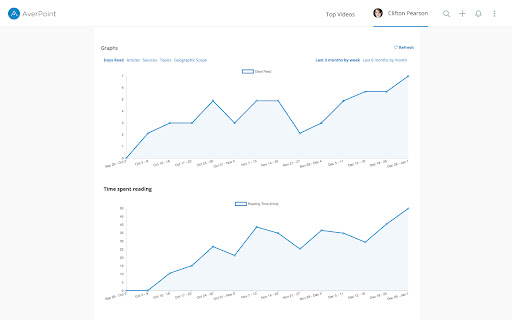
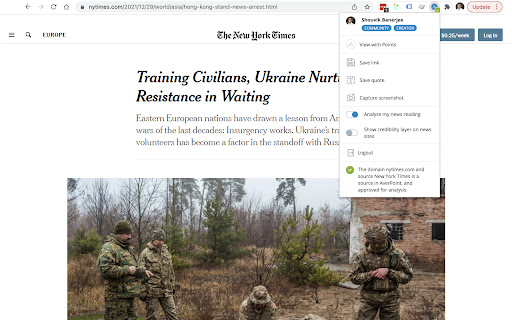
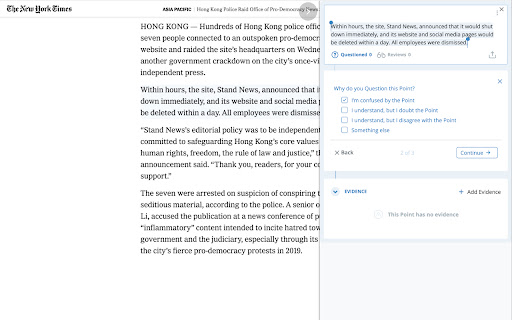
AverPoint screenshot

Links

Recommended Chrome extensions

Related listings from the same category, trending peers, and the same publisher portfolio.

Browse education
Talk & Comment: Voice Feedback & Audio Comments for Teachers icon

Talk & Comment: Voice Feedback & Audio Comments for Teachers

TalkandComment.com

Leave voice feedback on student work in Google Docs, Classroom or any page. Share one link; students listen on their phone.

Installs

200K+

Rating

★ 4.0

Study Tools voor Magister icon

Study Tools voor Magister

QkeleQ10

Een extensie die verschillende aspecten van Magister verbetert en problemen ermee oplost.

Installs

200K+

Rating

★ 4.5

rikaikun icon

rikaikun

Erek Speed

rikaikun shows the reading and English definition of Japanese words when you hover over Japanese text in the browser.

Installs

200K+

Rating

★ 4.6

Reverso – Translation, dictionary icon

Reverso – Translation, dictionary

Reverso Technologies Inc.

Translate and learn languages while reading or watching movies online. It's free.

Installs

200K+

Rating

★ 4.0

Padlet Mini icon

Padlet Mini

engine

Collect and bookmark the best of the web for yourself or with friends.

Installs

200K+

Rating

★ 4.1

ExCITATION – Journal Ranking & Impact Factor for Google Scholar™ icon

ExCITATION – Journal Ranking & Impact Factor for Google Scholar™

Excitation Journal

Show SJR, ABS & ABDC journal rankings in Google Scholar. Sort by citations, detect predatory journals & preview abstracts — free.

Installs

200K+

Rating

★ 4.5

Rapid Journal Quality Check icon

Rapid Journal Quality Check

jrk.devgit

Displays rankings and h-index for academic journals next to Google Scholar search results.

Installs

200K+

Rating

★ 4.3

Toucan by Babbel - Language Learning icon

Toucan by Babbel - Language Learning

jointoucan.com

Learn a new language just by browsing the internet.

Installs

200K+

Rating

★ 3.5

Readlang Web Reader icon

Readlang Web Reader

readlang

Read websites in the language you're learning, translate words you don't know, and we'll create flashcards to help you remember.

Installs

100K+

Rating

★ 4.2

Wayground AI icon

Wayground AI

Wayground (formerly Quizizz)

AI-powered teaching, one click away!

Installs

100K+

Rating

★ 4.3