Keyboard Shortcuts for Google Chrome™ icon

Keyboard Shortcuts for Google Chrome™ Chrome Extension Analysis

Automation & Workflow Efficiency

Chrome extension ID: eddfopoaiahkdjlledkdmmdmcjgecdeb

A productivity utility designed for the Google Chrome browser that enables users to manage and customize keyboard shortcuts. It supports both Windows and Mac users and provides a set of default shortcuts that can be personalized.

Developer:Free Apps
Version:4.0.0
Size:285KiB
Last updated:

Overview

Installs

6K+

Rating

★ 4.2

33 reviews

Languages

41 locales

Includes Deutsch, English, English (United States), Filipino...

Market analysis

Review-backed positioning, friction, and market signals for this Chrome extension.

Backed by review samples

Macro category

Automation & Workflow Efficiency

Pricing friction

Low review signal

Complaint intensity

Moderate review signal

Listing & review signals
Observed signals from store listing text and review samples.

Listing positioning

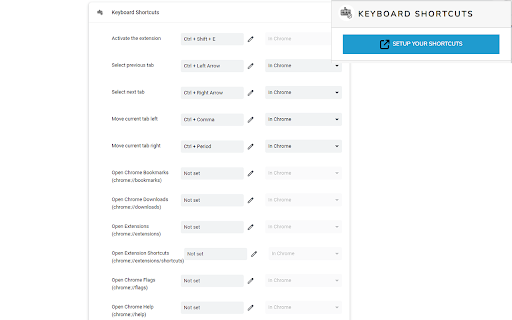
The extension positions itself as a tool to increase efficiency by saving time and reducing mouse clicks through 25 pre-set keyboard shortcuts. It allows users to modify these shortcuts or add their own for frequently used functions.

Inferred product pattern

A utility-focused productivity tool aimed at browser navigation customization.

Review-backed pain points

Users expressed frustration over the inability to override certain default browser shortcuts like Ctrl+W and requested additional features like a 'reopen closed tab' shortcut and the ability to modify the F11 key.

Observed feature gaps

Inability to override existing system/browser shortcuts and lack of specific requested functions like 'reopen closed tab'.

Tags
Keyboard ShortcutsBrowser ProductivityWorkflow Automation
Target users

- Power users

- Chrome browser users

- Efficiency-focused professionals

Primary use cases

- Customizing browser navigation

- Reducing mouse interaction

- Automating repetitive browser tasks

Positive themes

- Improved user experience

- Enhanced productivity

- Effective tab duplication

Negative themes

- Limited ability to override native browser shortcuts

- Functionality perceived as redundant by some

Observed friction

- No pricing friction observed as the extension is promoted as free.

Evidence boundary: Analysis based on the store listing description and user reviews discussing shortcut functionality and customization limits. The review sample size is small, which may not represent the full user experience.
Complaint summaries
Review-backed complaint signals grouped by operational area.

Support

No support complaints observed in the provided data.

Reliability

Some users reported that specific attempts to change or override existing shortcuts did not work as intended.

Privacy

No privacy complaints observed.

Access & pricing

- Free usage observed

- No account requirement observed

- Free plan or free usage claimed

Store listing facts

Listing assets

- Screenshots: 1

- Videos: 0

- Languages: 41

Trust signals

- Privacy policy

- Developer contact

- Official website

Store metadata

- Version: 4.0.0

- Size: 285KiB

- Last updated:

Listing SEO keywords

Search intent keywords
Keyword signals for evaluating how users may discover, compare, or search for this extension category.

Core discovery

keyboard shortcutschrome shortcutsbrowser shortcutscustom shortcuts

Comparison

native browser shortcutskeyboard automation

Problem

change chrome shortcutsoverride browser keysshortcut customization

Alternative

browser productivity toolsworkflow efficiency extensions

Similar extensions

Jump to related discovery paths:

Screenshots

Keyboard Shortcuts for Google Chrome™ screenshot

Links

Recommended Chrome extensions

Related listings from the same category, trending peers, and the same publisher portfolio.

Browse workflow