Snippet Highlighter - Web & PDF icon

Snippet Highlighter Chrome Extension Analysis

Automation & Workflow Efficiency

Store listing title: Snippet Highlighter - Web & PDF

Chrome extension ID: fkaokedhimpifhfadmgjpfjimkogdlcm

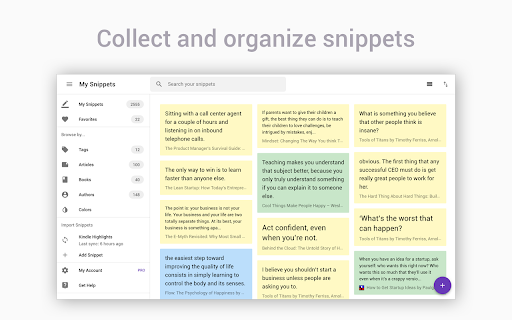
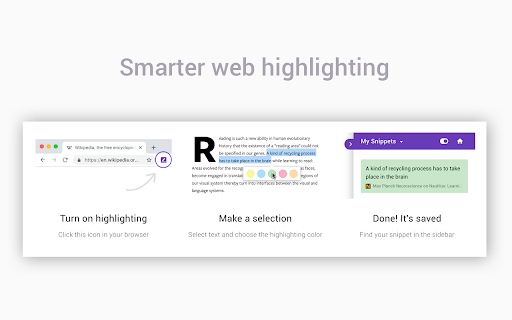
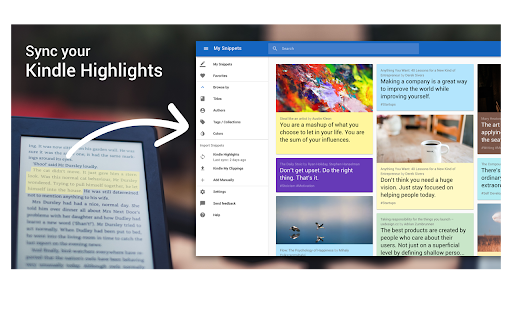
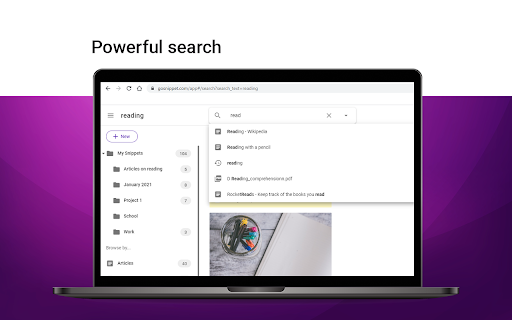
Snippet Highlighter is a browser extension that allows users to highlight text and images on websites and PDFs. It also supports importing highlights from Kindle devices. The extension offers features for organizing, searching, and exporting these highlights in various formats. A free account is required, with optional upgrades to a premium version for advanced features.

Developer:Adolix
Version:6.0.5
Size:5.38MiB
Last updated:

Overview

Installs

10K+

Rating

4.2

137 reviews

Languages

19 locales

Includes Deutsch, English, English (United Kingdom), English (United States)...

Market analysis

Review-backed positioning, friction, and market signals for this Chrome extension.

Backed by review samples

Macro category

Automation & Workflow Efficiency

Pricing friction

High review signal

Complaint intensity

High review signal

Listing & review signals
Observed signals from store listing text and review samples.

Listing positioning

Snippet Highlighter positions itself as a comprehensive tool for organizing, searching, and exporting highlights from websites, PDFs, and Kindle. It emphasizes bringing all highlights into one searchable, cloud-synced location for enhanced learning and reading experiences.

Inferred product pattern

Freemium annotation tool requiring account creation, with core organizational features reserved for paid users.

Review-backed pain points

Users report that highlights sometimes disappear or do not appear correctly on the page or in the sidebar. The extension's interface can be intrusive, and formatting of highlighted text is not always maintained. There is also significant dissatisfaction with the limited free functionality and the requirement to pay for features like tagging and folders.

Observed feature gaps

Some users desire more options within the extension's settings, such as disabling the highlight options pop-up for single-word selections or requiring a key press to activate the pop-up. The 'Word or Excel' export for highlights was listed as 'coming soon' in the description.

Tags
Highlighting ToolWeb AnnotationPDF AnnotationKindle HighlightsNote Taking
Target users

- Students

- Researchers

- Writers

- Business Professionals

- Readers

Primary use cases

- Annotating web pages

- Annotating PDF documents

- Importing and managing Kindle highlights

- Organizing research notes

- Saving and exporting important text snippets

Positive themes

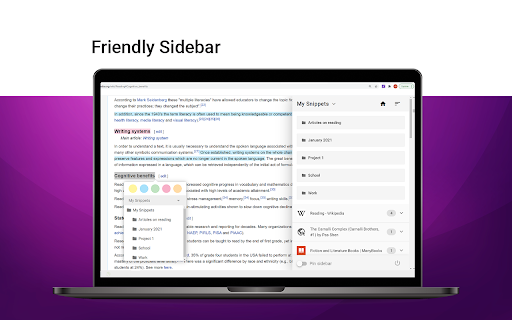
- The premium version offers a complete and visually appealing system for managing highlights with folders and tags.

- It is considered better than other highlighting extensions previously used.

Negative themes

- Highlights not appearing on the page or in the sidebar after being made.

- The extension's interface (pull-out bar) can obstruct website usability.

- Formatting issues with line breaks in highlighted text.

- Concerns about the need to pay for essential features like tagging and folders.

- Frustration with the requirement to create an account for basic functionality.

Observed friction

- Payment required for meaningful usage

- Free-tier complaints detected

- Account blocking complaints detected

- Performance complaints detected

- The free tier offers very limited functionality, with essential features like tagging and folders locked behind a paid subscription. Users express frustration that even simple note-taking requires payment, leading to a perception of a 'hook' to pay.

Evidence boundary: Review data indicates positive feedback on the premium version's organization features, but significant negative feedback regarding the reliability of highlighting, the intrusiveness of the UI, and the restrictive nature of the free tier. Account creation is also a point of contention. The provided reviews are a sample and may not represent the full user sentiment distribution. Specific details on refund experiences or long-term reliability are not extensively covered.
Complaint summaries
Review-backed complaint signals grouped by operational area.

Support

No specific complaints about direct support interactions were observed, but users express frustration with the account creation requirement for a simple tool and the perceived high cost of notes.

Reliability

Multiple reviews indicate issues with highlights not being saved or displayed correctly, as well as problems with PDF highlighting after waking the computer. Some users also report the extension simply not working.

Privacy

No privacy complaints were observed in the provided reviews.

Access & pricing

- Free entry with paid features

- Account required for core usage

- Limited free usage observed

Store listing facts

Listing assets

- Screenshots: 5

- Videos: 0

- Languages: 19

Trust signals

- Privacy policy

- Developer contact

- Official website

- Support link

Store metadata

- Version: 6.0.5

- Size: 5.38MiB

- Last updated:

Listing SEO keywords

Search intent keywords
Keyword signals for evaluating how users may discover, compare, or search for this extension category.

Core discovery

web highlighterpdf highlighterkindle highlight importernote taking extensionannotation tool

Comparison

evernote alternativeonenote alternativeraindrop alternative

Problem

save highlightsorganize notesannotate pdfmanage kindle highlights

Alternative

best highlighter extensionfree web annotation

Similar extensions

Jump to related discovery paths:

Screenshots

Snippet Highlighter - Web & PDF screenshot

Links

Recommended Chrome extensions

Related listings from the same category, trending peers, and the same publisher portfolio.

Browse education
News Feed Sanitizer icon

News Feed Sanitizer

Adolix

Clean your social networks news feeds, by filtering the posts based on a banned word list.

Installs

73

Rating

5.0

Knowt: Quizlet Import, AI Notes & Flashcards icon

Knowt: Quizlet Import, AI Notes & Flashcards

Knowt

Automatically import flashcards and notes from any video, PDF, article, or flashcard site. Knowt is the fastest way to study.

Installs

100K+

Rating

4.9

Padlet Mini icon

Padlet Mini

engine

Collect and bookmark the best of the web for yourself or with friends.

Installs

100K+

Rating

4.2

Readlang Web Reader icon

Readlang Web Reader

readlang

Read websites in the language you're learning, translate words you don't know, and we'll create flashcards to help you remember.

Installs

100K+

Rating

4.3

Yomitan Popup Dictionary icon

Yomitan Popup Dictionary

yomidevs

Popup dictionary for language learning

Installs

100K+

Rating

4.8

Language Learning with Netflix & YouTube-AFL icon

Language Learning with Netflix & YouTube-AFL

App For Language

Language learning with Netflix: dual subtitles, YouTube support, AI mind maps & speaking coach for fast, fun progress.

Installs

100K+

Rating

3.9

Translate - Translator, Dictionary, TTS icon

Translate - Translator, Dictionary, TTS

uLanguage App

Accurate translate words, phrases and texts using Google Translate. Full page translator, dictionary and text to speech (TTS).

Installs

100K+

Rating

4.5

Dualsub - YouTube Subtitle Translator icon

Dualsub - YouTube Subtitle Translator

Dualsub Studio

Translate and display dual subtitles on YouTube and other video websites.

Installs

100K+

Rating

3.6

AnswerAI - Homework AI Tutor & Study Helper icon

AnswerAI - Homework AI Tutor & Study Helper

AnswerAI Team

Your AI assistant ChatGPT Plugin.Answer questions and get AI answers quickly,write emails,articles,chatbot,learning assistant.

Installs

100K+

Rating

4.9

Pix Companion icon

Pix Companion

web-extensions

Browser extension for Pix

Installs

100K+

Rating

1.4