Translate with Translatium icon

Translate with Translatium Chrome Extension Analysis

Automation & Workflow Efficiency

Chrome extension ID: gfdkaaldlffejeafbpoimbnabjlbpfgl

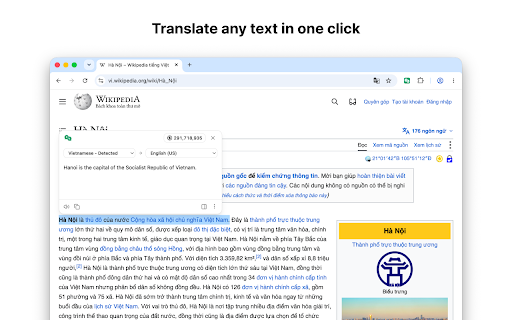
Translate with Translatium is a browser extension that functions as a bridge to the Translatium desktop app. It requires the standalone software to be installed and running to perform translations on selected text from any webpage.

Version:50.0.0
Size:73.01KiB
Last updated:

Overview

Installs

5K+

Rating

4.0

9 reviews

Languages

1 locales

Includes English

Market analysis

Review-backed positioning, friction, and market signals for this Chrome extension.

Backed by review samples

Macro category

Automation & Workflow Efficiency

Pricing friction

Low review signal

Complaint intensity

Moderate review signal

Listing & review signals
Observed signals from store listing text and review samples.

Listing positioning

The extension is positioned as a companion tool that bridges the browser with the standalone Translatium desktop application for macOS and Windows. It streamlines translation workflows by allowing users to send highlighted text directly from the browser to the desktop app via a right-click menu.

Inferred product pattern

External-software dependent browser bridge.

Review-backed pain points

Users have reported that the extension sometimes fails to copy text to the desktop application, and some find the requirement to use a right-click menu less efficient than competitive keyboard shortcuts or double-click triggers.

Observed feature gaps

Lack of direct translation capability within the browser (without the desktop app) and absence of keyboard shortcut support for trigger actions.

Tags
TranslationDesktop CompanionProductivityWorkflow Integration
Target users

- Translatium desktop app users

- Multilingual web users

Primary use cases

- Translating highlighted text

- Sending text from browser to desktop translator

Positive themes

- Functional for core users

- General utility satisfaction

Negative themes

- Failure to capture or transfer text

- Lack of shortcut-based translation

- Preference for direct double-click translation

Observed friction

- Performance complaints detected

- No direct pricing friction reported, though users note the software requires a separate desktop installation.

Evidence boundary: Evidence gathered from a mix of user reviews detailing functionality gaps and positive sentiment regarding basic utility. The review sample size is small, which may not fully represent the stability of the latest version.
Complaint summaries
Review-backed complaint signals grouped by operational area.

Support

No specific support or refund complaints identified in the review sample.

Reliability

Users have explicitly noted that the extension occasionally fails to transmit text to the desktop application.

Privacy

None noted.

Access & pricing

- Free usage observed

- No account requirement observed

- Free plan or free usage claimed

Store listing facts

Listing assets

- Screenshots: 1

- Videos: 0

- Languages: 1

Trust signals

- Privacy policy

- Developer contact

- Official website

- Support link

Store metadata

- Version: 50.0.0

- Size: 73.01KiB

- Last updated:

Listing SEO keywords

Search intent keywords
Keyword signals for evaluating how users may discover, compare, or search for this extension category.

Core discovery

Translatium browser extensiontext translation toolbrowser to desktop translator

Comparison

DeepL alternativeweb translation extension

Problem

Translatium not workingextension text capture failure

Alternative

online translatorChrome translation plugin

Similar extensions

Jump to related discovery paths:

Screenshots

Translate with Translatium screenshot

Links

Recommended Chrome extensions

Related listings from the same category, trending peers, and the same publisher portfolio.

Browse education
Open with Switchbar icon

Open with Switchbar

WebCatalog, Inc.

Integrate Switchbar with your browser, so you can move a web page from one browser to another at the click of a button.

Installs

2K+

Rating

3.0

Certificate Enrollment for ChromeOS icon

Certificate Enrollment for ChromeOS

google.com

Request a certificate for your device.

Installs

200K+

Rating

4.4

Add to Google Classroom icon

Add to Google Classroom

Canopy

This extension adds the current site to Google Classroom

Installs

200K+

Rating

4.2

Knowt: Quizlet Import, AI Notes & Flashcards icon

Knowt: Quizlet Import, AI Notes & Flashcards

Knowt

Automatically import flashcards and notes from any video, PDF, article, or flashcard site. Knowt is the fastest way to study.

Installs

100K+

Rating

4.9

Padlet Mini icon

Padlet Mini

engine

Collect and bookmark the best of the web for yourself or with friends.

Installs

100K+

Rating

4.2

Readlang Web Reader icon

Readlang Web Reader

readlang

Read websites in the language you're learning, translate words you don't know, and we'll create flashcards to help you remember.

Installs

100K+

Rating

4.3

Yomitan Popup Dictionary icon

Yomitan Popup Dictionary

yomidevs

Popup dictionary for language learning

Installs

100K+

Rating

4.8

Language Learning with Netflix & YouTube-AFL icon

Language Learning with Netflix & YouTube-AFL

App For Language

Language learning with Netflix: dual subtitles, YouTube support, AI mind maps & speaking coach for fast, fun progress.

Installs

100K+

Rating

3.9

Translate - Translator, Dictionary, TTS icon

Translate - Translator, Dictionary, TTS

uLanguage App

Accurate translate words, phrases and texts using Google Translate. Full page translator, dictionary and text to speech (TTS).

Installs

100K+

Rating

4.5

Dualsub - YouTube Subtitle Translator icon

Dualsub - YouTube Subtitle Translator

Dualsub Studio

Translate and display dual subtitles on YouTube and other video websites.

Installs

100K+

Rating

3.6