React Inspector icon

React Inspector Chrome Extension Analysis

Developer & Designer Tools

Chrome extension ID: gkkcgbepkkhfnnjolcaggogkjodmlpkh

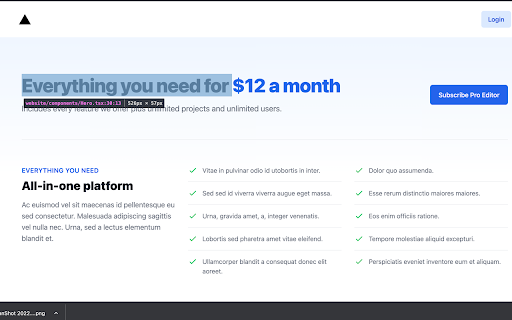
React Inspector is a free, open-source Chrome extension that allows developers to inspect React components in the browser and open their associated source files in a local editor. It relies on React Fiber nodes and requires a development build to function correctly.

Developer:hand-dot
Version:1.2.4
Size:28.77KiB
Last updated:

Overview

Installs

7K+

Rating

★ 3.3

13 reviews

Languages

1 locales

Includes English

Market analysis

Review-backed positioning, friction, and market signals for this Chrome extension.

Backed by review samples

Macro category

Developer & Designer Tools

Pricing friction

Low review signal

Complaint intensity

Moderate review signal

Listing & review signals
Observed signals from store listing text and review samples.

Listing positioning

The extension is positioned as a productivity utility for React developers, enabling them to jump directly from a browser-rendered component to its source code in their local IDE. It emphasizes a seamless workflow integration with existing tools like React Developer Tools and local file systems.

Inferred product pattern

Single-purpose developer utility designed to bridge browser inspection with local code editing.

Review-backed pain points

Users frequently report that the extension fails to identify or open components ('This element cannot be opened in React Inspector') and encounter issues with newer build tools or strict Content Security Policies.

Observed feature gaps

The extension lacks robust compatibility with modern build pipelines like Vite and newer security configurations, leading to inconsistent performance across varied development environments.

Tags
ReactDeveloper ToolIDE IntegrationFrontend
Target users

- Frontend Developers

- React Engineers

- Full Stack Developers

Primary use cases

- Direct navigation from browser DOM to IDE source code

- Streamlined React component debugging

Positive themes

- Time-saving for debugging

- Works well for some user environments

- Successful integration with React DevTools

Negative themes

- Fails to open source files in certain configurations

- CSP policy violations

- General functionality failure in specific dev stacks (e.g., Vite)

Observed friction

- Performance complaints detected

- None; the product is open-source and free.

Evidence boundary: Evidence is based on user reviews citing specific technical failures and positive confirmations of productivity benefits. Review sample size is small and may not represent the experience of the total user base.
Complaint summaries
Review-backed complaint signals grouped by operational area.

Support

No specific complaints about support, though users report technical bugs via GitHub.

Reliability

Several reports of the extension failing to trigger or redirect to the IDE, particularly in Vite projects or due to CSP errors.

Privacy

None observed.

Access & pricing

- Free usage observed

- No account requirement observed

- Free plan or free usage claimed

Store listing facts

Listing assets

- Screenshots: 1

- Videos: 1

- Languages: 1

Trust signals

- Developer contact

Store metadata

- Version: 1.2.4

- Size: 28.77KiB

- Last updated:

Listing SEO keywords

Search intent keywords
Keyword signals for evaluating how users may discover, compare, or search for this extension category.

Core discovery

React inspectorReact source code openerReact devtoolsFrontend debugging tool

Comparison

React DevTools alternativesChrome extension for React development

Problem

React inspector not workingcannot open element in React inspector

Alternative

React component inspectorVS Code React extension

Similar extensions

Jump to related discovery paths:

Screenshots

React Inspector screenshot

Links

Videos: Watch

Recommended Chrome extensions

Related listings from the same category, trending peers, and the same publisher portfolio.

Browse developer
ChatGPT Pro icon

ChatGPT Pro

hand-dot

Introducing the VSCode-like Input for ChatGPT Chrome Extension By installing this extension, it seamlessly replaces the standard…

Installs

1K+

Rating

★ 5.0

TikTok Pixel Helper icon

TikTok Pixel Helper

TikTok For Business

The TikTok Pixel Helper is a plug-in that monitors whether your TikTok Pixel is functioning properly.

Installs

600K+

Rating

★ 2.6

Google Analytics Debugger icon

Google Analytics Debugger

Google Analytics

Prints useful information to the JavaScript console by enabling the debug version of the Google Analytics Javascript.

Installs

600K+

Rating

★ 4.2

Salesforce Inspector Reloaded icon

Salesforce Inspector Reloaded

Thomas Prouvot

Productivity tools for Salesforce administrators and developers to inspect data and metadata directly from the Salesforce UI.

Installs

500K+

Rating

★ 4.8

Tag Assistant Companion icon

Tag Assistant Companion

Google

The Tag Assistant Companion extension works with Tag Assistant to help troubleshoot installation of gtag.js and Google Tag Manager.

Installs

500K+

Rating

★ 3.1

Axure RP Extension for Chrome icon

Axure RP Extension for Chrome

Axure Software Solutions, Inc.

An extension that allows viewing of locally published Axure RP prototypes (HTML files) from Google Chrome.

Installs

500K+

Rating

★ 3.3

User-Agent Switcher and Manager icon

User-Agent Switcher and Manager

rynu.smith

Spoof websites trying to gather information about your web navigation to deliver distinct content you may not want

Installs

400K+

Rating

★ 4.3

SelectorsHub icon

SelectorsHub

Sanjay Kumar | SelectorsHub Founder

Locators Plugin to Auto Generate and Verify Playwright Locators, XPath & CSS Selectors.

Installs

400K+

Rating

★ 4.8

daily.dev | Where developers discover what's next icon

daily.dev | Where developers discover what's next

Daily Dev Ltd.

Developer news, personalized to your stack, in every new tab. Join 400,000+ developers. Free and open source.

Installs

400K+

Rating

★ 4.8

CSS Peeper icon

CSS Peeper

CSS Peeper

Inspect website styles in seconds. Supercharge your workflow, and save hours of work.

Installs

400K+

Rating

★ 4.1