ChatGPT Pro icon

ChatGPT Pro Chrome Extension Analysis

AI & Writing Assistants

Chrome extension ID: mkiflddndppkblphffoppopiciiocpln

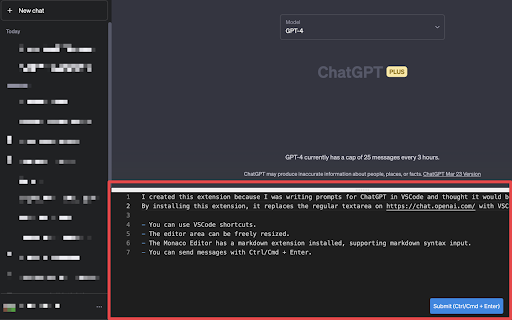
This Chrome extension modifies the input field on chat.openai.com, replacing the default textarea with a VSCode-like editor. It offers features such as VSCode shortcuts, a freely resizable editor area, integration of Monaco Editor markdown syntax, and the ability to send messages using Ctrl/Cmd + Enter.

Developer:hand-dot
Version:1.0.8
Size:1.73MiB
Last updated:

Overview

Installs

1K+

Rating

★ 5.0

1 reviews

Languages

1 locales

Includes English (United States)

Market analysis

Review-backed positioning, friction, and market signals for this Chrome extension.

Backed by review samples

Macro category

AI & Writing Assistants

Pricing friction

Low review signal

Complaint intensity

Moderate review signal

Listing & review signals
Observed signals from store listing text and review samples.

Listing positioning

The extension positions itself as a productivity tool designed to enhance the ChatGPT input experience. It replaces the standard textarea with a VSCode-like (Monaco Editor) interface, promising improved efficiency through features familiar to developers and power users.

Inferred product pattern

A utility extension that enhances the UI/UX of a third-party AI application, specifically targeting productivity through familiar developer tools.

Review-backed pain points

The primary pain point, based on the sole review, is that the extension is currently not working. This indicates a critical functional breakage, despite the user appreciating the concept.

Observed feature gaps

The most significant observed gap, as reported by the user, is the current lack of functionality ('Not working now'), which implies a need for an update or fix rather than a missing feature from the original design.

Tags
ChatGPT AssistantVSCode EditorProductivityInput EnhancementMarkdown
Target users

- ChatGPT power users

- Developers using ChatGPT

- Users familiar with VSCode

- Users who prefer markdown input

Primary use cases

- Enhancing ChatGPT's text input experience

- Utilizing VSCode shortcuts within ChatGPT

- Writing and formatting messages with markdown in ChatGPT

- Resizing the ChatGPT input area

Positive themes

- The core concept of a VSCode-like input for ChatGPT is appealing

Negative themes

- The extension is currently non-functional

Observed friction

- Performance complaints detected

- No pricing information is available in the store listing, and review-backed data is not available.

Evidence boundary: The analysis is based on the Chrome Web Store listing, including the title, short and long descriptions, and one user review. The product has only one user review, which significantly limits the breadth and depth of insights into user sentiment, common issues, or widely appreciated features.
Complaint summaries
Review-backed complaint signals grouped by operational area.

Support

The single review highlights the product is currently non-functional and requests an update, suggesting a potential lack of timely maintenance or responsiveness to critical issues.

Reliability

The sole review explicitly states 'Not working now,' indicating a critical current reliability issue that renders the extension unusable.

Privacy

Review-backed data is not available.

Access & pricing

- No clear monetization signal

- No account requirement observed

- No clear pricing signal

Store listing facts

Listing assets

- Screenshots: 1

- Videos: 1

- Languages: 1

Trust signals

- Developer contact

- Support link

Store metadata

- Version: 1.0.8

- Size: 1.73MiB

- Last updated:

Listing SEO keywords

Search intent keywords
Keyword signals for evaluating how users may discover, compare, or search for this extension category.

Core discovery

ChatGPT editorVSCode input ChatGPTChatGPT markdownresizable ChatGPT inputChatGPT productivity

Comparison

ChatGPT vs VSCode inputbetter ChatGPT input

Problem

ChatGPT input limitationsChatGPT markdown inputVSCode shortcuts ChatGPT

Alternative

ChatGPT UI extensionsChatGPT text editor

Similar extensions

Jump to related discovery paths:

Screenshots

ChatGPT Pro screenshot

Links

Recommended Chrome extensions

Related listings from the same category, trending peers, and the same publisher portfolio.

Browse workflow
React Inspector icon

React Inspector

hand-dot

The Inspector launch with Ctrl+Shift+X (Command+Shift+X on Mac). You can detect and open the React component source code easily.

Installs

6K+

Rating

★ 3.3

Mendeley Web Importer icon

Mendeley Web Importer

Mendeley

Fast, convenient import of references and PDFs to your Mendeley Reference Manager library.

Installs

3.0M+

Rating

★ 2.0

Enable local file links icon

Enable local file links

Takashi Sugimoto (tksugimoto)

Make it possible to open by click a link to a local file that is disabled by Chrome.

Installs

3.0M+

Rating

★ 3.9

Microsoft Defender Browser Protection icon

Microsoft Defender Browser Protection

Microsoft Corporation

Protect yourself against online threats, like phishing and malicious websites, with real-time protection from Microsoft.

Installs

3.0M+

Rating

★ 3.1

Content Server Browser Web Extension icon

Content Server Browser Web Extension

OpenText Corporation

Content Server Browser Web Extension for Chrome

Installs

3.0M+

Rating

★ 2.8

金山收藏助手 icon

金山收藏助手

金山收藏助手

一键收藏,永久保存网页正文或片段到金山文档

Installs

2.0M+

Rating

★ 4.7

Evernote Web Clipper icon

Evernote Web Clipper

Evernote

Use the Evernote extension to save things you see on the web into your Evernote account.

Installs

2.0M+

Rating

★ 4.5

Scribe: AI Documentation, SOPs & Process Intelligence icon

Scribe: AI Documentation, SOPs & Process Intelligence

chrome-store-admins

Turn any workflow into documentation your teams and AI agents can follow. Save each team member 35 hours/month.

Installs

2.0M+

Rating

★ 4.4

Momentum icon

Momentum

Momentum

Transform your browser into a beautifully designed tab that helps you feel calm, keep focus, and stay energized.

Installs

2.0M+

Rating

★ 4.2

Google Scholar PDF Reader icon

Google Scholar PDF Reader

scholar-chrome-extensions

Supercharge your paper reading: follow references, skim outline, jump to figures, cite and save.

Installs

2.0M+

Rating

★ 4.0