Edit with Notepad++ icon

Edit with Notepad++ Chrome Extension Analysis

Developer & Designer Tools

Chrome extension ID: gpmjpkmohjgaimfhebdjebpgdnpcadji

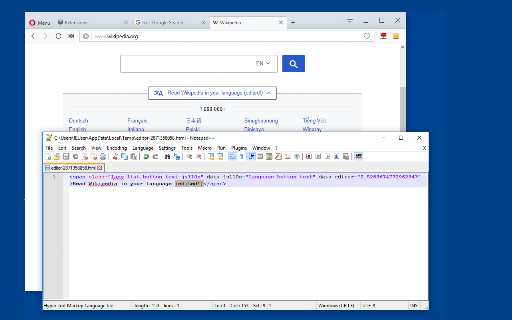
This tool allows users to edit the content of text areas, HTML nodes, and CSS stylesheets directly through Notepad++. It uses a native client to monitor local file changes and automatically updates the browser view upon saving.

Developer:joue.quroi
Version:0.2.2
Size:44.85KiB
Last updated:

Overview

Installs

20K+

Rating

3.5

24 reviews

Languages

1 locales

Includes English

Market analysis

Review-backed positioning, friction, and market signals for this Chrome extension.

Backed by review samples

Macro category

Developer & Designer Tools

Pricing friction

Low review signal

Complaint intensity

Moderate review signal

Listing & review signals
Observed signals from store listing text and review samples.

Listing positioning

The extension positions itself as a bridge between the Notepad++ text editor and the web browser. It aims to provide a workflow where developers can modify web elements like HTML, CSS, and JavaScript in real-time by saving changes in their local editor.

Inferred product pattern

A niche developer utility that uses a native messaging host to sync local desktop text editors with live web content.

Review-backed pain points

Users reported issues with the extension failing to save settings, difficulties establishing a connection with the required native client, and uncertainty about how to edit local HTML files.

Observed feature gaps

Reviewers expressed difficulty or lack of clarity regarding the process for editing local HTML files.

Tags
Notepad++ IntegrationWeb DevelopmentReal-Time EditingHTML Editor
Target users

- Web Developers

- Frontend Engineers

- Software Students

- UI/UX Designers

Primary use cases

- Real-time editing of HTML and CSS

- Modifying form elements and text areas

- Syncing local code changes to the browser

Positive themes

- Streamlined coding workflow

- Useful for programming projects

Negative themes

- Difficulty with connection/setup

- Settings not persisting

- Confusion regarding local file editing

Observed friction

- No pricing information or friction observed in the provided data.

Evidence boundary: Evidence is derived from the product description and a small sample of user reviews regarding setup, connectivity, and feature usage. The review sample is relatively small (24 comments), which may not capture the full spectrum of technical issues or user satisfaction.
Complaint summaries
Review-backed complaint signals grouped by operational area.

Support

Users expressed a need for assistance regarding connection issues and installation steps.

Reliability

Reports of settings not being saved and the extension failing to connect to the native client.

Privacy

No privacy complaints observed.

Access & pricing

- No clear monetization signal

- No account requirement observed

- No clear pricing signal

Store listing facts

Listing assets

- Screenshots: 1

- Videos: 0

- Languages: 1

Trust signals

- Developer contact

- Official website

Store metadata

- Version: 0.2.2

- Size: 44.85KiB

- Last updated:

Listing SEO keywords

Search intent keywords
Keyword signals for evaluating how users may discover, compare, or search for this extension category.

Core discovery

Notepad++ web editoredit HTML in Notepad++real-time CSS editor extensionbrowser Notepad++ sync

Comparison

Sublime Text browser integrationVS Code live edit

Problem

how to edit local HTML files in browserNotepad++ extension connection error

Alternative

Chrome DevToolsLive Server extension

Similar extensions

Jump to related discovery paths:

Screenshots

Edit with Notepad++ screenshot

Links

Recommended Chrome extensions

Related listings from the same category, trending peers, and the same publisher portfolio.

Browse developer