Notes Tab icon

Notes Tab Chrome Extension Analysis

Tab & Bookmark Productivity

Chrome extension ID: hngoegoklccnaghmdfodhbbpkgeblfpo

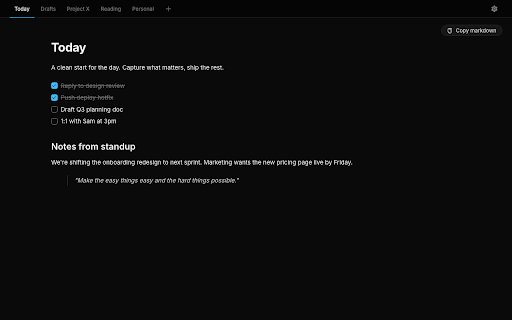
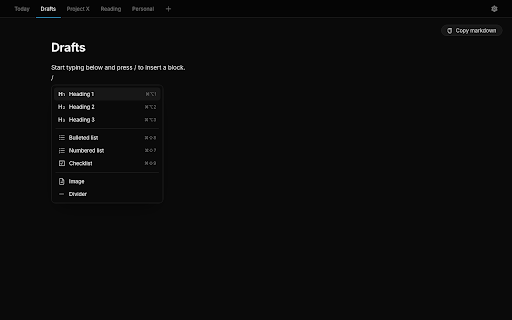
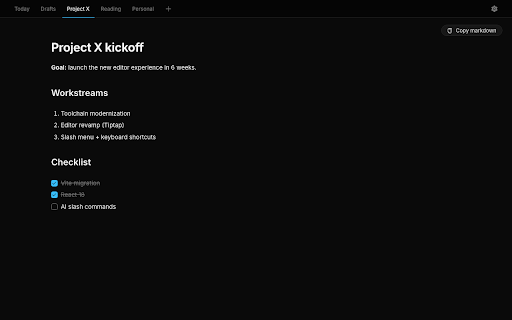
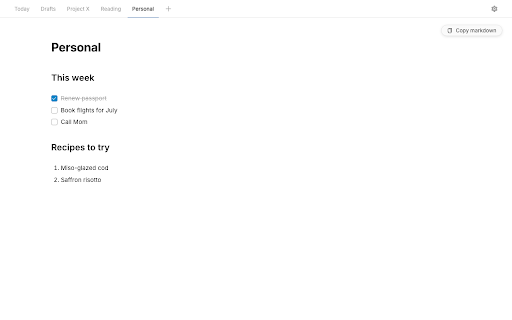
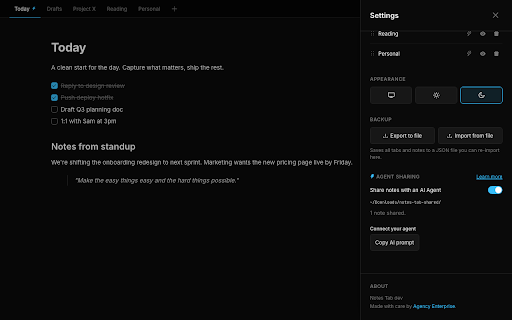
This extension transforms the browser's new tab page into a workspace featuring a markdown-capable notes editor, tabbed organization for different projects, and keyboard-friendly slash commands. It is designed to keep notes local on the user's device, strictly avoiding cloud syncing or data collection.

Version:2.8.1
Size:795KiB
Last updated:

Overview

Installs

152

Rating

4.6

7 reviews

Languages

1 locales

Includes English

Market analysis

Review-backed positioning, friction, and market signals for this Chrome extension.

Backed by review samples

Macro category

Tab & Bookmark Productivity

Pricing friction

Low review signal

Complaint intensity

Moderate review signal

Listing & review signals
Observed signals from store listing text and review samples.

Listing positioning

Notes Tab positions itself as a frictionless, privacy-first productivity tool that replaces the default browser new tab page with a feature-rich markdown editor. It emphasizes local-only storage and a distraction-free environment to capture quick thoughts and manage tasks.

Inferred product pattern

Single-purpose local productivity utility focusing on 'New Tab' real estate.

Review-backed pain points

Users have reported that the extension does not consistently override the default new tab page in browsers other than Google Chrome, specifically citing Opera and Arc.

Observed feature gaps

Lack of browser universality; the extension's behavior is optimized for Chrome, leading to conflicts or failure to load in Chromium-based browsers that handle new tab overrides differently.

Tags
NotesNew TabMarkdown EditorProductivity
Target users

- Power users

- Knowledge workers

- Developers

- Students

Primary use cases

- Quick idea capture

- To-do list management

- Project note-taking

- Drafting code snippets

Positive themes

- High usability

- Excellent replacement for traditional new tab interfaces

- Appreciation for minimalist design

Negative themes

- Compatibility issues with non-Chrome browsers (Opera, Arc)

- Difficulty overriding default new tab settings in some environments

Observed friction

- None; the product is free to use with no apparent monetization friction.

Evidence boundary: Evidence is derived from 7 user reviews and the official Chrome Web Store listing. Most reviews are highly positive, with one outlier citing browser compatibility issues. The limited number of reviews (7) may not represent the full user base, particularly regarding cross-browser performance beyond Chrome.
Complaint summaries
Review-backed complaint signals grouped by operational area.

Support

No support-related complaints identified; issues are limited to browser-specific technical functionality.

Reliability

Minor reliability complaints regarding browser compatibility and failure to override existing new tab settings.

Privacy

None; the extension is positively perceived for its local-storage-only, no-telemetry architecture.

Access & pricing

- Free usage observed

- No account requirement observed

- Free plan or free usage claimed

Store listing facts

Listing assets

- Screenshots: 5

- Videos: 0

- Languages: 1

Trust signals

- Developer contact

Store metadata

- Version: 2.8.1

- Size: 795KiB

- Last updated:

Listing SEO keywords

Search intent keywords
Keyword signals for evaluating how users may discover, compare, or search for this extension category.

Core discovery

markdown notes new tabproductivity extensionlocal notes browserfast notes editor

Comparison

chrome new tab replacementbest note taking extension

Problem

cluttered new tabmissing notes

Alternative

sticky notes extensionbrowser workspace tool

Similar extensions

Jump to related discovery paths:

Screenshots

Notes Tab screenshot

Recommended Chrome extensions

Related listings from the same category, trending peers, and the same publisher portfolio.

Browse workflow
Table Extractor - Download any Table as a CSV icon

Table Extractor - Download any Table as a CSV

Agency Enterprise

The extension downloads HTML tables in CSV format.

Installs

965

Rating

1.0

Shuffle to Random YouTube Videos icon

Shuffle to Random YouTube Videos

Agency Enterprise

Add a shuffle button to YouTube. Discover random videos from you homepage.

Installs

619

Rating

2.9

Evernote Web Clipper icon

Evernote Web Clipper

Evernote

Use the Evernote extension to save things you see on the web into your Evernote account.

Installs

2.0M+

Rating

4.7

Keeper® Password Manager & Digital Vault icon

Keeper® Password Manager & Digital Vault

Keeper Security

Generate strong passwords, autofill and protect your confidential info with zero-knowledge encryption.

Installs

2.0M+

Rating

4.8

Snow Web Application Metering icon

Snow Web Application Metering

snow_chrome_extensions

This extension tracks web application use for the purpose of license compliance and cost optimization. www.snowsoftware.com/browser

Installs

2.0M+

Rating

1.3

Mendeley Web Importer icon

Mendeley Web Importer

Mendeley

Fast, convenient import of references and PDFs to your Mendeley Reference Manager library.

Installs

2.0M+

Rating

2.3

Enable local file links icon

Enable local file links

Takashi Sugimoto (tksugimoto)

Make it possible to open by click a link to a local file that is disabled by Chrome.

Installs

2.0M+

Rating

3.9

Microsoft Defender Browser Protection icon

Microsoft Defender Browser Protection

Microsoft Corporation

Protect yourself against online threats, like phishing and malicious websites, with real-time protection from Microsoft.

Installs

2.0M+

Rating

4.2

Визуальные закладки icon

Визуальные закладки

Yandex

Визуальные закладки – это страница, на которой собраны ваши любимые сайты

Installs

2.0M+

Rating

3.4

Web Signer icon

Web Signer

Softplan Websigner Developers

Extensão para assinatura digital no browser

Installs

2.0M+

Rating

2.9