Voyager icon

Voyager Chrome Extension Analysis

AI & Writing Assistants

Chrome extension ID: iifacdnjakkhjjiengaffnegbndgingi

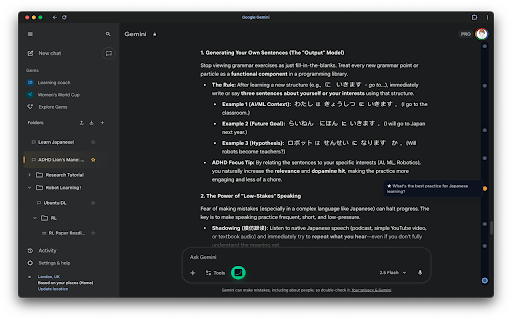
Voyager is a browser extension that adds organizational layers to the Gemini interface. It enables users to manage conversations via a visual timeline, categorize chats into folders, and export chat histories in Markdown or JSON formats.

Developer:Nagi-ovo
Version:1.7.1
Size:2.95MiB
Last updated:

Overview

Installs

100K+

Rating

4.9

1,470 reviews

Languages

8 locales

Includes English, español, français, русский...

Market analysis

Review-backed positioning, friction, and market signals for this Chrome extension.

Backed by review samples

Macro category

AI & Writing Assistants

Pricing friction

Low review signal

Complaint intensity

Moderate review signal

Listing & review signals
Observed signals from store listing text and review samples.

Listing positioning

Voyager positions itself as a productivity enhancement tool specifically for Google Gemini and AI Studio users. It emphasizes improved organization, navigation, and data portability through features like timelines, folders, and prompt libraries.

Inferred product pattern

A utility-layer enhancement tool that adds management and export capabilities to a specific third-party AI platform.

Review-backed pain points

Users have reported difficulty moving older dialogues into folders, disappearing 'move to folder' menu options, and specific UI bugs where hiding certain elements makes them unrecoverable.

Observed feature gaps

Reviews suggest a need for better reliability in the 'remove watermark' feature and more robust methods for migrating legacy chat threads into the new folder system.

Tags
Gemini AssistantChat OrganizerPrompt ManagerAI Productivity
Target users

- Gemini power users

- AI researchers

- Prompt engineers

- Developers

Primary use cases

- Organizing complex AI conversation threads

- Managing and reusing prompt libraries

- Exporting AI research and reasoning processes

Positive themes

- Highly useful folder organization

- Intuitive user interface enhancements

- Appreciation for free access

Negative themes

- UI bugs and disappearing menus

- Instability requiring page refreshes

- Inconsistent feature performance (e.g., watermark removal)

Observed friction

- Performance complaints detected

- No pricing friction observed; users actively praised the product for being free to use.

Evidence boundary: Analysis based on the product's feature list and user reviews covering usability, bug reports, and satisfaction levels. Review sample includes non-English feedback and specific technical bug reports that may not represent the experience of all users.
Complaint summaries
Review-backed complaint signals grouped by operational area.

Support

No specific support channel complaints, but users are vocal about the need for bug fixes regarding menu stability and UI elements.

Reliability

Users reported instances of instability necessitating page refreshes and slow-closing pop-up windows.

Privacy

No privacy complaints; the listing explicitly claims local storage and open-source code.

Access & pricing

- Free usage observed

- No account requirement observed

- Free plan or free usage claimed

Store listing facts

Listing assets

- Screenshots: 1

- Videos: 0

- Languages: 8

Trust signals

- Privacy policy

- Developer contact

- Official website

Store metadata

- Version: 1.7.1

- Size: 2.95MiB

- Last updated:

Listing SEO keywords

Search intent keywords
Keyword signals for evaluating how users may discover, compare, or search for this extension category.

Core discovery

Gemini chat organizerAI prompt libraryGemini folder managerexport Gemini chats

Comparison

Gemini assistantAI chat navigator

Problem

organize Gemini conversationsGemini prompt vaultGemini chat history export

Alternative

AI workflow assistantChat management tool

Similar extensions

Jump to related discovery paths:

Screenshots

Voyager screenshot

Links

Recommended Chrome extensions

Related listings from the same category, trending peers, and the same publisher portfolio.

Browse workflow
Komorebi icon

Komorebi

Nagi-ovo

A calm Everforest color theme for the web, in matching light and dark — softer, consistent colors that are easier on the eyes.

Installs

15

Rating

Momentum icon

Momentum

Momentum

Transform your browser into a beautifully designed tab that helps you feel calm, keep focus, and stay energized.

Installs

2.0M+

Rating

4.5

Evernote Web Clipper icon

Evernote Web Clipper

Evernote

Use the Evernote extension to save things you see on the web into your Evernote account.

Installs

2.0M+

Rating

4.7

Keeper® Password Manager & Digital Vault icon

Keeper® Password Manager & Digital Vault

Keeper Security

Generate strong passwords, autofill and protect your confidential info with zero-knowledge encryption.

Installs

2.0M+

Rating

4.8

Snow Web Application Metering icon

Snow Web Application Metering

snow_chrome_extensions

This extension tracks web application use for the purpose of license compliance and cost optimization. www.snowsoftware.com/browser

Installs

2.0M+

Rating

1.3

Mendeley Web Importer icon

Mendeley Web Importer

Mendeley

Fast, convenient import of references and PDFs to your Mendeley Reference Manager library.

Installs

2.0M+

Rating

2.3

Enable local file links icon

Enable local file links

Takashi Sugimoto (tksugimoto)

Make it possible to open by click a link to a local file that is disabled by Chrome.

Installs

2.0M+

Rating

3.9

Microsoft Defender Browser Protection icon

Microsoft Defender Browser Protection

Microsoft Corporation

Protect yourself against online threats, like phishing and malicious websites, with real-time protection from Microsoft.

Installs

2.0M+

Rating

4.2

Визуальные закладки icon

Визуальные закладки

Yandex

Визуальные закладки – это страница, на которой собраны ваши любимые сайты

Installs

2.0M+

Rating

3.4

Web Signer icon

Web Signer

Softplan Websigner Developers

Extensão para assinatura digital no browser

Installs

2.0M+

Rating

2.9