Chrome Clock icon

Chrome Clock Chrome Extension Analysis

Automation & Workflow Efficiency

Chrome extension ID: ikdkhlegcamfipdgppblbafboadhjgpo

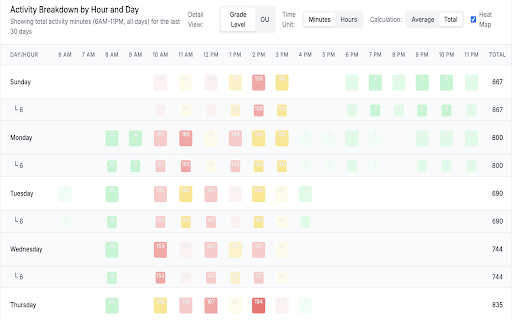
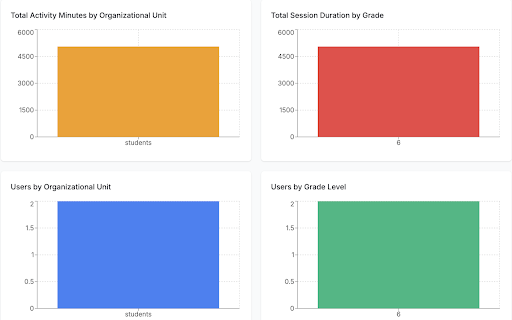
Chrome Clock monitors student Chromebook screen time by starting a timer when the device is actively in use and stopping it during inactivity. The captured data is synced to an administrative dashboard, showing heat maps and trends across grades or districts. This allows educational institutions to evaluate device engagement and identify students with low technology usage.

Developer:Get Set Tech
Version:1.26
Size:93.19KiB
Last updated:

Overview

Installs

70K+

Rating

★ —

0 reviews

Languages

1 locales

Includes English

Market analysis

Review-backed positioning, friction, and market signals for this Chrome extension.

No review samples found

Macro category

Automation & Workflow Efficiency

Pricing friction

Low review signal

Complaint intensity

Low review signal

Listing & review signals
Observed signals from store listing text and review samples.

Listing positioning

Chrome Clock is positioned as a simple, privacy-first analytics tool designed specifically for K-12 school environments. It tracks active Chromebook usage by student, grade, and time of day to help administrators make informed technology and screen time policies. The extension emphasizes that it does not monitor browsing history or content, protecting student privacy.

Inferred product pattern

An educational background tracking utility that integrates with Google Workspace for Education to feed device state events to a central SaaS dashboard.

Review-backed pain points

No review-backed pain points are available because this extension currently has no public reviews.

Observed feature gaps

No feature gaps could be identified from public reviews due to the absence of review data.

Tags
Chromebook TrackerScreen Time AnalyticsK-12 EducationGoogle WorkspaceStudent Monitoring
Target users

- K-12 School Administrators

- School District IT Directors

- Educational Technology Coordinators

- School Principals

Primary use cases

- Tracking overall student screen time on school-issued Chromebooks

- Analyzing hourly and grade-level device usage patterns

- Identifying student cohorts with extremely low device engagement

- Supporting school-district conversations around balanced tech policies

Positive themes

- Review-backed data is not available

Negative themes

- Review-backed data is not available

Observed friction

- No pricing friction is reported. The store listing does not detail individual upgrade tiers, and there are no user reviews mentioning costs or paywalls.

Evidence boundary: The analysis is based entirely on the official developer-provided store listing, describing features, intended K-12 target audiences, usage mechanics, and privacy claims. There are no reviews or ratings available. Due to a complete lack of public user reviews, user-side performance, real-world utility, configuration hurdles, and exact pricing/account login setups could not be independently verified.
Complaint summaries
Review-backed complaint signals grouped by operational area.

Support

No support complaints are available as there are no public reviews.

Reliability

No performance or reliability complaints have been documented in public reviews.

Privacy

No privacy complaints are documented. The developer markets the product as a strict, privacy-first analytics utility that avoids tracking browser history or content.

Access & pricing

- No clear monetization signal

- No clear access signal

- No clear pricing signal

Store listing facts

Listing assets

- Screenshots: 3

- Videos: 1

- Languages: 1

Trust signals

- Privacy policy

- Developer contact

- Official website

Store metadata

- Version: 1.26

- Size: 93.19KiB

- Last updated:

Listing SEO keywords

Search intent keywords
Keyword signals for evaluating how users may discover, compare, or search for this extension category.

Core discovery

chromebook screen time trackerschool student device monitoringk-12 technology usage analytics

Comparison

chrome clock vs goguardianchrome clock vs hapara student tracking

Problem

how to track student screen timemeasure school chromebook active usage

Alternative

chromebook active timerstudent device usage heat mapgoogle workspace educational tracker

Similar extensions

Jump to related discovery paths:

Screenshots

Chrome Clock screenshot

Links

Recommended Chrome extensions

Related listings from the same category, trending peers, and the same publisher portfolio.

Browse education
Talk & Comment: Voice Feedback & Audio Comments for Teachers icon

Talk & Comment: Voice Feedback & Audio Comments for Teachers

TalkandComment.com

Leave voice feedback on student work in Google Docs, Classroom or any page. Share one link; students listen on their phone.

Installs

200K+

Rating

★ 4.0

Study Tools voor Magister icon

Study Tools voor Magister

QkeleQ10

Een extensie die verschillende aspecten van Magister verbetert en problemen ermee oplost.

Installs

200K+

Rating

★ 4.5

rikaikun icon

rikaikun

Erek Speed

rikaikun shows the reading and English definition of Japanese words when you hover over Japanese text in the browser.

Installs

200K+

Rating

★ 4.6

Reverso – Translation, dictionary icon

Reverso – Translation, dictionary

Reverso Technologies Inc.

Translate and learn languages while reading or watching movies online. It's free.

Installs

200K+

Rating

★ 4.0

Padlet Mini icon

Padlet Mini

engine

Collect and bookmark the best of the web for yourself or with friends.

Installs

200K+

Rating

★ 4.1

ExCITATION – Journal Ranking & Impact Factor for Google Scholar™ icon

ExCITATION – Journal Ranking & Impact Factor for Google Scholar™

Excitation Journal

Show SJR, ABS & ABDC journal rankings in Google Scholar. Sort by citations, detect predatory journals & preview abstracts — free.

Installs

200K+

Rating

★ 4.5

Rapid Journal Quality Check icon

Rapid Journal Quality Check

jrk.devgit

Displays rankings and h-index for academic journals next to Google Scholar search results.

Installs

200K+

Rating

★ 4.3

Toucan by Babbel - Language Learning icon

Toucan by Babbel - Language Learning

jointoucan.com

Learn a new language just by browsing the internet.

Installs

200K+

Rating

★ 3.5

Readlang Web Reader icon

Readlang Web Reader

readlang

Read websites in the language you're learning, translate words you don't know, and we'll create flashcards to help you remember.

Installs

100K+

Rating

★ 4.2

Wayground AI icon

Wayground AI

Wayground (formerly Quizizz)

AI-powered teaching, one click away!

Installs

100K+

Rating

★ 4.3